Desk Decorating Ideas for a Spooky Office Cubicle

Create a spooky office cubicle with Halloween desk decor ideas that keep your workspace usable, tidy, and mindful of workplace safety.
Messenger is one of the most popular online communication tools in the world. According to the latest statistics from Meta, global users spend more than 7 billion minutes on calls on Facebook and Messenger every day. And to further improve this experience, Meta today announced a series of new features coming to Messenger, including some that have been long requested by users.
AI background in video calls
Meta is bringing the ability for users to create AI backgrounds that can be used during video calls. For example, if a user is on a video call celebrating a birthday party, they can create a birthday-themed background using AI and use it throughout the call. To create a personalized AI background, users simply tap the effects icon in the sidebar menu of the video call and select “Backgrounds.”
HD video calling and background noise reduction
HD video calling was one of the most requested features by Messenger users. Meta finally gave in to the community with new HD video calling support, along with background noise cancellation and voice isolation, for a better video calling experience on Messenger.
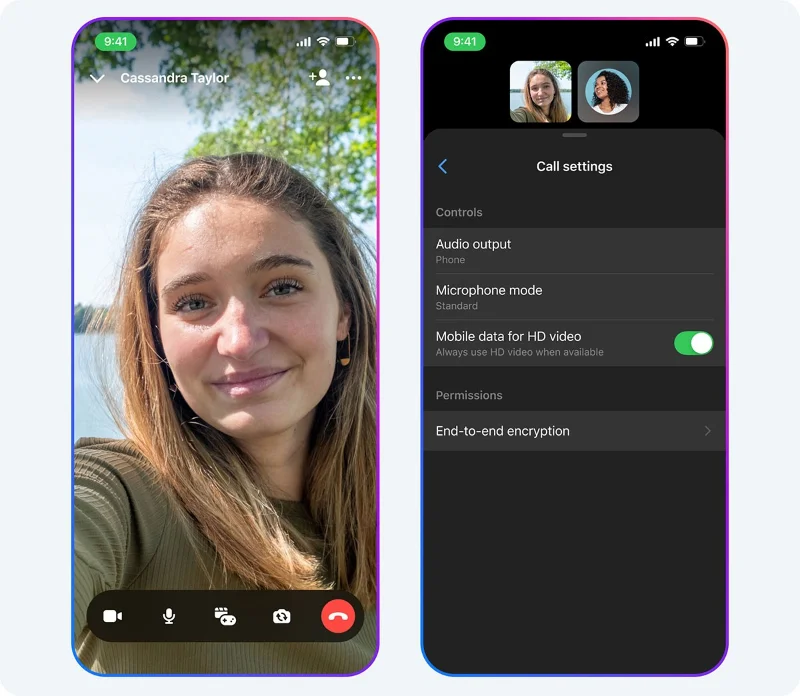
Additionally, HD resolution will be set as the default for calls made over WiFi. Of course, users can also enable HD mode for video calls made over mobile data by going into the call settings menu and enabling the new “Mobile data for HD video” option. Background noise cancellation and voice isolation can also be turned on and off through this same settings menu.
Audio and video messages
Messenger finally supports audio and video messages. When the call recipient is not available, callers can leave an audio or video message. To send an audio or video message, users just need to use the newly added "Record message" button.
Hands-free calling and texting on iOS
For Messenger iOS users, Meta has added the ability for users to ask Siri to send messages on Messenger. Users can send messages by saying "Hey Siri, send a message to Alex on Messenger" and then reading the message.
With the additional features in the new update, Messenger users can expect a much more enjoyable and efficient calling experience.
Create a spooky office cubicle with Halloween desk decor ideas that keep your workspace usable, tidy, and mindful of workplace safety.
Plan a recognizable Halloween 2026 look with pop culture costumes inspired by Spider-Man, Supergirl, Toy Story 5, Moana, Mario, and Wednesday.
Sort leftover Halloween candy safely, share or repurpose sealed treats, and choose food use or compost for pumpkins based on their condition.
Compare workplace Halloween costume choices by respect, dress code, mobility, and safety—and learn when a subtle accessory or a policy check is the better option.
Find a couples costume that fits your style, budget, and comfort level, from Addams Family classics to original inside-joke duos.
Need a last-minute high school Halloween costume? Compare 10 easy closet-based ideas by prep time, comfort, school-day practicality, and simple safety checks.
Use a simple 2026 Halloween decorating timeline for indoor décor, outdoor displays, and fresh pumpkins, with practical adjustments for weather and events.
Mix five vivid, approachable Halloween cocktails with measured recipes, simple prep tips, and an alcohol-free option for your party guests.
Find 15 office-friendly Halloween costume ideas for 2026, with practical checks for dress codes, respectful themes, comfort, and workplace safety.
Plan a fun elementary school Halloween party with easy crafts, games, inclusive treats, costume tips, and a sample 75-minute classroom schedule.








