Pop Culture Costume Ideas That Will Dominate Halloween 2026

Plan a recognizable Halloween 2026 look with pop culture costumes inspired by Spider-Man, Supergirl, Toy Story 5, Moana, Mario, and Wednesday.
Over the past few years, Google has invested heavily in developing advanced security algorithms for the Play Store, but preventing threats early and thoroughly is not easy.
Data collected between June 2023 and April 2024 by cybersecurity researchers from Zscaler security organization discovered more than 200 malicious apps, with millions of downloads, publicly distributed on the Google Play Store. The most common threats that researchers found on the official Android app store include:
Earlier in May this year, Zscaler researchers also warned about more than 90 malicious apps on Google Play, with a total of 5.5 million downloads.
While Google has security mechanisms in place to detect malicious apps, threat actors still have a number of tricks up their sleeves to bypass the verification process. In a report last year, the Google Cloud security team described a method of distributing malware through app updates, or by downloading malware from attacker-controlled servers.
While Zscaler's report focuses on popular Android malware, other researchers have discovered a number of campaigns that also abuse Google Play to distribute malware to millions of people.
A typical example is the Necro malware downloader for Android, which was downloaded 11 million times through just two apps released on the Google Play Store.
In another case, the Goldoson Android malware was detected in 60 legitimate apps with a total of 100 million downloads also on the Play Store.
Last year, SpyLoan malware was found in apps on Google Play that were downloaded more than 12 million times.
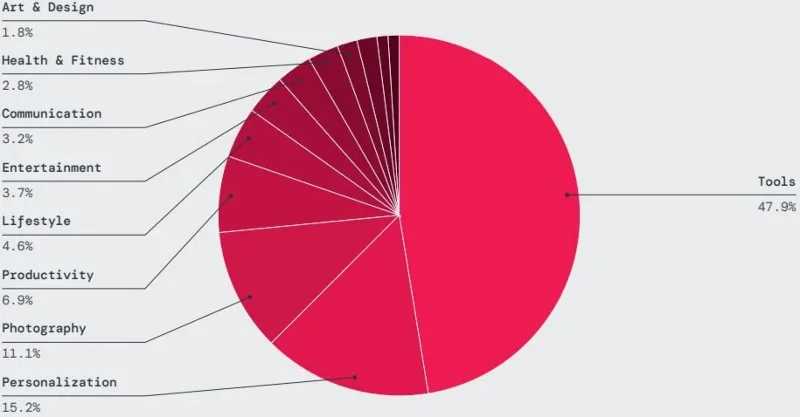
Nearly half of the malicious apps detected by Zscaler ThreatLabz were published on Google Play in the tools, personalization, photography, productivity, and lifestyle categories.
Zscaler's mobile threat report also shows a significant increase in spyware infections, primarily caused by the SpyLoan, SpinOK, and SpyNote groups. Over the past year, the company recorded 232,000 blocks of spyware activity.
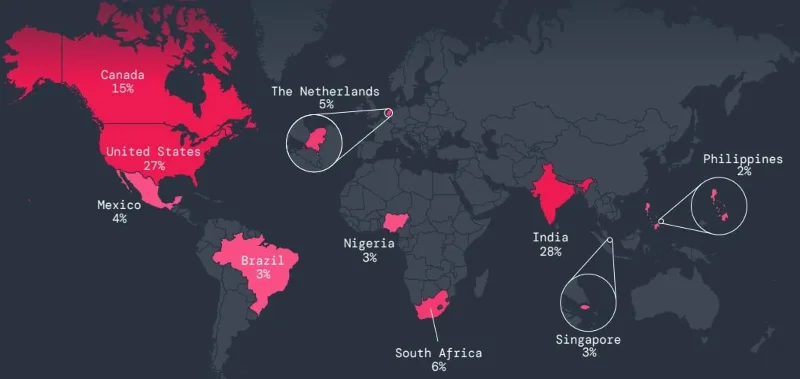
The countries most targeted by mobile malware over the past year were India and the United States, followed by Canada, South Africa and the Netherlands.
According to the report, mobile malware was primarily targeted at the education sector, with a 136.8% increase in blocked transactions. The services sector saw a 40.9% increase, and chemicals and mining increased by 24%. All other sectors saw a general decline.
To minimize the chance of being infected with malware from Google Play, users should carefully read reviews from others to see what issues have been reported, then thoroughly check information about the app publisher.
Plan a recognizable Halloween 2026 look with pop culture costumes inspired by Spider-Man, Supergirl, Toy Story 5, Moana, Mario, and Wednesday.
Sort leftover Halloween candy safely, share or repurpose sealed treats, and choose food use or compost for pumpkins based on their condition.
Compare workplace Halloween costume choices by respect, dress code, mobility, and safety—and learn when a subtle accessory or a policy check is the better option.
Find a couples costume that fits your style, budget, and comfort level, from Addams Family classics to original inside-joke duos.
Need a last-minute high school Halloween costume? Compare 10 easy closet-based ideas by prep time, comfort, school-day practicality, and simple safety checks.
Use a simple 2026 Halloween decorating timeline for indoor décor, outdoor displays, and fresh pumpkins, with practical adjustments for weather and events.
Mix five vivid, approachable Halloween cocktails with measured recipes, simple prep tips, and an alcohol-free option for your party guests.
Find 15 office-friendly Halloween costume ideas for 2026, with practical checks for dress codes, respectful themes, comfort, and workplace safety.
Plan a fun elementary school Halloween party with easy crafts, games, inclusive treats, costume tips, and a sample 75-minute classroom schedule.
Compare realistic side hustles for 2026 by startup cost, fees, flexibility, and income control, with current tax and scam guidance from official sources.








