Desk Decorating Ideas for a Spooky Office Cubicle

Create a spooky office cubicle with Halloween desk decor ideas that keep your workspace usable, tidy, and mindful of workplace safety.
In a surprise move on stage at the Snapdragon Summit today, Qualcomm officially announced the Snapdragon 8 Elite, its next-generation flagship SoC for high-end smartphones.
Qualcomm has changed the naming scheme for its flagship SoCs from “Snapdragon 8 Gen X” to Snapdragon X Elite. This new naming scheme also aligns the Snapdragon 8 Elite mobile chipsets with the Snapdragon X Elite PC chipset series, creating a high degree of consistency across the company’s product portfolio.
And of course, it's not just the name that's new, the Snapdragon 8 Elite is a major upgrade over the previous generation, with a host of comprehensive improvements. With this chip, Qualcomm aims to set a new performance standard in the smartphone industry, increasing competitiveness with rival products.
First of all, the Snapdragon 8 Elite will be built on TSMC's 3nm process node for significant performance and power efficiency gains. For the first time, Qualcomm is bringing its own custom ARM Oryon CPU to a smartphone processor. The new Prime and Performance core architecture, which comes with 24MB of cache and can reach 4.32GHz, promises the following performance improvements:
More specifically, there will be 2 cores running at 4.32 GHz, while 6 smaller cores operate at 3.53 GHz, providing a balance of performance for different tasks. The 24MB of L2 cache will be divided evenly between the Prime and Performance cores.
On the graphics side, the Adreno 830 GPU on the Snapdragon 8 Elite delivers 40% better overall performance and 35% improved ray tracing compared to its predecessor, the Snapdragon 8 Gen 3. Additionally, when it comes to AI performance using the NPU, the Snapdragon 8 Elite will be a huge step forward. With the industry's fastest Qualcomm Hexagon NPU (6-core vector accelerators and 8-core scalar accelerators), users can expect 45% better AI performance than the NPU in the Snapdragon 8 Gen 3, as well as advanced graphics technologies like Unreal Engine, Nanite, and Chaos Engine.
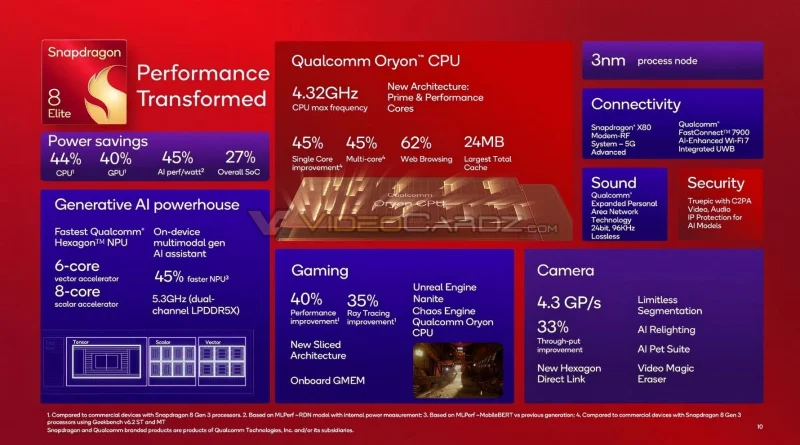
In addition to performance improvements, the Snapdragon 8 Elite is also much more power efficient. Qualcomm claims the following power efficiency improvements on the new chip:
The Snapdragon 8 Elite is also a perfect solution for premium smartphone camera experiences, with support for 4.3 Gigapixels/second and a 33% improvement in throughput. The processor is also compatible with advanced technologies such as Limitless Segmentation, AI Relighting, AI Pet Suite, Video Magic Eraser, etc.
In terms of connectivity, the Snapdragon 8 Elite comes with the Snapdragon X80 modem - the first 5G modem with 6X carrier aggregation and AI-based mmWave range extension, Qualcomm FastConnect 7900, supporting Wi-Fi 7, Bluetooth 5.4, and ultra-wideband in a single 6nm chip.
Several major Android manufacturers, including ASUS, Honor, iQOO, OnePlus, OPPO, RealMe, Samsung, Vivo, Xiaomi… are expected to launch smartphones powered by the Snapdragon 8 Elite chip in the near future.
Create a spooky office cubicle with Halloween desk decor ideas that keep your workspace usable, tidy, and mindful of workplace safety.
Plan a recognizable Halloween 2026 look with pop culture costumes inspired by Spider-Man, Supergirl, Toy Story 5, Moana, Mario, and Wednesday.
Sort leftover Halloween candy safely, share or repurpose sealed treats, and choose food use or compost for pumpkins based on their condition.
Compare workplace Halloween costume choices by respect, dress code, mobility, and safety—and learn when a subtle accessory or a policy check is the better option.
Find a couples costume that fits your style, budget, and comfort level, from Addams Family classics to original inside-joke duos.
Need a last-minute high school Halloween costume? Compare 10 easy closet-based ideas by prep time, comfort, school-day practicality, and simple safety checks.
Use a simple 2026 Halloween decorating timeline for indoor décor, outdoor displays, and fresh pumpkins, with practical adjustments for weather and events.
Mix five vivid, approachable Halloween cocktails with measured recipes, simple prep tips, and an alcohol-free option for your party guests.
Find 15 office-friendly Halloween costume ideas for 2026, with practical checks for dress codes, respectful themes, comfort, and workplace safety.
Plan a fun elementary school Halloween party with easy crafts, games, inclusive treats, costume tips, and a sample 75-minute classroom schedule.








