Desk Decorating Ideas for a Spooky Office Cubicle

Create a spooky office cubicle with Halloween desk decor ideas that keep your workspace usable, tidy, and mindful of workplace safety.
Surely many people still remember the "scandal" of exploding Nvidia RTX 40-series graphics cards. The root cause of this mess is due to a "flaw" in the design of the new 16-pin 12VHPWR connector, which can easily melt or burn, leading to serious component damage.
Further investigation confirmed that the issue was related to improperly inserting or plugging the power cable into the GPU's power slots, and this prompted the company to innovate the design to create ways to prevent similar types of issues from occurring.
However, this “nightmare” seems to be back and haunting Nvidia once again. Some owners of Nvidia RTX 5090 Founders Edition graphics cards are reporting power connectors burning out and power supply units (PSUs) failing. This is similar to what happened when the RTX 4090 series of cards launched two years ago.
A report on Reddit appears to show damage occurring on both the PSU-side power cable end and the part that connects directly to the GPU. Interestingly, the issue has been reported with power cables from multiple manufacturers, including MODDIY and FSP, which may suggest that the problem isn't with one specific cable.
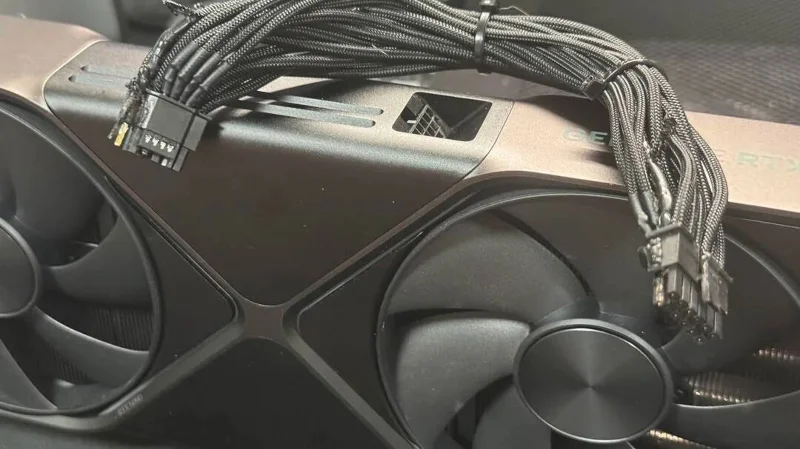
Nvidia's RTX 40-series cards introduced the 12VHPWR power connector standard to the market, which was advertised as designed for the next generation of graphics cards with higher power demands. To address the burn-in issues with the RTX 4090, PCI-SIG, the organization responsible for the 12VHPWR connector standard, updated the design. The new 12V-2x6 connector has shorter sensor pins and longer conductive terminals.
Nvidia uses a 12V-2x6 connector on its RTX 50-series cards, although you can still use your existing 12VHPWR cables. Some manufacturers, like Corsair and MSI, have added color-coded pins to the 12VHPWR cables to indicate if the connector is not plugged in properly.
Speaking at an event in January, an Nvidia representative said they "don't want" to see similar fires occur with the RTX 5090 or 5080, saying: "We made some changes to the connector to address the issue at the time, and now, two years later, we have not seen any similar incidents."
It's still unclear exactly what's causing the problem, whether it's the power cable, the PSU, or both. Some users have even theorized that the thinner pins on the PSU's 12VHPWR connector could lead to increased resistance and cause a burnout.
Create a spooky office cubicle with Halloween desk decor ideas that keep your workspace usable, tidy, and mindful of workplace safety.
Plan a recognizable Halloween 2026 look with pop culture costumes inspired by Spider-Man, Supergirl, Toy Story 5, Moana, Mario, and Wednesday.
Sort leftover Halloween candy safely, share or repurpose sealed treats, and choose food use or compost for pumpkins based on their condition.
Compare workplace Halloween costume choices by respect, dress code, mobility, and safety—and learn when a subtle accessory or a policy check is the better option.
Find a couples costume that fits your style, budget, and comfort level, from Addams Family classics to original inside-joke duos.
Need a last-minute high school Halloween costume? Compare 10 easy closet-based ideas by prep time, comfort, school-day practicality, and simple safety checks.
Use a simple 2026 Halloween decorating timeline for indoor décor, outdoor displays, and fresh pumpkins, with practical adjustments for weather and events.
Mix five vivid, approachable Halloween cocktails with measured recipes, simple prep tips, and an alcohol-free option for your party guests.
Find 15 office-friendly Halloween costume ideas for 2026, with practical checks for dress codes, respectful themes, comfort, and workplace safety.
Plan a fun elementary school Halloween party with easy crafts, games, inclusive treats, costume tips, and a sample 75-minute classroom schedule.








