10 useful shortcuts to increase productivity on Microsoft Edge
Keyboard shortcuts are a great productivity tool, especially for those whose jobs involve a lot of typing.
In a press release issued today, Opera has officially confirmed that it will be collaborating with Google, specifically Google Cloud, to deploy Gemini AI models as part of its Aria AI browser assistant service that the company is investing heavily in. Opera’s Aria uses multiple LLMs instead of just one. With the successful signing of the partnership agreement with Google, Opera now has access to the tools developed for Gemini.
Aria is powered entirely by artificial intelligence algorithms and is designed to enhance the browsing experience for Opera users. Aria is built on Opera’s innovative “Composer” architecture, which provides a variety of intelligent functions for users. Whether you’re performing a web search, composing a document, asking for code, or looking for product information, Aria can provide live support in the form of a conversational interface, allowing seamless interaction with AI capabilities.
With Gemini AI, the main features being touted will be Image Generation and Voice Output. These features, included in the latest AI Feature Drop for Opera One Developer, use the Imagen 2 model on Vertex AI and responses can be read out in a conversational-like fashion thanks to Google's text-to-speech model.
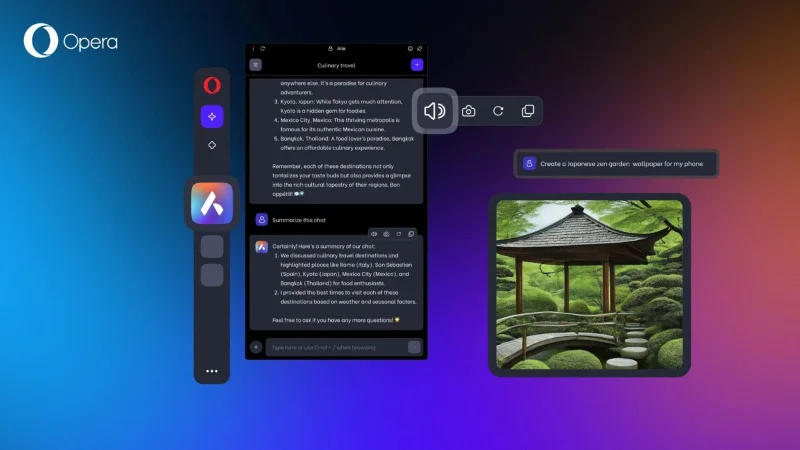
Opera has recently added a slew of notable AI features to its browser, even allowing LLM to be downloaded and run locally on your computer, giving you access to over 150 models from over 50 platforms, including Meta's Llama and Google's Gemma.
This is the main difference between Opera and other browsers that the company is currently pursuing since Opera One launched in June 2023. This is clearly a change from the traditional Opera web browser that we are used to seeing. The main highlights include the modular design, ab Islands to group open tabs, and especially the aforementioned Aria AI virtual assistant.
While Opera may not have as much market share as some of the other major browsers, it's great to see the company trying to keep up with its competitors, especially in the nascent but competitive space of general AI.
Keyboard shortcuts are a great productivity tool, especially for those whose jobs involve a lot of typing.
Google Chrome is the world's most popular browser, but that doesn't mean you have to use it. There are plenty of great Chrome alternatives that will help you leave Google behind for good, and here are the best.
After a long time with countless rumors, Opera has just officially launched a built-in AI assistant platform called Browser Operator.
Discover the powerful features of Internet Explorer 11, the web browser designed to meet the demands of 2024 and beyond.
Discover how to chat seamlessly on WhatsApp using the Opera browser, leveraging the latest technological advancements.
Learn how to easily install and remove extensions for Coc Coc, a browser similar to Chrome, boosting your browsing experience.
The complete death of Windows 7 also means the end of support for popular browser platforms like Chrome, Edge, and Firefox.
Chrome is currently the most popular web browser because of the stability and the utilities it brings. However, during use, there are errors with this browser that make users feel confused.
Coc Coc is Vietnamese, it has a Vietnamese style, created for Vietnamese people, uses Vietnamese language and solves the most painful problems that every Vietnamese web browser faces. !
Starting with Google Chrome version 78, you will see a wide variety of tabbed content, not just the title of your web browser, but also the URL of the site.
Opera is the first web browser that allows you to pin chat services like Facebook Messenger, WhatsApp and Telegram to the browser without installing any additional components.
Opera has integrated Facebook Messenger, WhatsApp and Telegram chat applications right in the Sidebar, allowing users to surf the web while chatting with friends easily.
In this upgrade, Windows 10 Mobile officially bid farewell to Internet Explorer, switching to Microsoft Edge. But perhaps a lot of users are still new and unfamiliar with using this browser.
Skype is the best free chat and messaging software available today. However, the errors that this tool encountered is not small. Although these are not very serious errors, it also causes many problems for users.
Tired of Microsoft Teams OneDrive Error blocking file sync? Follow our step-by-step guide to solve Microsoft Teams "OneDrive Error" File Sync issues quickly. Proven fixes for smooth collaboration in Teams channels. Get your files syncing error-free today!
Tired of Microsoft Teams workflows and Power Automate errors halting your productivity? Get step-by-step solutions to common issues like authentication failures, timeouts, and flow errors. Fix them in minutes and automate effortlessly!
Facing Microsoft Teams "Download Error" on MacBook? Discover proven troubleshooting steps to resolve download failures quickly, from cache clears to reinstalls, and get back to smooth teamwork.
Tired of the frustrating Microsoft Teams "Where is Teams" Folder Error? Discover proven, step-by-step troubleshooting fixes to resolve it quickly and restore smooth teamwork. Latest methods included!
Frustrated by Microsoft Teams JavaScript Error on desktop app? Discover proven steps to fix it fast: clear cache, update, reset, and reinstall. Get back to seamless collaboration in minutes!
Struggling with Microsoft Teams "Guest Login" Error? Discover step-by-step fixes, from quick cache clears to admin settings, to resolve guest access issues fast and collaborate seamlessly. Updated with the latest tips!
Tired of the Microsoft Teams "For PC" download error blocking your work? Follow our proven, step-by-step guide to resolve it quickly and get Teams running smoothly on your PC today.
Struggling with Microsoft Teams "Windows 7" login error? Discover step-by-step fixes for this frustrating issue on Windows 10/11. Clear cache, edit registry, and more – get back to seamless collaboration today!
Tired of Microsoft Teams Error Code 0x80070005 blocking your meetings? Follow this 2026 guide with step-by-step fixes for access denied issues. Get Teams running smoothly in minutes!
Master the installation of the Microsoft Teams Add-in for Outlook 2026 effortlessly. Boost your productivity with seamless scheduling and meetings. Follow our proven, up-to-date steps for instant success!
Struggling with Microsoft Teams "License Error" 2026? Discover proven, step-by-step solutions to resolve it fast. Clear cache, check licenses, and get back to seamless collaboration—no IT help needed!
Whether youre in your 50s, 60s, or even 70s, its not too late to prioritize your health and put yourself first. Here are the best exercises for people 50 and older.
Struggling with Microsoft Teams Error Caa50024 on Windows 10/11? Follow our step-by-step fixes to resolve crashes and launch issues quickly. Latest proven solutions for seamless teamwork.
Stuck with Microsoft Teams login error AADSTS50011? Discover proven, step-by-step fixes to resolve the reply URL mismatch issue and log in seamlessly. No tech skills needed!
Tired of the frustrating Microsoft Teams "Win 7" Compatibility Error blocking your meetings? Get instant fixes with our step-by-step guide, including workarounds for older Windows versions. Resolve it now and stay connected!









