Desk Decorating Ideas for a Spooky Office Cubicle

Create a spooky office cubicle with Halloween desk decor ideas that keep your workspace usable, tidy, and mindful of workplace safety.
The NCOA estimates that Americans will receive 19.2 billion phishing messages by 2024, which equates to about 63 fake messages per person per month. With SMS phishing attacks (also known as smishing ) on the rise, it’s time to harness the power of some helpful tools to prevent yourself from becoming a victim.
Table of Contents
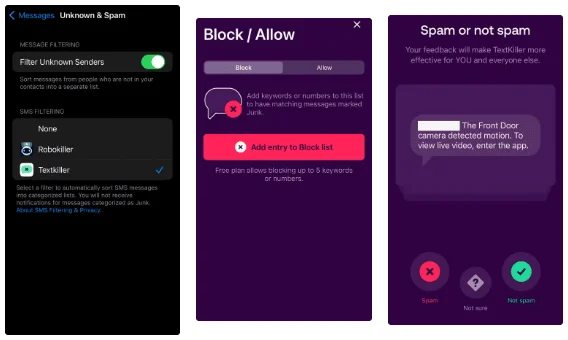
Instead of trying to figure out whether a text message is real or fake yourself, why not let an app like TextKiller do it for you? TextKiller (available only on iOS) claims to block up to 99% of spam text messages. To do so, it compares the messages you receive against its ever-growing database of smishing messages. If the message you receive matches one in its database, it’s automatically blocked. If you have TextKiller enabled, you can also filter out transactional, promotional, and spam messages.
Setting up TextKiller is simple. Once you download TextKiller, open your iMessages settings , scroll to Unknown & Spam , and tap the Enable TextKiller button.
The app offers a 7-day free trial, after which you’ll have to pay $69.99/year or $4.99/week. That may seem steep, but it’s nothing compared to the billions of dollars lost to phishing attacks.
In 2006, British mathematician Clive Humby declared that data was the new “oil.” The comment proved to be prophetic, as every company today is collecting user data and using it for whatever purpose they see fit. The more personal data they collect, the greater the chance that it will fall into the wrong hands.
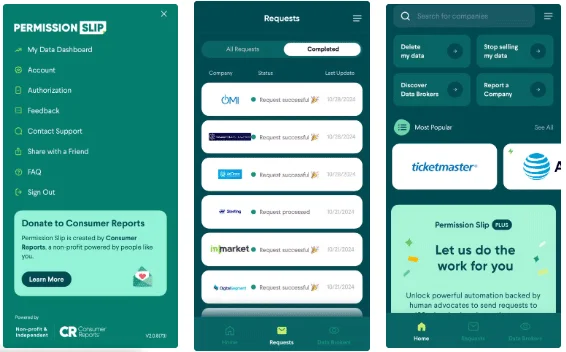
To prevent this from happening, you can use Permission Slip (available on Android and iOS) to easily ask companies to delete or not sell your personal information. You can request that your data be deleted or not sold from any company you've ever interacted with.
If you pay the annual fee of $59.99, Permission Slip will fill out the deletion request form on your behalf. If you opt for the free version, the app will redirect you to the correct page where you can fill out the necessary form to determine how your data is used.
The messaging app you're using probably has some built-in features that help protect you from scam messages. You just need to learn how to use them.
iMessage doesn't automatically identify and block suspicious text messages, but it can filter them. You can filter messages using one of the following filter options:
You may have your filter set to All Messages . If so, you're definitely interacting with SMS messages. Even if you don't click on links or reply to these messages, you're still opening them. If you open multiple smishing messages, you're definitely interacting with a message in a way that the scammer wants. Avoid this by changing your filter to Known Senders .
If you’re using an Android device, you can enable automatic spam detection. If Google Messages detects a phishing message, it will automatically place it in your spam folder, preventing you from interacting with it. Google identifies spam by scanning each message for links and checking the URL to determine if the link is malicious. Occasionally, unencrypted messages may also be scanned to help detect and improve Google’s AI detection models.
To turn on spam protection, open Google Messages, click your initials in the upper-right corner, then click Message Settings and Spam Protection . Once there, you'll have the option to turn on spam protection.
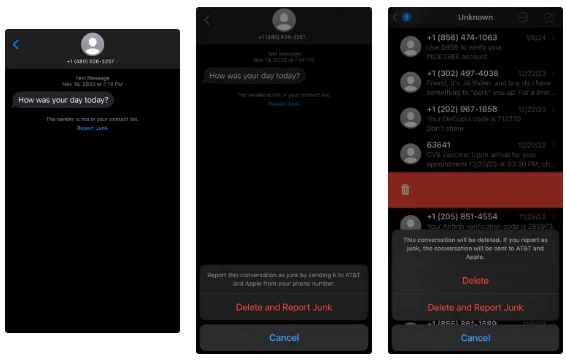
Both iMessage and Google Messages allow users to report text messages. Reporting text messages on these apps sends information about the message to Apple or Google and your phone carrier.
Phone carriers like AT&T will send these reported messages to their ActiveArmor security team, who will evaluate them. If they determine it is smishing, they will block the phone number and delete any websites, email accounts, or resources associated with the message. They will also share this information with other carriers and industry security partners.
We’ve all received a text message from someone who seems to have the wrong number. Our instinct is to help them out and text back, saying they’ve got the wrong number. 10 years ago, smishing scams were rare and it was likely the person texting you had the wrong number, but now they’re rare.
Cybercriminals will engage in months-long social engineering attacks to gain your trust before convincing you to send money or invest in a fraudulent scheme. Since 2020, victims worldwide have collectively lost more than $75 billion, according to Time.
Not only can you be scammed, but texting back also verifies that your number is active. This can cause your number to be pooled with thousands of others and sold on the dark web , making you a target for even more scam messages.
Also, make sure not to click on any links. These links could be malware or take you to a fake website where your login information will be stolen.
The only reason you would fall victim to a text scam is because a criminal has your number. Create a smaller digital footprint by never giving out your phone number. Companies love to collect and then sell your personal information. If you give your number to one company, there’s a good chance they’ll sell it to another. Criminals can buy legitimate phone numbers from data brokers or on the dark web.
Smishing messages are becoming more common and sophisticated, but so are the tools and methods used to identify and block them. Using the tools and following the tips detailed in this article can significantly reduce your risk of becoming a victim of a smishing attack.
Create a spooky office cubicle with Halloween desk decor ideas that keep your workspace usable, tidy, and mindful of workplace safety.
Plan a recognizable Halloween 2026 look with pop culture costumes inspired by Spider-Man, Supergirl, Toy Story 5, Moana, Mario, and Wednesday.
Sort leftover Halloween candy safely, share or repurpose sealed treats, and choose food use or compost for pumpkins based on their condition.
Compare workplace Halloween costume choices by respect, dress code, mobility, and safety—and learn when a subtle accessory or a policy check is the better option.
Find a couples costume that fits your style, budget, and comfort level, from Addams Family classics to original inside-joke duos.
Need a last-minute high school Halloween costume? Compare 10 easy closet-based ideas by prep time, comfort, school-day practicality, and simple safety checks.
Use a simple 2026 Halloween decorating timeline for indoor décor, outdoor displays, and fresh pumpkins, with practical adjustments for weather and events.
Mix five vivid, approachable Halloween cocktails with measured recipes, simple prep tips, and an alcohol-free option for your party guests.
Find 15 office-friendly Halloween costume ideas for 2026, with practical checks for dress codes, respectful themes, comfort, and workplace safety.
Plan a fun elementary school Halloween party with easy crafts, games, inclusive treats, costume tips, and a sample 75-minute classroom schedule.








