IPhone 16 Pro and Pro Max deliver impressive 5G speeds thanks to Qualcomm
The new iPhone 16 Pro models are equipped with the Snapdragon X75 modem, which brings many improvements.
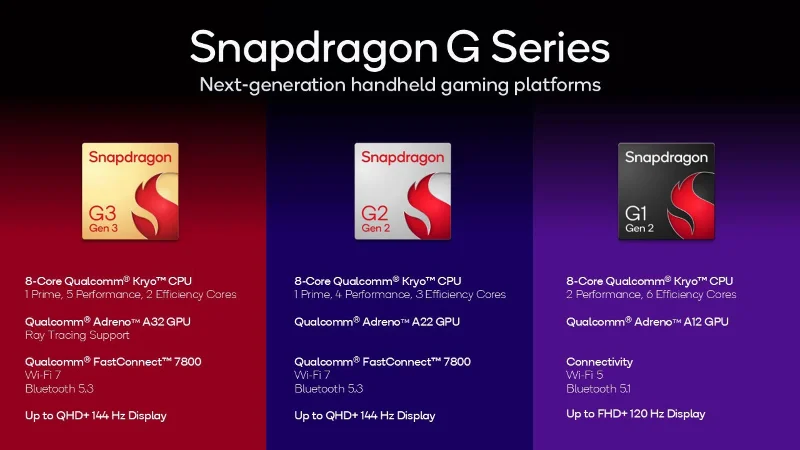
Qualcomm has just announced three new processors designed specifically for mobile gaming devices and handheld consoles. The new lineup includes three models: Snapdragon G3 Gen 3, Snapdragon G2 Gen 2, and Snapdragon G1 Gen 2. All three versions promise to deliver “smooth, modern experiences,” and allow users to play cloud, console, Android, or even PC games anytime, anywhere.
Snapdragon G3 Gen 3: Flagship chip
The Snapdragon G3 Gen 3 is the flagship model in the lineup, delivering 30% faster processing performance and 28% faster graphics than its predecessor. The processor is equipped with 8 Kryo cores (1 main core, 5 performance cores, and 2 energy-saving cores) and Adreno A32 GPU with ray-tracing support and image output at QHD+ resolution with a refresh rate of up to 144Hz. In terms of connectivity, the chip supports Wi-Fi 7 and Bluetooth 5.3.
The Snapdragon G3 Gen 3 also features a host of improvements in power optimization and memory efficiency, Bluetooth 5.3 support, and reduced latency Wi-Fi 7. Notably, it includes full support for Lumen technology and Unreal Engine 5's Global Illumination and Reflections system—a first for Android handsets, promising more vivid visuals.
Snapdragon G2 Gen 2: High performance for cloud gaming
With the Snapdragon G2 Gen 2, Qualcomm promises 2.3x better CPU performance (1 main core, 4 performance cores, 3 efficiency cores) and 3.8x better graphics performance (Adreno A22 GPU) than the previous generation Snapdragon G2. According to Qualcomm, the chip is aimed at cloud gaming at up to 144 FPS, but it can also run Android games very well. Wi-Fi 7 is also supported because high-performance cloud gaming requires a stable network connection.
Snapdragon G1 Gen 2: For 1080p 120Hz devices
The Snapdragon G1 Gen 2 is a “low-end” processor for devices with 1080p 120Hz displays. It has 80% faster processing performance and a 25% faster GPU (Adreno A12). Unlike the two higher-end versions above, the Snapdragon G1 Gen 2 only supports Wi-Fi 5 and Bluetooth 5.1. The lack of Wi-Fi 6 support is a bit of a bummer, especially since the chip is also heavily marketed for cloud gaming handsets.

Qualcomm says the first devices using the new Snapdragon G series will be available this quarter from manufacturers such as AYANEO, ONEXSUGAR, Retroid Pocket, and many other brands.
The new iPhone 16 Pro models are equipped with the Snapdragon X75 modem, which brings many improvements.
On stage at MWC 2025, Qualcomm made a splash when it introduced its eighth generation of 5G modem called the X85, which is expected to be used in flagship smartphones launching later this year.
Google has decided to end its long-standing partnership with Qualcomm and instead use MediaTek's T900 modem in the Pixel 10 series.
Qualcomm has officially announced the Snapdragon 8 Elite, its next-generation flagship SoC for premium smartphones.
After launching the Snapdragon 8s Gen 3 as a budget-friendly version of the flagship Snapdragon 8 Gen 3, Qualcomm is preparing to launch the next generation.
Leading Android smartphone brands like Google and Samsung are currently pioneering the policy of providing software update support as well as security patches for 7 consecutive years for the latest generation of smartphones.
Qualcomm has quietly introduced a new mid-range mobile processor called Snapdragon 6 Gen 3 (codename SM6475-AB).
Back in December 2023, AMD introduced the Ryz 8040 (Hawk Point) series mobile APUs, while also revealing a few brief details about the next-generation Strix Point series.
Struggling with Microsoft Teams Proxy Error? Discover proven Troubleshooting Microsoft Teams "Proxy Error" Settings Fix steps. Clear cache, adjust proxy settings, and get back to seamless calls in minutes with our expert guide.
Tired of Microsoft Teams OneDrive Error blocking file sync? Follow our step-by-step guide to solve Microsoft Teams "OneDrive Error" File Sync issues quickly. Proven fixes for smooth collaboration in Teams channels. Get your files syncing error-free today!
Tired of Microsoft Teams workflows and Power Automate errors halting your productivity? Get step-by-step solutions to common issues like authentication failures, timeouts, and flow errors. Fix them in minutes and automate effortlessly!
Facing Microsoft Teams "Download Error" on MacBook? Discover proven troubleshooting steps to resolve download failures quickly, from cache clears to reinstalls, and get back to smooth teamwork.
Tired of the frustrating Microsoft Teams "Where is Teams" Folder Error? Discover proven, step-by-step troubleshooting fixes to resolve it quickly and restore smooth teamwork. Latest methods included!
Frustrated by Microsoft Teams JavaScript Error on desktop app? Discover proven steps to fix it fast: clear cache, update, reset, and reinstall. Get back to seamless collaboration in minutes!
Struggling with Microsoft Teams "Guest Login" Error? Discover step-by-step fixes, from quick cache clears to admin settings, to resolve guest access issues fast and collaborate seamlessly. Updated with the latest tips!
Tired of the Microsoft Teams "For PC" download error blocking your work? Follow our proven, step-by-step guide to resolve it quickly and get Teams running smoothly on your PC today.
Struggling with Microsoft Teams "Windows 7" login error? Discover step-by-step fixes for this frustrating issue on Windows 10/11. Clear cache, edit registry, and more – get back to seamless collaboration today!
Tired of Microsoft Teams Error Code 0x80070005 blocking your meetings? Follow this 2026 guide with step-by-step fixes for access denied issues. Get Teams running smoothly in minutes!
Master the installation of the Microsoft Teams Add-in for Outlook 2026 effortlessly. Boost your productivity with seamless scheduling and meetings. Follow our proven, up-to-date steps for instant success!
Struggling with Microsoft Teams "License Error" 2026? Discover proven, step-by-step solutions to resolve it fast. Clear cache, check licenses, and get back to seamless collaboration—no IT help needed!
Whether youre in your 50s, 60s, or even 70s, its not too late to prioritize your health and put yourself first. Here are the best exercises for people 50 and older.
Struggling with Microsoft Teams Error Caa50024 on Windows 10/11? Follow our step-by-step fixes to resolve crashes and launch issues quickly. Latest proven solutions for seamless teamwork.
Stuck with Microsoft Teams login error AADSTS50011? Discover proven, step-by-step fixes to resolve the reply URL mismatch issue and log in seamlessly. No tech skills needed!









