5 Halloween Cocktails That Are Easy to Serve at Your 2026 Bash

Mix five vivid, approachable Halloween cocktails with measured recipes, simple prep tips, and an alcohol-free option for your party guests.
The default voice recorder on Android phones is flawed, lacking essential features like effective noise cancellation and powerful editing tools. After years of dealing with these limitations, many people have decided to switch to the Dolby On app and have never looked back.
Table of Contents
One of the reasons people quickly fell in love with the Dolby On app is that it’s completely free. Unlike many other voice recording apps on the Play Store that display ads or lock essential features behind paywalls, Dolby On offers a seamless, ad-free experience with all features accessible right from the start.
Furthermore, Dolby On doesn't just record voice like other apps; it automatically enhances the audio to make it sound sharper without any extra effort.
Whether I was recording a quick voice memo or recording a lecture, the difference in audio quality was immediately noticeable compared to Google's default voice recorder.
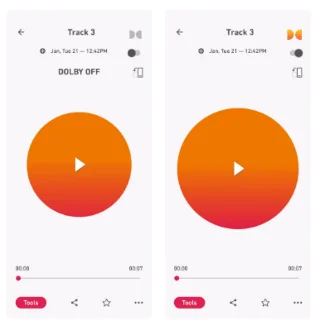
As someone who regularly records in busy or unpredictable environments, background noise is always a challenge. Whether it’s traffic noise, background chatter, or the constant hum of an air conditioner, these sounds can easily ruin a perfectly good recording.
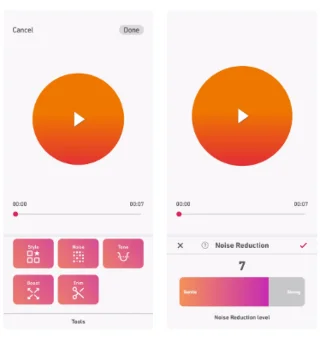
With Dolby On, you can instantly remove most of this unwanted noise by going to Tools > Noise . It also gives you full control over the strength of the noise reduction, meaning you can fine-tune it to your liking.
With Android's default voice recorder app, you often have to rely on third-party tools to remove noise after recording, which is both inconvenient and time-consuming.
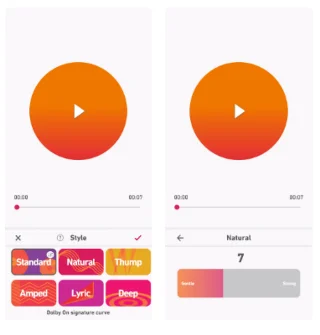
In addition to automatic audio enhancement and noise cancellation, Dolby On also offers a variety of preset EQ styles like Natural, Amped, Lyric, Deep, and Thump to further enhance your recordings. While these presets are primarily designed for music recordings, they’re incredibly useful for everything from voiceovers to podcasts.
Just open your recording, go to Tools > Style , and try out these presets. Each preset has a distinct purpose – Natural enhances vocal clarity for a crisp, authentic sound, while Amped adds energy and power. If you want a strong bass feel, Thump adds immersive depth, while Deep smooths things out for a rich, resonant sound.
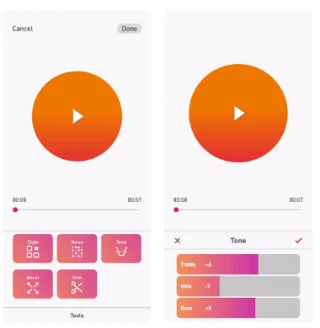
When the built-in Dolby On presets don't meet your audio needs, go to Tools > Tone to manually adjust the Treble, Mids, and Bass levels. Whether you need to boost the frequencies for clarity or add a little warmth to the bass, it's easy to tweak each setting to your liking.
Integrating these options directly into the voice recording app really streamlines the process, saving a significant amount of time and effort compared to using other free audio editing tools.
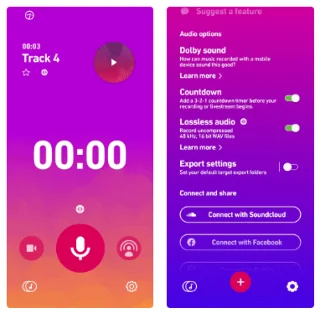
Another feature that many people really like about Dolby On is the recording countdown timer. It may seem like a small detail, but it’s surprisingly useful. When you enable the Countdown option in the settings, you’ll see a 3-2-1 countdown before recording starts.
This timer gives you enough time to prepare and more importantly eliminates the need to cut out awkward silences or awkwardness that often occurs when starting a recording in other apps.
While there are a number of options for recording audio on Android, it's the added features that have driven people to switch to Dolby On. In contrast, Google 's built-in Voice Recorder app doesn't offer anything close to these options, making Dolby On a much more convenient option for users.
Overall, these improvements have made a noticeable difference and thus, people do not feel the need to go back to the default voice recording app.
Mix five vivid, approachable Halloween cocktails with measured recipes, simple prep tips, and an alcohol-free option for your party guests.
Find 15 office-friendly Halloween costume ideas for 2026, with practical checks for dress codes, respectful themes, comfort, and workplace safety.
Plan a fun elementary school Halloween party with easy crafts, games, inclusive treats, costume tips, and a sample 75-minute classroom schedule.
Compare realistic side hustles for 2026 by startup cost, fees, flexibility, and income control, with current tax and scam guidance from official sources.
Upgrade your home office ergonomics with current OSHA and NIOSH guidance on chair fit, monitor height, laptop setup, lighting, and movement.
Learn why emotional intelligence matters in leadership, where it helps most, how to strengthen it, and how to tell whether your approach is working.
A practical roadmap for moving into tech without a degree: choose an accessible role, build job-ready skills, prove them with projects, and use hiring feedback to improve.
Build a credible LinkedIn personal brand in 2026 with current profile, content, newsletter, analytics, verification, and visibility guidance from LinkedIn.
Quiet quitting and quiet firing are catchy labels, not diagnoses. Learn what is verified, what depends on context, and what employees and managers can do next.
Fractional executives offer senior leadership without a full-time hire. Learn when the model works, what to ask, and the risks to manage.








