Desk Decorating Ideas for a Spooky Office Cubicle

Create a spooky office cubicle with Halloween desk decor ideas that keep your workspace usable, tidy, and mindful of workplace safety.
Excel users need to be on guard as a newly discovered phishing campaign is targeting Microsoft's spreadsheet application.
This campaign distributes a new fileless malware version of a dangerous remote access Trojan that is being distributed through a Microsoft 365 (formerly Microsoft Office) vulnerability - and is now being actively exploited.
Hackers are targeting Excel to spread dangerous malware
Always on the front lines, Fortinent's Fortiguard Labs has uncovered a phishing campaign targeting Excel users.
The attack uses a phishing email lure disguised as a shipping order with a malicious Microsoft Excel spreadsheet attached. Once downloaded and opened, the spreadsheet exploits a remote code execution vulnerability (CVE-2017-0199) to download the HTML application.
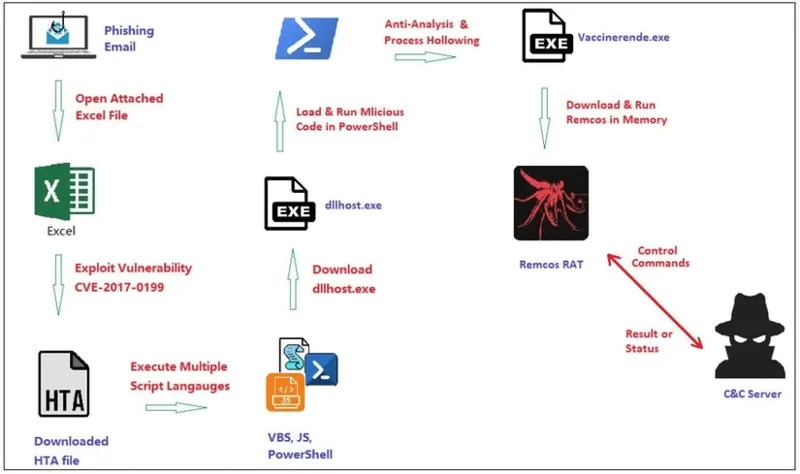
Once downloaded, the HTML application executes and attempts to download another file – the actual Remcos malware. Remcos is a well-known remote access Trojan that can give attackers a direct line into an infected computer. It is one of many dangerous malware types that can be purchased in neat packages on underground hacker forums.
This time, however, researcher Xiaopeng Zhang found a fileless variant of the Remcos RAT that works with the infected system's memory, allowing it to evade detection by anti-malware tools. It also adds a specific autorun system registry to "maintain persistence and control over the victim's device across reboots"—another example of persistent malware.
Remcos RAT operators can use keyloggers and screen recorders to collect private information, audio, and other data. The stolen data is then encrypted and sent back to the operator, where it can be exploited.
Keep Microsoft 365 and your computer up to date to stay safe!
Unfortunately, the research does not indicate specific versions of Microsoft Excel affected by this vulnerability. Although the CVE-2017-0199 note does list older versions of Excel and Office under “Known Affected Software Configurations,” that section has not been updated since the phishing campaign was discovered.
So when in doubt, keep Microsoft 365 and your operating system up to date. If possible, upgrade to the latest version of Microsoft 365 for maximum security.
Create a spooky office cubicle with Halloween desk decor ideas that keep your workspace usable, tidy, and mindful of workplace safety.
Plan a recognizable Halloween 2026 look with pop culture costumes inspired by Spider-Man, Supergirl, Toy Story 5, Moana, Mario, and Wednesday.
Sort leftover Halloween candy safely, share or repurpose sealed treats, and choose food use or compost for pumpkins based on their condition.
Compare workplace Halloween costume choices by respect, dress code, mobility, and safety—and learn when a subtle accessory or a policy check is the better option.
Find a couples costume that fits your style, budget, and comfort level, from Addams Family classics to original inside-joke duos.
Need a last-minute high school Halloween costume? Compare 10 easy closet-based ideas by prep time, comfort, school-day practicality, and simple safety checks.
Use a simple 2026 Halloween decorating timeline for indoor décor, outdoor displays, and fresh pumpkins, with practical adjustments for weather and events.
Mix five vivid, approachable Halloween cocktails with measured recipes, simple prep tips, and an alcohol-free option for your party guests.
Find 15 office-friendly Halloween costume ideas for 2026, with practical checks for dress codes, respectful themes, comfort, and workplace safety.
Plan a fun elementary school Halloween party with easy crafts, games, inclusive treats, costume tips, and a sample 75-minute classroom schedule.








