Kawaii Halloween Decor Without Gore or Jump Scares

Create a gentle Halloween look with pastel colors, friendly ghosts, easy no-carve accents, and practical safety tips for your home.
Astroscale Japan Inc, a Japanese company working to clean up space debris, has just shared a remarkable image - the first photo of a piece of space junk at an extremely close distance.
The image was taken from a distance of just 50 meters by the Astroscale-Japan (ADRAS-J) satellite camera system during the company's Active Debris Removal mission. The subject of the photo is a large piece of space debris measuring 11 meters by 4 meters. It is the upper stage of a Japanese H-IIA rocket, which has been circling the Earth in low Earth orbit since 2009.
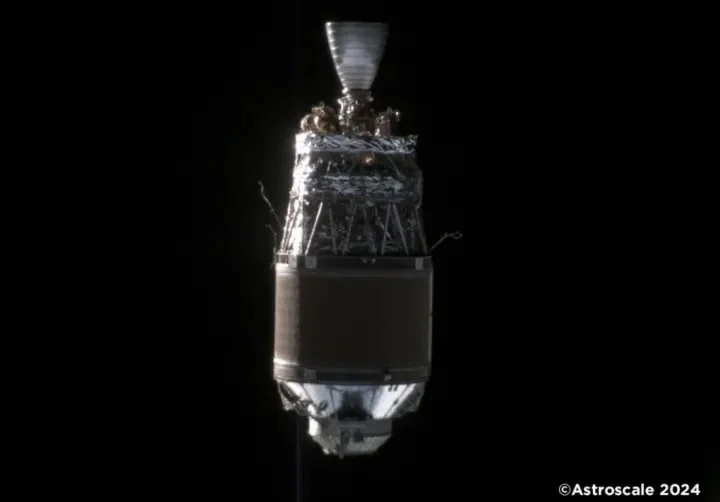
Once ADRAS-J was within a few miles of the debris field, the team deployed an infrared camera that used a navigation algorithm to navigate safely. In May, ADRAS-J came within 50 meters of the landfill, enough to capture detailed images of the object. ADRAS-J will now attempt to move closer to the debris field to capture more detailed images.
The Japanese space agency has selected Astroscale for its Space Debris Removal Program (CRD2), and ADRAS-J is part of that initiative. Studying a piece of space junk up close allows Astroscale to fully understand the condition and movements of the object before it is destroyed. The data collected will allow scientists to launch another mission in the future to safely approach, “grab” the object with a robotic arm, and remove it from orbit, where it will burn up in Earth’s atmosphere.
Space debris in low Earth orbit includes not only old rocket parts, but also decommissioned satellites and even debris from collisions between these parts. NASA says there are millions of pieces of space junk orbiting the Earth at speeds of 18,000 miles per hour, posing a direct threat to active satellites, as well as the human habitat on the International Space Station and China’s new space station.
A series of international efforts have been underway over the years to find ways to safely and effectively remove the debris, which is estimated to total nearly 6,000 tonnes.
Create a gentle Halloween look with pastel colors, friendly ghosts, easy no-carve accents, and practical safety tips for your home.
Create a spooky office cubicle with Halloween desk decor ideas that keep your workspace usable, tidy, and mindful of workplace safety.
Plan a recognizable Halloween 2026 look with pop culture costumes inspired by Spider-Man, Supergirl, Toy Story 5, Moana, Mario, and Wednesday.
Sort leftover Halloween candy safely, share or repurpose sealed treats, and choose food use or compost for pumpkins based on their condition.
Compare workplace Halloween costume choices by respect, dress code, mobility, and safety—and learn when a subtle accessory or a policy check is the better option.
Find a couples costume that fits your style, budget, and comfort level, from Addams Family classics to original inside-joke duos.
Need a last-minute high school Halloween costume? Compare 10 easy closet-based ideas by prep time, comfort, school-day practicality, and simple safety checks.
Use a simple 2026 Halloween decorating timeline for indoor décor, outdoor displays, and fresh pumpkins, with practical adjustments for weather and events.
Mix five vivid, approachable Halloween cocktails with measured recipes, simple prep tips, and an alcohol-free option for your party guests.
Find 15 office-friendly Halloween costume ideas for 2026, with practical checks for dress codes, respectful themes, comfort, and workplace safety.








