Pop Culture Costume Ideas That Will Dominate Halloween 2026

Plan a recognizable Halloween 2026 look with pop culture costumes inspired by Spider-Man, Supergirl, Toy Story 5, Moana, Mario, and Wednesday.
Snapdragon 6 Gen 4 Launched: Bringing AI, Gaming and Battery Improvements to Mid-Range Smartphones
Qualcomm has just officially launched the new Snapdragon 6 Gen 4 mobile processor platform, bringing enhanced performance, better battery efficiency, and a series of advanced AI features to the mid-range smartphone segment. Designed to serve a wide range of users, this chipset not only meets the needs of gamers and content creators, but also professional users who need seamless connectivity, high-quality images, and reliable performance.
Specifications and Features
Snapdragon 6 Gen 4 is the first chip in the Snapdragon 6 series to be manufactured on TSMC's 4nm process and integrate the new ARMv9 architecture. The CPU configuration is quite impressive with 1 main core 2.3GHz, 3 Cortex A720 cores 2.2GHz and 4 power-saving Cortex A520 cores 1.8GHz.
The Snapdragon 6 Gen 4 is built to strike a balance between power and efficiency. The chipset supports advanced AI capabilities, making tasks like video post-processing, photography, and voice recognition smoother. The platform is designed to handle demanding gaming experiences, delivering 4K visuals and lossless wireless audio through Snapdragon Sound.
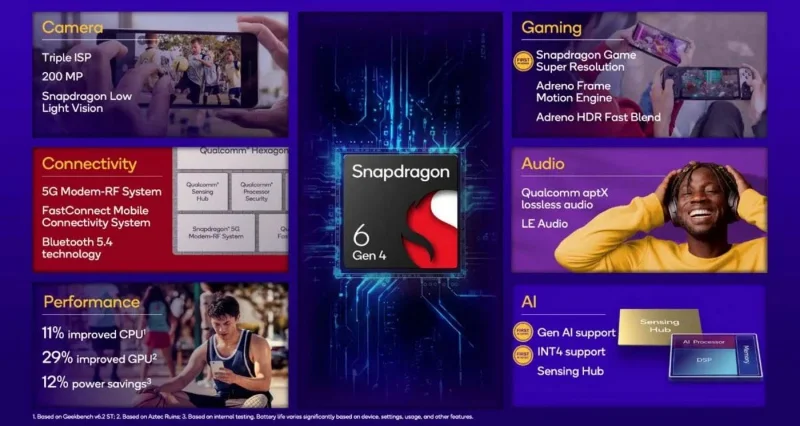
In terms of graphics capabilities, the GPU on the Snapdragon 6 Gen 4 is said to be 29% more powerful than the previous generation. Notably, for the first time, the Snapdragon 6 series is equipped with Snapdragon Game Super Resolution, allowing graphics to be upgraded from 1080p to 4K. Adreno Frame Motion Generation technology is also integrated, helping to enhance the gaming experience.
The Snapdragon 6 Gen 4 is equipped with a 5G modem that supports both mmWave and sub-6GHz with download speeds of up to 2.9Gbps. Wireless connectivity standards are also upgraded to Wi-Fi 6E and Bluetooth 5.4 LE. With 5G and ultra-fast Wi-Fi connectivity, users can expect stable and high-speed internet access for web browsing, streaming, and video calling.
Snapdragon 6 Gen 4 also improves photography with enhanced image processing for clearer photos in a variety of lighting conditions. Battery efficiency has been optimized, ensuring longer usage on a single charge without compromising performance.
Smartphones powered by the Snapdragon 6 Gen 4 will launch in the coming months. Realme, Oppo, and Honor are expected to be the first brands to integrate this chipset into their upcoming mid-range devices this year.
Plan a recognizable Halloween 2026 look with pop culture costumes inspired by Spider-Man, Supergirl, Toy Story 5, Moana, Mario, and Wednesday.
Sort leftover Halloween candy safely, share or repurpose sealed treats, and choose food use or compost for pumpkins based on their condition.
Compare workplace Halloween costume choices by respect, dress code, mobility, and safety—and learn when a subtle accessory or a policy check is the better option.
Find a couples costume that fits your style, budget, and comfort level, from Addams Family classics to original inside-joke duos.
Need a last-minute high school Halloween costume? Compare 10 easy closet-based ideas by prep time, comfort, school-day practicality, and simple safety checks.
Use a simple 2026 Halloween decorating timeline for indoor décor, outdoor displays, and fresh pumpkins, with practical adjustments for weather and events.
Mix five vivid, approachable Halloween cocktails with measured recipes, simple prep tips, and an alcohol-free option for your party guests.
Find 15 office-friendly Halloween costume ideas for 2026, with practical checks for dress codes, respectful themes, comfort, and workplace safety.
Plan a fun elementary school Halloween party with easy crafts, games, inclusive treats, costume tips, and a sample 75-minute classroom schedule.
Compare realistic side hustles for 2026 by startup cost, fees, flexibility, and income control, with current tax and scam guidance from official sources.








