Desk Decorating Ideas for a Spooky Office Cubicle

Create a spooky office cubicle with Halloween desk decor ideas that keep your workspace usable, tidy, and mindful of workplace safety.
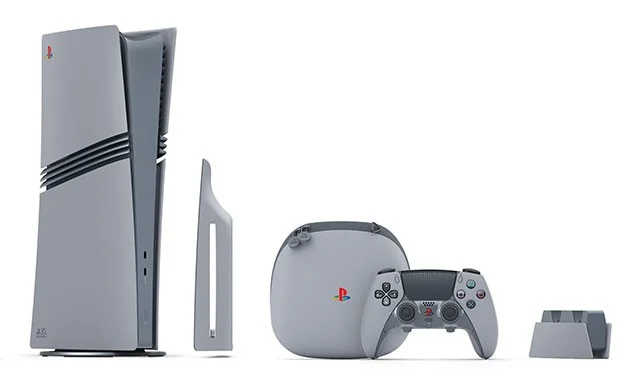
Sony Interactive Entertainment has just unveiled a series of PlayStation 5 consoles and accessories, a special limited edition to celebrate the 30th anniversary of the iconic PlayStation brand. The PlayStation 30th Anniversary Collection honors the milestone of the first PlayStation console in 1994 with a retro design.
The most premium of the collection is the retro-inspired limited edition PlayStation 5 Pro console, which is inspired by the design of the first-generation PlayStation (PS1), with a gray color scheme and colorful PlayStation logo. It is integrated with a 2TB SSD and corresponding accessories such as the DualSense Edge controller with a similar design. Only 12,300 units will be sold, each with a specific number, representing the PS1's launch date of December 3, 1994.
There will also be some nice collectibles included in the 30th Anniversary Collection: Original PlayStation-style cable connector covers and PlayStation-shaped cable ties that recall the 1990s aesthetic. Some 30th Anniversary posters, cable ties, stickers, and even a PlayStation PS paper clip are also included. This promises to be a highly sought-after set by collectors in the near future.
Customers can sign up for a chance to pre-order the PlayStation 30th Anniversary Collection starting September 26. In regions directly supported, PlayStation Network members can pre-order the PS5 Pro, Portal, and DualSense Edge from PlayStation Direct. In other markets, pre-orders will be accepted through the usual retail partners.
All orders are expected to ship by November 21. The race to collect these special editions promises to be fierce.
Create a spooky office cubicle with Halloween desk decor ideas that keep your workspace usable, tidy, and mindful of workplace safety.
Plan a recognizable Halloween 2026 look with pop culture costumes inspired by Spider-Man, Supergirl, Toy Story 5, Moana, Mario, and Wednesday.
Sort leftover Halloween candy safely, share or repurpose sealed treats, and choose food use or compost for pumpkins based on their condition.
Compare workplace Halloween costume choices by respect, dress code, mobility, and safety—and learn when a subtle accessory or a policy check is the better option.
Find a couples costume that fits your style, budget, and comfort level, from Addams Family classics to original inside-joke duos.
Need a last-minute high school Halloween costume? Compare 10 easy closet-based ideas by prep time, comfort, school-day practicality, and simple safety checks.
Use a simple 2026 Halloween decorating timeline for indoor décor, outdoor displays, and fresh pumpkins, with practical adjustments for weather and events.
Mix five vivid, approachable Halloween cocktails with measured recipes, simple prep tips, and an alcohol-free option for your party guests.
Find 15 office-friendly Halloween costume ideas for 2026, with practical checks for dress codes, respectful themes, comfort, and workplace safety.
Plan a fun elementary school Halloween party with easy crafts, games, inclusive treats, costume tips, and a sample 75-minute classroom schedule.








