Desk Decorating Ideas for a Spooky Office Cubicle

Create a spooky office cubicle with Halloween desk decor ideas that keep your workspace usable, tidy, and mindful of workplace safety.
School buses are a familiar means of transportation in the United States. Although they have been around for more than eight decades, they have some special designs that help minimize the risk of children being left behind on the bus.
Below are the safety standards of school buses in the US to ensure safety.
Color and exterior design
The American school bus has remained yellow for the past 80 years. The reason is that yellow is one of the most easily detected colors by the naked eye, even in poor lighting conditions, helping to reduce traffic accidents.
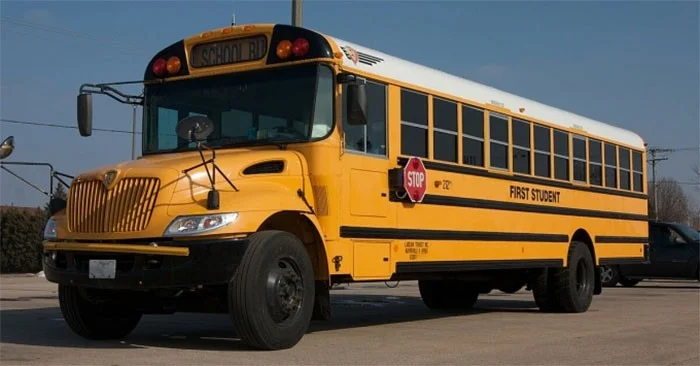
In addition, the outside of the bus is equipped with a flashing light system that is easily detected by the naked eye, or a red stop sign with the word "stop".
According to the US National Highway Traffic Safety Administration (NHTSA), school buses are specially designed to help passengers inside endure much less impact force than passenger cars or trucks.
Seat belts may not be required.
The seats on school buses are designed to be extremely sturdy with high backs and plenty of padding, so there are no seat belts. In the event of a collision, the seats absorb most of the impact, protecting the children sitting inside.
But for small American school buses (with a weight capacity under 10,000 lbs or about 4.5 tons), seat belts must be designed.
Safety warning system
According to Rohrerbus, to limit the number of children left on the bus, many buses in the US are now equipped with a safety warning system. It is a button designed and placed at the back of the bus. After stopping the bus and turning off the engine, the driver must get out to press this button. This helps the driver check to see if there are any children sleeping on the bus.
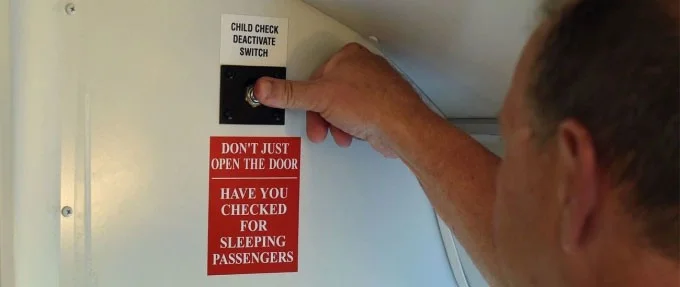
If the driver forgets to press the button, the alarm system will be activated after a certain period of time, and the alarm will sound until the driver presses the button.
Exits from the inside
The American school bus has three emergency exits that can be opened from the inside, located on the front, side, and back of the bus. Students can open them with just a few movements, and escape by themselves in case they are left behind.
Other safety features
Most American school buses are equipped with cameras, allowing people from the outside to see the entire inside of the vehicle.
From a young age, students who use the bus to get to school are trained in basic first aid and escape skills. This helps children stay calm and know what to do in an emergency.
School bus drivers are required to have a commercial driver's license (CDL) with an endorsement (S) and must pass a physical examination every two years.
In addition, because they are driving for children, American bus drivers must also complete a special training course on how to communicate with children, safety rules to follow when working with young children...
Create a spooky office cubicle with Halloween desk decor ideas that keep your workspace usable, tidy, and mindful of workplace safety.
Plan a recognizable Halloween 2026 look with pop culture costumes inspired by Spider-Man, Supergirl, Toy Story 5, Moana, Mario, and Wednesday.
Sort leftover Halloween candy safely, share or repurpose sealed treats, and choose food use or compost for pumpkins based on their condition.
Compare workplace Halloween costume choices by respect, dress code, mobility, and safety—and learn when a subtle accessory or a policy check is the better option.
Find a couples costume that fits your style, budget, and comfort level, from Addams Family classics to original inside-joke duos.
Need a last-minute high school Halloween costume? Compare 10 easy closet-based ideas by prep time, comfort, school-day practicality, and simple safety checks.
Use a simple 2026 Halloween decorating timeline for indoor décor, outdoor displays, and fresh pumpkins, with practical adjustments for weather and events.
Mix five vivid, approachable Halloween cocktails with measured recipes, simple prep tips, and an alcohol-free option for your party guests.
Find 15 office-friendly Halloween costume ideas for 2026, with practical checks for dress codes, respectful themes, comfort, and workplace safety.
Plan a fun elementary school Halloween party with easy crafts, games, inclusive treats, costume tips, and a sample 75-minute classroom schedule.








