Desk Decorating Ideas for a Spooky Office Cubicle

Create a spooky office cubicle with Halloween desk decor ideas that keep your workspace usable, tidy, and mindful of workplace safety.
What is a hammerhead worm? What are the characteristics of a hammerhead worm? Let's find out together!
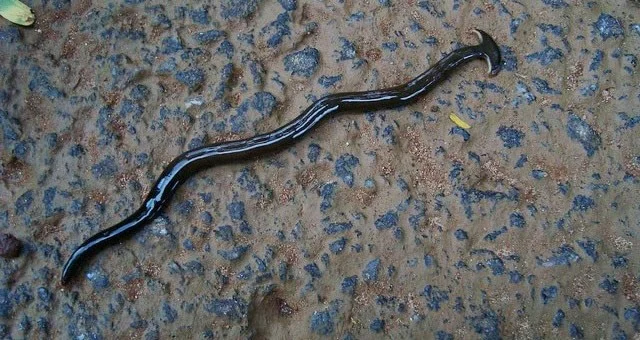
A man named Danish Ho from the southern Malaysian state of Johor discovered this strange creature. Mr. Danish Ho thought he had discovered a new species of snake because he had never seen such a creature before.
This terrifying "monster" is actually a hammerhead worm, a type of flatworm belonging to the Geoplanidae family. This is the largest worm ever recorded in the world. When fully grown, their bodies can reach up to 60cm in length, causing many people to mistake them for snakes.
The video captures terrifying footage of a creature that looks like it came straight out of a science fiction movie.
What you need to know about hammerhead worms
The most distinctive features of hammerhead worms are their fan- or hammer-shaped heads and long, flattened bodies. The underside of the flatworms has a large "crawling sole" that is used for locomotion. Species are distinguished by head shape, size, color, and striping patterns.
Hammerhead worms are carnivorous, and are considered a dangerous invasive species in the United States and Europe. They come in a variety of shapes, sizes, and colors.
Hammerhead worms hunt by secreting a sticky substance that immobilizes their victims. They then use enzymes to melt their prey into water, sucking the liquid nutrients into their bodies.
Their main food is earthworms, snails and insects. If they cannot hunt, hammerhead worms cannibalize themselves and regenerate in a short time.
Hammerhead worms have a wide variety of reproductive methods, some species lay eggs while others simply split in half. After splitting, the hind end can move immediately and a new head will grow after a few days. Hammerhead worms reproduce asexually several times a month.
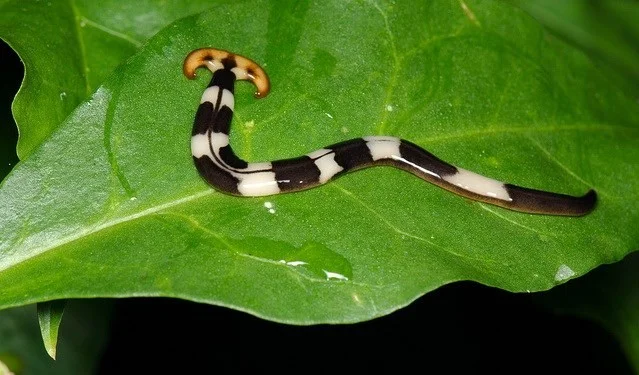
According to research by scientists, hammerhead worms have no respiratory system, no bone structure, no circulatory system and the mouth can play the same role as the anus.
Create a spooky office cubicle with Halloween desk decor ideas that keep your workspace usable, tidy, and mindful of workplace safety.
Plan a recognizable Halloween 2026 look with pop culture costumes inspired by Spider-Man, Supergirl, Toy Story 5, Moana, Mario, and Wednesday.
Sort leftover Halloween candy safely, share or repurpose sealed treats, and choose food use or compost for pumpkins based on their condition.
Compare workplace Halloween costume choices by respect, dress code, mobility, and safety—and learn when a subtle accessory or a policy check is the better option.
Find a couples costume that fits your style, budget, and comfort level, from Addams Family classics to original inside-joke duos.
Need a last-minute high school Halloween costume? Compare 10 easy closet-based ideas by prep time, comfort, school-day practicality, and simple safety checks.
Use a simple 2026 Halloween decorating timeline for indoor décor, outdoor displays, and fresh pumpkins, with practical adjustments for weather and events.
Mix five vivid, approachable Halloween cocktails with measured recipes, simple prep tips, and an alcohol-free option for your party guests.
Find 15 office-friendly Halloween costume ideas for 2026, with practical checks for dress codes, respectful themes, comfort, and workplace safety.
Plan a fun elementary school Halloween party with easy crafts, games, inclusive treats, costume tips, and a sample 75-minute classroom schedule.








