Stunning photos of the interior of the ISS space station laboratory

On February 17, the crewed space flight of Axiom Mission 3 lifted off from Kennedy Space Center, carrying four astronauts and a number of samples to serve more than 30 important researches at the International Space Station (ISS) Laboratory.

According to the plan, the astronauts will conduct more than 30 experiments in the space environment.

Recently, Marcus Wandt - a project mission specialist of the European Space Agency (ESA), shared a photo taken by himself while floating in the zero-gravity environment of the main research laboratory of the International Space Station (ISS) called Destiny. This is where many experiments and in-depth research are conducted in the zero-gravity environment.
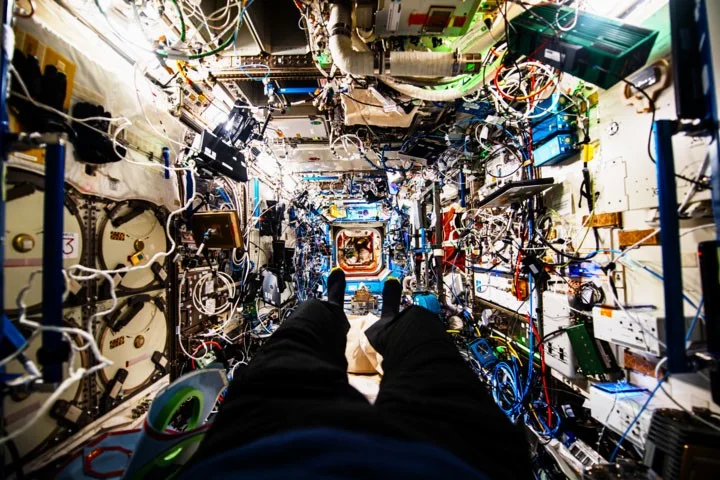
Stunning photos of the interior of the ISS space station laboratory
In the photo, to keep all the tools tied down, the walls of the Destiny module are lined with various devices and strung wires.

Since astronauts experience weightlessness inside the space station, Marcus Wandt's legs and feet can also be seen floating in the photo.

The Destiny module has 24 equipment racks, supporting various studies related to human health, safety and quality of life in zero gravity conditions, thereby allowing them to better understand the nature of human health and the world we live in.

“An astronaut’s perspective: How does this photo make you feel: Relaxed, stressed, wanting to play, or wanting to rearrange things?” Wandt wrote in an X post.

Leave a Comment

Where are Microsoft Teams Registry Keys Located on Windows 11?

Where are Microsoft Teams Registry Keys Located on Windows 11?

Unlock the precise locations of Microsoft Teams registry keys on Windows 11. Step-by-step guide to find, access, and safely tweak them for optimal performance and troubleshooting. Essential for IT pros and Teams enthusiasts.

How to Fix Microsoft Teams Training Error Video Lag

How to Fix Microsoft Teams Training Error Video Lag

Tired of Microsoft Teams "Training Error" Video Lag ruining your meetings? Follow our step-by-step guide with the latest fixes for smooth video calls—no more frustration!

How to Fix Microsoft Teams Error occurred During Sign-In

How to Fix Microsoft Teams Error occurred During Sign-In

Frustrated by Microsoft Teams "Error occurred" during sign-in? Discover proven, step-by-step fixes to get back online fast. Clear cache, reset app, and more for seamless login. Works on Windows, Mac & web.

Troubleshooting Microsoft Teams Call Error Disconnecting

Troubleshooting Microsoft Teams Call Error Disconnecting

Struggling with Microsoft Teams "Call Error" Disconnecting? Discover proven, step-by-step fixes for call drops, network issues, and more. Get back to seamless meetings fast with our expert troubleshooting guide.

How to Fix Microsoft Teams Error 2603: Login Loop Fix

How to Fix Microsoft Teams Error 2603: Login Loop Fix

Stuck in Microsoft Teams Error 2603 login loop? Get proven step-by-step fixes to resolve the issue fast and restore seamless teamwork. Clear cache, reset, reinstall – all covered!

How to Fix Microsoft Teams Voice Call Error

How to Fix Microsoft Teams Voice Call Error

Tired of Microsoft Teams voice call errors? Follow our step-by-step guide to troubleshoot no audio, echo, or call drops. Proven fixes for crystal-clear calls every time.

How to Fix Microsoft Teams Workflows Error Power Automate

How to Fix Microsoft Teams Workflows Error Power Automate

Struggling with Microsoft Teams "Workflows Error" in Power Automate? Discover proven, step-by-step fixes to resolve connection issues, permissions, and more. Get your workflows running smoothly today!

How to Fix Microsoft Teams Reddit Popular Error Fixes

How to Fix Microsoft Teams Reddit Popular Error Fixes

Tired of Microsoft Teams crashes, black screens, and sign-in loops? Unlock Reddit's most popular, proven fixes to resolve common Microsoft Teams errors quickly and get back to productive meetings. Step-by-step guides inside!

Troubleshooting Microsoft Teams Error 53003: Access Denied

Troubleshooting Microsoft Teams Error 53003: Access Denied

Tired of Microsoft Teams Error 53003 Access Denied blocking your meetings? Discover proven, step-by-step fixes to troubleshoot and resolve it quickly – no tech expertise needed!

How to Fix Microsoft Teams Media Error During Calls

How to Fix Microsoft Teams Media Error During Calls

Tired of Microsoft Teams media errors ruining your calls? Follow our expert, step-by-step guide to fix audio, video, and media issues quickly. Restore crystal-clear meetings today!

How to Fix Microsoft Teams Classic Login Error

How to Fix Microsoft Teams Classic Login Error

Struggling with Microsoft Teams "Classic" login error? Discover proven, step-by-step fixes to get back online fast. Clear cache, reset credentials, and more—no tech skills needed!

Troubleshooting Microsoft Teams Test Call Mic Error

Troubleshooting Microsoft Teams Test Call Mic Error

Struggling with Microsoft Teams Test Call mic error? Discover step-by-step troubleshooting for microphone issues, from quick checks to advanced fixes. Restore crystal-clear audio in minutes!

Solving Microsoft Teams Error AADSTS90023: Invalid Authentication

Solving Microsoft Teams Error AADSTS90023: Invalid Authentication

Struggling with Microsoft Teams Error AADSTS90023 Invalid Authentication? Discover step-by-step fixes to resolve this Azure AD issue quickly. Clear cache, reset credentials, and get back to seamless collaboration today!

Solving Microsoft Teams Error 1200: Step-by-Step Recovery

Solving Microsoft Teams Error 1200: Step-by-Step Recovery

Struggling with Microsoft Teams Error 1200? Discover proven step-by-step fixes to resolve connection issues, clear cache, and get back to seamless collaboration. Quick recovery tips inside!

Why is My Microsoft Teams Status Stuck on Away?

Why is My Microsoft Teams Status Stuck on Away?

Frustrated with your Microsoft Teams status stuck on 'Away'? Uncover the top reasons like idle timeouts and power settings, plus step-by-step fixes to get back to 'Available' fast. Updated with the latest Teams features.









