5 Halloween Cocktails That Are Easy to Serve at Your 2026 Bash

Mix five vivid, approachable Halloween cocktails with measured recipes, simple prep tips, and an alcohol-free option for your party guests.
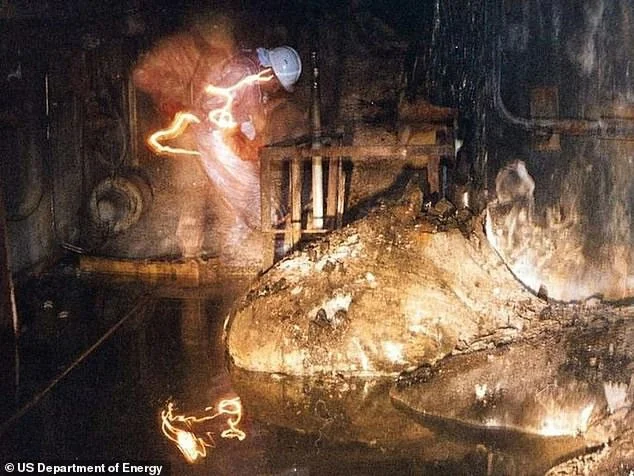
This object is located in the Chernobyl area, Ukraine, as a result of one of the most terrifying radiation leaks in history. This object is shaped like a giant foot, so it is called "Elephant's Foot".
The Daily Mail calls the "Elephant's Foot" "the most dangerous thing in the world", to the point that just looking at this object can cause death.
Scientists predict that even after hundreds of years, without protective equipment, humans will not be able to get close to the "Elephant's Foot".

How did the "elephant foot" appear?
On April 26, 1986, reactor number 4 of the Chernobyl nuclear power plant in Ukraine suffered an accident that caused the temperature in the reactor core to rise to an uncontrollable level. The coolant pumped in immediately evaporated. Due to the high pressure, the reactor eventually exploded, causing the Chernobyl nuclear disaster. When rescue teams arrived to contain the radiation, they discovered "the most dangerous object in the world".
According to scientists, the "world's most dangerous object" is a complex mixture with extremely high radioactive concentrations created by reactor No. 4 when it heated up, melting the surrounding steel and concrete, forming "radioactive lava". When it cooled, this hardened into a new material called corium, which is the "Elephant's Foot".
The Danger of the "Elephant's Foot"
In 1986, the "Elephant's Foot" emitted up to 10,000 x-rays per hour (a unit of radiation measurement) - a dose 1,000 times higher than the level that can cause cancer, equivalent to 4.5 million X-rays that humans still use during X-rays.
If a person comes into contact with this substance for 30 seconds, they will feel dizzy and tired for at least a week. If they come into contact for 2 minutes, the cells will start to bleed. If they come into contact for 4 minutes, they will experience vomiting, diarrhea, and fever. And after just 5 minutes of being near it, the person who comes into contact is almost beyond help, and will die within 2 days.
Artur Korneyev, deputy director of the Shelter Object project, had the most exposure to elephants’ feet. He was an experienced expert and wore strict protective gear when handling them. An article published in 2021 revealed that Artur was still alive, in Ukraine.
After nearly four decades, the "Elephant's Foot" is gradually cooling down, but scientists still warn about the danger of this object.
In 2016, to limit the leakage of radiation to the outside, a concrete and steel structure called "Safe Prison" was placed above the "Elephant's Foot". Because corium has only appeared 5 times in history, it is very rare, so no one is sure how the "Elephant's Foot" will change in the future.
Mix five vivid, approachable Halloween cocktails with measured recipes, simple prep tips, and an alcohol-free option for your party guests.
Find 15 office-friendly Halloween costume ideas for 2026, with practical checks for dress codes, respectful themes, comfort, and workplace safety.
Plan a fun elementary school Halloween party with easy crafts, games, inclusive treats, costume tips, and a sample 75-minute classroom schedule.
Compare realistic side hustles for 2026 by startup cost, fees, flexibility, and income control, with current tax and scam guidance from official sources.
Upgrade your home office ergonomics with current OSHA and NIOSH guidance on chair fit, monitor height, laptop setup, lighting, and movement.
Learn why emotional intelligence matters in leadership, where it helps most, how to strengthen it, and how to tell whether your approach is working.
A practical roadmap for moving into tech without a degree: choose an accessible role, build job-ready skills, prove them with projects, and use hiring feedback to improve.
Build a credible LinkedIn personal brand in 2026 with current profile, content, newsletter, analytics, verification, and visibility guidance from LinkedIn.
Quiet quitting and quiet firing are catchy labels, not diagnoses. Learn what is verified, what depends on context, and what employees and managers can do next.
Fractional executives offer senior leadership without a full-time hire. Learn when the model works, what to ask, and the risks to manage.








