10 Samsung Galaxy Features All Android Phones Should Learn
If you've been using a Samsung phone for a few years now, you'll find the great features the Galaxy line offers hard to beat.
Samsung's software update roadmap provides information about devices that are eligible to receive monthly, quarterly, and bi-annual operating system updates. Samsung recently revised this software update schedule and reportedly removed four Galaxy devices from the list, officially confirming the end of their software update cycle.
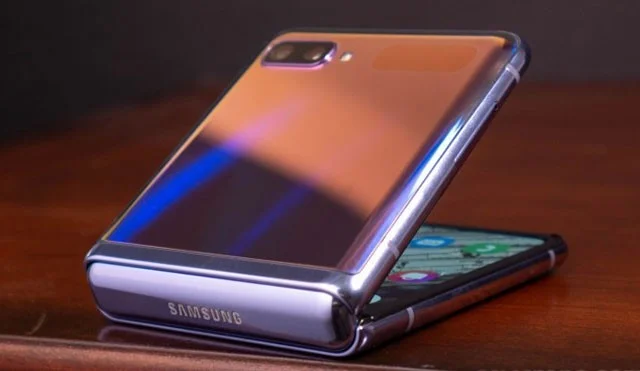
The devices in question include the Galaxy Z Flip 5G, Galaxy Tab S7, Galaxy Tab S7+, and Galaxy M31s, all of which were released in 2020. Being removed from the update schedule means that these devices will no longer receive the latest software updates or security patches. Critical fixes may still be provided in the event of a critical issue that is critical to the security of the device.
So if you’re still using these four-year-old models, you won’t get any new features or the latest security patches on your device. This could leave your device vulnerable to emerging security threats. The good news, however, is that your devices will continue to function normally.
Samsung has a policy of providing software updates to its devices for a set period of time, depending on the model. Earlier this year, the South Korean tech giant announced that it would provide seven years of major operating system upgrades to its Galaxy smartphone brand. This includes both Android OS updates and security patches.
But it's worth noting that devices eligible for the seven-year software support policy only include models launched in 2024 or later. Samsung has also proposed a similar seven-year OS update plan for the Tizen operating system running on its AI TVs.
Back to the Galaxy Z Flip 5G, Galaxy Tab S7, Galaxy Tab S7+ and Galaxy M31s. The end of the software support cycle is one of the signs that users should consider upgrading to a newer model for security as well as the opportunity to experience modern features.
If you've been using a Samsung phone for a few years now, you'll find the great features the Galaxy line offers hard to beat.
Taking screenshots on Samsung Galaxy phones is also extremely easy.
Certainly none of us want to be in a situation where we need to call for emergency help, but it is always essential to be prepared for the worst.
Just bought a new Samsung Galaxy phone and need to configure it? Here are 10 settings you should change to make your Samsung phone run better.
The idea behind Samsung's system-wide internal search feature is to help users find everything they need on their device from a single area, with simple, quick operations.
Whenever you want to switch to Pixel, the following important features on Samsung phones make many people reconsider.
While you may be familiar with the pre-installed apps, there are a number of lesser-known but equally valuable apps that Samsung offers.
Samsung is a popular smartphone manufacturer with a product range covering almost every segment of the market under the Galaxy brand.
Some high-end smartphones are now gradually moving users from password and fingerprint security authentication to more convenient facial recognition technology.
Think you know everything about the Samsung Galaxy? You might change your mind after trying these 6 features you didn't even know you needed!
Sound quality may not be something that comes to mind when talking about smartphones, but in fact, it is a very important component in evaluating the user experience.
You may already be using Secure Folder on your Samsung Galaxy phone to protect sensitive data, but are you getting the most out of this feature?
Those who enjoy editing photos from time to time will find that the built-in photo editor on Samsung Galaxy phones offers everything they need.
Google's Pixel phones aren't as advanced as Samsung's flagship Galaxy phones in terms of hardware, but they offer a superior Android experience.
Struggling with Microsoft Teams Proxy Error? Discover proven Troubleshooting Microsoft Teams "Proxy Error" Settings Fix steps. Clear cache, adjust proxy settings, and get back to seamless calls in minutes with our expert guide.
Tired of Microsoft Teams OneDrive Error blocking file sync? Follow our step-by-step guide to solve Microsoft Teams "OneDrive Error" File Sync issues quickly. Proven fixes for smooth collaboration in Teams channels. Get your files syncing error-free today!
Tired of Microsoft Teams workflows and Power Automate errors halting your productivity? Get step-by-step solutions to common issues like authentication failures, timeouts, and flow errors. Fix them in minutes and automate effortlessly!
Facing Microsoft Teams "Download Error" on MacBook? Discover proven troubleshooting steps to resolve download failures quickly, from cache clears to reinstalls, and get back to smooth teamwork.
Tired of the frustrating Microsoft Teams "Where is Teams" Folder Error? Discover proven, step-by-step troubleshooting fixes to resolve it quickly and restore smooth teamwork. Latest methods included!
Frustrated by Microsoft Teams JavaScript Error on desktop app? Discover proven steps to fix it fast: clear cache, update, reset, and reinstall. Get back to seamless collaboration in minutes!
Struggling with Microsoft Teams "Guest Login" Error? Discover step-by-step fixes, from quick cache clears to admin settings, to resolve guest access issues fast and collaborate seamlessly. Updated with the latest tips!
Tired of the Microsoft Teams "For PC" download error blocking your work? Follow our proven, step-by-step guide to resolve it quickly and get Teams running smoothly on your PC today.
Struggling with Microsoft Teams "Windows 7" login error? Discover step-by-step fixes for this frustrating issue on Windows 10/11. Clear cache, edit registry, and more – get back to seamless collaboration today!
Tired of Microsoft Teams Error Code 0x80070005 blocking your meetings? Follow this 2026 guide with step-by-step fixes for access denied issues. Get Teams running smoothly in minutes!
Master the installation of the Microsoft Teams Add-in for Outlook 2026 effortlessly. Boost your productivity with seamless scheduling and meetings. Follow our proven, up-to-date steps for instant success!
Struggling with Microsoft Teams "License Error" 2026? Discover proven, step-by-step solutions to resolve it fast. Clear cache, check licenses, and get back to seamless collaboration—no IT help needed!
Whether youre in your 50s, 60s, or even 70s, its not too late to prioritize your health and put yourself first. Here are the best exercises for people 50 and older.
Struggling with Microsoft Teams Error Caa50024 on Windows 10/11? Follow our step-by-step fixes to resolve crashes and launch issues quickly. Latest proven solutions for seamless teamwork.
Stuck with Microsoft Teams login error AADSTS50011? Discover proven, step-by-step fixes to resolve the reply URL mismatch issue and log in seamlessly. No tech skills needed!









