Kawaii Halloween Decor Without Gore or Jump Scares

Create a gentle Halloween look with pastel colors, friendly ghosts, easy no-carve accents, and practical safety tips for your home.
Want to see an atom? Here's a picture of a single atom, completely visible to the naked eye.
All normal matter in the Universe is made up of tiny building blocks, too small to be seen with the naked eye. But we humans wouldn't let the physical limitations of our eyes stop us from seeing what we want to see, would we?
The breakthrough in atomic imaging has implications and applications for physics and engineering, giving us the amazing ability to study atomic structure in high resolution and three dimensions. We can use this for everything from materials science to quantum communications.
By definition, an atom is the fundamental unit of matter consisting of a central nucleus surrounded by a cloud of negatively charged electrons. Atoms are incredibly small, measuring only a few tenths of a nanometer in diameter. In fact, they are so small that you can't see them with the naked eye, even with the aid of the most advanced microscopes.
However, a recently released image shows the shape of an atom floating in an electric field, and it is "large" enough to be visible to the naked eye without the need for any kind of microscope.
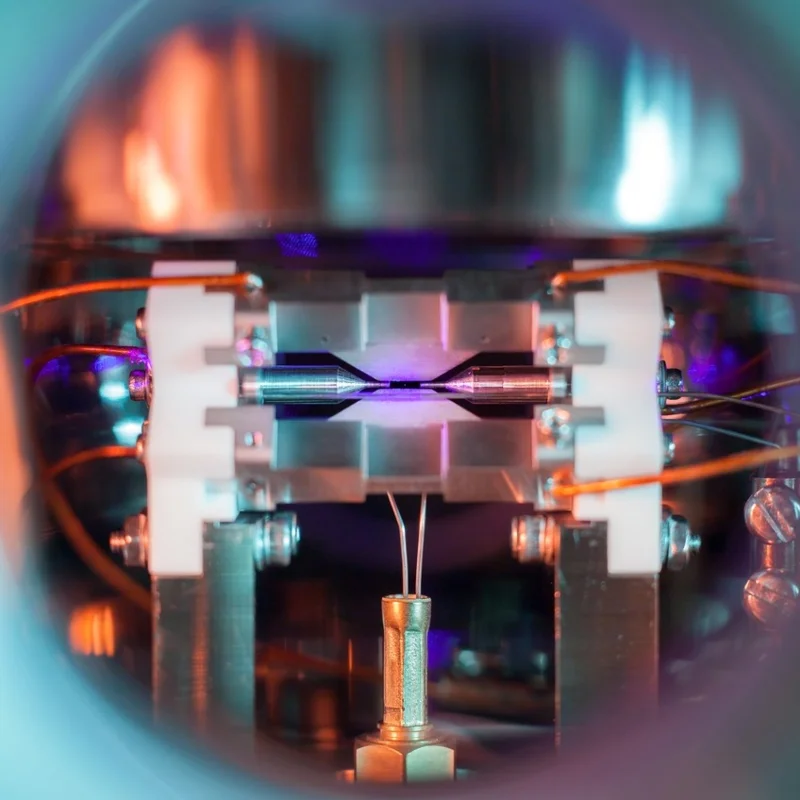
This incredible photo by photographer David Nadlinger and titled “Single Atom In An Ion Trap” is also the winner of the UK Engineering and Physical Sciences Research Council’s science photography competition, and depicts the shape of a single strontium atom, immersed in a strong electric field, and zapped by a laser beam causing the atom to emit light.
Although the single strontium atom in this image is visible to the naked eye, you will definitely have to strain your eyes and focus closely to see it. Specifically, if you look closely at the center of the image, you will see a tiny, faint blue dot. That is the strontium atom, illuminated by a blue-violet laser.
Strontium was chosen as the star of the photo because of the size of the alkaline earth element’s atoms. Strontium has an atomic number of 38 protons and a strontium atom is a few millionths of a millimeter in diameter. Normally, this size is still too small to be seen with the naked eye, but scientists used a clever trick to make the atoms appear much brighter.
Accordingly, the strontium atom in the photo was irradiated with a high-power laser, causing the electrons orbiting the atom to become energized. These energized electrons will emit bright light. When they have reached enough energy, the electrons will emit light strong enough for a conventional camera to capture an image of that atom.
However, that doesn’t mean you’ll be able to see the atom entirely with the naked eye. The image above is a long exposure, meaning that the intense light emitted by the electrons of the strontium atom is still too faint for the human eye to pick up. Instead, you’ll need to use your camera’s long exposure feature to “collect” enough light from the atom to make it visible in the image.
Create a gentle Halloween look with pastel colors, friendly ghosts, easy no-carve accents, and practical safety tips for your home.
Create a spooky office cubicle with Halloween desk decor ideas that keep your workspace usable, tidy, and mindful of workplace safety.
Plan a recognizable Halloween 2026 look with pop culture costumes inspired by Spider-Man, Supergirl, Toy Story 5, Moana, Mario, and Wednesday.
Sort leftover Halloween candy safely, share or repurpose sealed treats, and choose food use or compost for pumpkins based on their condition.
Compare workplace Halloween costume choices by respect, dress code, mobility, and safety—and learn when a subtle accessory or a policy check is the better option.
Find a couples costume that fits your style, budget, and comfort level, from Addams Family classics to original inside-joke duos.
Need a last-minute high school Halloween costume? Compare 10 easy closet-based ideas by prep time, comfort, school-day practicality, and simple safety checks.
Use a simple 2026 Halloween decorating timeline for indoor décor, outdoor displays, and fresh pumpkins, with practical adjustments for weather and events.
Mix five vivid, approachable Halloween cocktails with measured recipes, simple prep tips, and an alcohol-free option for your party guests.
Find 15 office-friendly Halloween costume ideas for 2026, with practical checks for dress codes, respectful themes, comfort, and workplace safety.








