Your Toshiba washing machine displays the characters E1, E2, F, EA... while in use and the machine also stops working, making you confused, not understanding the cause? Quantrimang will help you decode those characters and give the most detailed solution, please refer to it.
Quick View
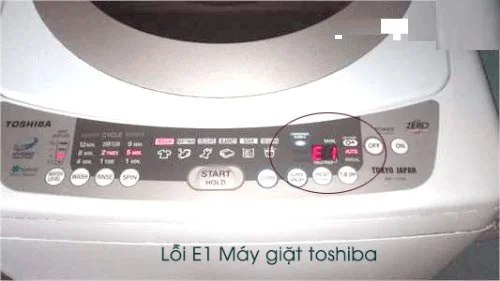
- E1: Error due to drain pipe
- E2, E21, E23: Door switch error, broken magnetic switch, broken door lock switch, door not closed properly
- E3, E31, E32: Laundry is unevenly distributed in the washing drum, the washing machine is not balanced, the control board has problems leading to false error messages.
- E4: Float failure
- E5: Water supply error
- E6, E7, E8: Washing motor jammed, too many clothes, low water level
- E64: Display error due to damaged Board components
- E9, E91, E92: Water leak, broken washing drum, stuck drain valve
- E94: Sensor error
- E95: Error due to magnetic switch, washing machine main board error, float line error
- EA (domestic machine): Voltage supply error
- F (domestic machine): Overloaded washing capacity
- How to use Toshiba washing machine durable
E1: Error due to drain pipe
- The drain hose is not attached to the washing machine.
- Exhaust pipe bent or mouth flooded
- Drain pipe clogged with foreign objects or residue
- Exhaust pipe placed too high
How to fix
- Open and close the washing machine lid, then press the Start button to let the machine operate normally again. This operation helps the Toshiba washing machine control system repair itself and eliminate the washing machine's operating errors.
- Let the washing machine drain the water inside the drum. If the E1 error message still appears, we will start checking and fixing the parts outside and inside the machine with the next steps.
- Check the drain hose for bends, blockages or obstructions. If so, fix it immediately so the washing machine can operate normally again.
- Check the drain hose to see if it is loose or has slipped off the washing machine. If it is loose, it needs to be reattached and secured firmly to ensure it does not slip off again, causing the Toshiba washing machine to display error E1.
- If the Toshiba washing machine still has an error, the E1 error does not originate from the pipe and may be due to the drain pump, a clogged drain inside the washing drum or a problem with the washing machine's control board. To continue the repair, disconnect the power supply to the washing machine to ensure safety during the repair process.
- Remove the pump located behind the washing machine, check and clean all parts.
E2, E21, E23: Door switch error, broken magnetic switch, broken door lock switch, door not closed properly
How to fix
- Just close the lid of the washing machine firmly.
- Call a washing machine repairman at home to check if the door switch is faulty. If it is, you may need to replace the part.
E3, E31, E32: Laundry is unevenly distributed in the washing drum, the washing machine is not balanced, the control board has problems leading to false error messages.
How to fix
- Check to see if the laundry inside is tangled or bunched to one side. If so, redistribute the laundry evenly. In addition, the next time you put clothes into the washing machine, you need to put them in one by one to avoid putting the whole thing in at once, which can easily cause the washing machine to shift.
- Check around the washing machine legs to see if they are tilted or if the washing machine is securely placed. The location of the washing machine plays an important role in keeping the machine from breaking down.
- Call a washing machine repair service to ensure this error is fixed. Avoid self-checking and incorrect repairs that can cause the washing machine to have more serious errors.
E4: Float failure
How to fix
- Check the status of the pressure float switch and whether the switch is open or closed. If the float is found to be damaged, it should be replaced or if the float switch is open, it should be closed.
- Float switch in normal condition, check pressure float. If pressure float is broken, replace new float.
- If the above causes have been checked and fixed but the washing machine still shows error E4, the washing machine may have a damaged control board or many other causes. In this case, you need to call a washing machine repair service.
E5: Water supply error
- Faucet can be locked, out of water
- Water supply pipe is clogged
- Filter damaged
- Water level sensor broken
How to fix
- Turn on the water tap again.
- Clean the water pipe leading to the washing machine
- Remove the filter for cleaning.
- Call a washing machine repairman to fix the water level sensor and circuit board error.
E6, E7, E8: Washing motor jammed, too many clothes, low water level
How to fix
- Buy a new genuine exhaust motor to replace the old one.
- Check the load status of the washing machine and set the required water level.
E64: Display error due to damaged Board components
How to fix
- Contact warranty or repair service
E9, E91, E92: Water leak, broken washing drum, stuck drain valve
How to fix
- The water is leaking because it is placed on an uneven surface, so you need to place the machine on a more level surface.
- Replace new washing drum
- Check the washing machine's drain valve, which can be removed to clean the filter or replace it. If the drain valve is still working properly and is not damaged, you should check the water level sensor.
E94: Sensor error
How to fix
- Check if the water level sensor is working properly, if damaged, it needs to be replaced.
E95: Error due to magnetic switch, washing machine main board error, float line error
How to fix
- These are complicated errors, you should contact the home washing machine repair service to fix these errors.
EA (domestic machine): Voltage supply error
How to fix
F (domestic machine): Overloaded washing capacity
How to fix
- Remove some clothes from the washing machine to reduce the amount of laundry to be washed.
How to use Toshiba washing machine durable
Some notes users need to pay attention to when using Toshiba washing machines to avoid some errors and increase the durability of the machine.
- Check the water supply, power source, drain pipe, etc. to see if they meet the requirements before washing.
- Make sure the place where the washing machine is installed is sturdy and level.
- Pay attention to the amount of clothes when washing, it should not be too much compared to the washing machine's standards, and also set the water level corresponding to the amount of clothes.
- Clean the washing machine regularly.
- Regularly check the washing drum for problems such as jamming or holes.
>> Reference :









