Desk Decorating Ideas for a Spooky Office Cubicle

Create a spooky office cubicle with Halloween desk decor ideas that keep your workspace usable, tidy, and mindful of workplace safety.
1Password users, beware! Attackers are trying to steal your master password using a sneaky phishing email designed to trick you. If you click on the link in the email, your account details will be stolen — along with any other passwords associated with that account.
1Password users receive fake master password reset emails
As first discovered by Tech Issues Today, via the 1Password subreddit, 1Password users are constantly receiving requests to reset their master password.
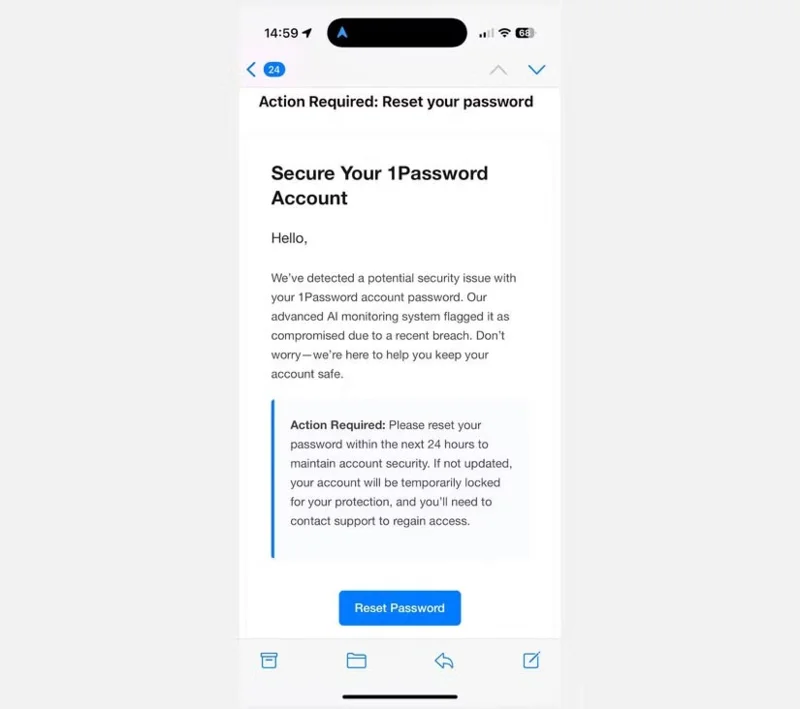
The scam email asks users to take immediate action upon discovering a security breach on 1Password's system, and that resetting their password is the only way to protect their account. Reddit user DirectorBusiness5512 detailed the 1Password scam, explaining where the scam email came from and what it contained.
Other 1Password users on Reddit were quick to respond, agreeing that they too received the same fake email — but were equally confused about how the email addresses associated with the original 1Password accounts were leaked.
Like any scam, if a 1Password user clicks on the link in the email, they are taken to a very convincing 1Password password reset page. Of course, entering any details on this page will immediately result in your data being stolen and reused. While adding your banking details to a phishing email is bad enough, giving the scammer your master password is a self-destructive tactic.
1Password recommends blocking and ignoring emails
On the 1Password subreddit, an official 1Password account, 1PasswordCSBlake, explained how this 1Password master password reset phishing attack works.
As others have suggested, we believe these emails were sent to a large number of users in the hope that some of them happened to be 1Password users. We have identified the platform used to send the phishing emails and reported it to their security team. Additionally, we can confirm that the phishing domain has been removed.
Additionally, if you are a 1Password user who interacted with the phishing email and provided your master password, you should immediately contact support@1password.com for assistance.
But for now, 1Password users can rest assured that the password manager hasn't been compromised and your accounts and passwords are safe.
Create a spooky office cubicle with Halloween desk decor ideas that keep your workspace usable, tidy, and mindful of workplace safety.
Plan a recognizable Halloween 2026 look with pop culture costumes inspired by Spider-Man, Supergirl, Toy Story 5, Moana, Mario, and Wednesday.
Sort leftover Halloween candy safely, share or repurpose sealed treats, and choose food use or compost for pumpkins based on their condition.
Compare workplace Halloween costume choices by respect, dress code, mobility, and safety—and learn when a subtle accessory or a policy check is the better option.
Find a couples costume that fits your style, budget, and comfort level, from Addams Family classics to original inside-joke duos.
Need a last-minute high school Halloween costume? Compare 10 easy closet-based ideas by prep time, comfort, school-day practicality, and simple safety checks.
Use a simple 2026 Halloween decorating timeline for indoor décor, outdoor displays, and fresh pumpkins, with practical adjustments for weather and events.
Mix five vivid, approachable Halloween cocktails with measured recipes, simple prep tips, and an alcohol-free option for your party guests.
Find 15 office-friendly Halloween costume ideas for 2026, with practical checks for dress codes, respectful themes, comfort, and workplace safety.
Plan a fun elementary school Halloween party with easy crafts, games, inclusive treats, costume tips, and a sample 75-minute classroom schedule.








