Make Realistic Fake Blood Without a Cleanup Surprise

Mix a glossy prop-only fake blood batch, choose safer products for skin and costumes, and test cleanup before Halloween night.
Tsunami clouds have the shape of rolling ocean waves and often appear before thunderstorms and storms.
Tsunami clouds, also known as shelf clouds, are distant storm circulation clouds that typically form along the leading edge of a thunderstorm. They appear as wedge-shaped structures, often extending in an arc across the sky, sometimes creating the illusion of a rolling tsunami.
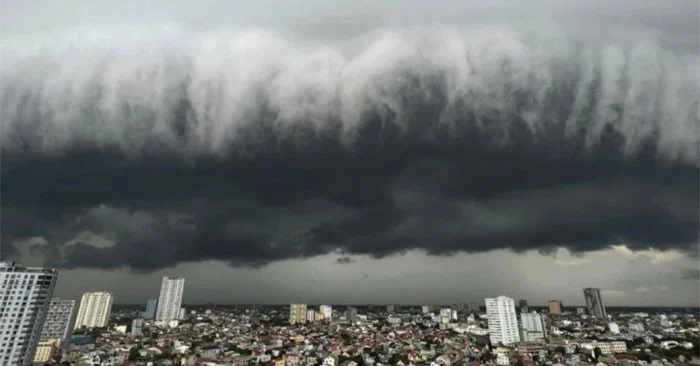
This type of cloud is a low, horizontally formed cloud with a well-defined cloud mass. The long, prominent line in the cloud is the boundary between the updraft and downdraft of a thunderstorm.
The appearance of tsunami clouds is a sign of a strong storm. In places where it appears, it will cause heavy rain and lightning.
When cold, dense air is pushed by wind into a warmer air mass, which often occurs in the strong downdraft of a thunderstorm, shelf clouds form.
The cold air rushes down to the ground before spreading out in all directions. As the cloud passes, the wind direction changes abruptly and its speed increases. A few minutes later, heavy rain or hail and strong winds will appear.
According to the National Weather Service, shelf clouds are always associated with the base of a parent cloud or thunderstorm. This is an important identifying feature of shelf clouds. They are often associated with strong, straight-line winds and rarely produce tornadoes.
Mix a glossy prop-only fake blood batch, choose safer products for skin and costumes, and test cleanup before Halloween night.
Create a gentle Halloween look with pastel colors, friendly ghosts, easy no-carve accents, and practical safety tips for your home.
Create a spooky office cubicle with Halloween desk decor ideas that keep your workspace usable, tidy, and mindful of workplace safety.
Plan a recognizable Halloween 2026 look with pop culture costumes inspired by Spider-Man, Supergirl, Toy Story 5, Moana, Mario, and Wednesday.
Sort leftover Halloween candy safely, share or repurpose sealed treats, and choose food use or compost for pumpkins based on their condition.
Compare workplace Halloween costume choices by respect, dress code, mobility, and safety—and learn when a subtle accessory or a policy check is the better option.
Find a couples costume that fits your style, budget, and comfort level, from Addams Family classics to original inside-joke duos.
Need a last-minute high school Halloween costume? Compare 10 easy closet-based ideas by prep time, comfort, school-day practicality, and simple safety checks.
Use a simple 2026 Halloween decorating timeline for indoor décor, outdoor displays, and fresh pumpkins, with practical adjustments for weather and events.
Mix five vivid, approachable Halloween cocktails with measured recipes, simple prep tips, and an alcohol-free option for your party guests.








