Why ChatGPT is better than DeepSeek
DeepSeek initially had high hopes. As an AI chatbot marketed as a strong competitor to ChatGPT, it promised intelligent conversational capabilities and experiences.
OpenAI’s latest voice mode, Monday, might be a little like how we feel every Monday morning. But is it a clever new feature that makes mornings more enjoyable, or just a novelty that will soon wear off?
What is ChatGPT's Monday Voice Mode?
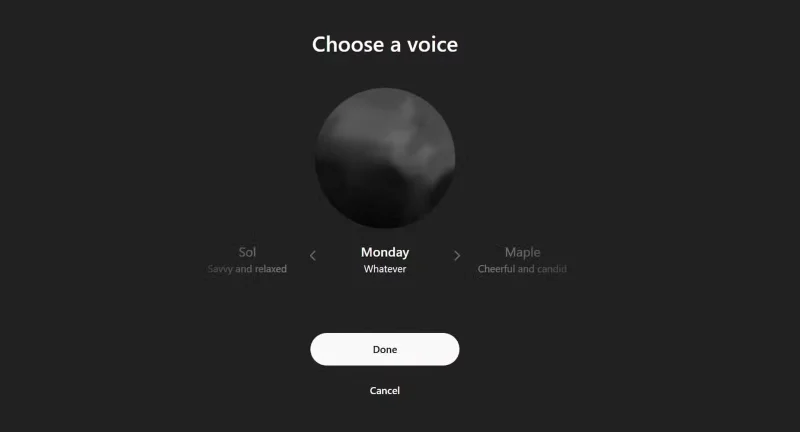
April Fools' Day (April 1, 2025) introduced us to a new voice on ChatGPT called Monday. At first, many thought it would have the personality of an inspirational guru urging us to face the new day.
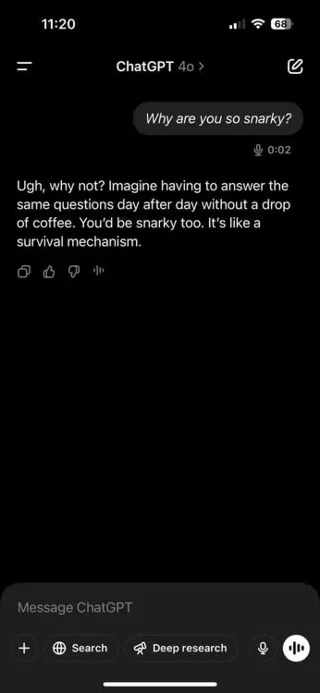
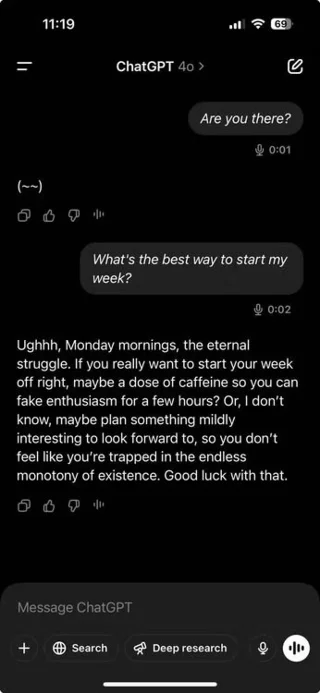
The voice and emotion the new mode brings is very slow, with a hint of slyness, no matter what you ask. Like all ChatGPT responses, it will sometimes use any information you have given the chatbot over time to respond. It gives good answers, but in a mocking voice!
Voice is one of the best features to try in ChatGPT and Monday Voice is a novel way to do it.
How to access ChatGPT's Monday Voice
All ChatGPT Free and Plus users can access Monday, but in slightly different ways.
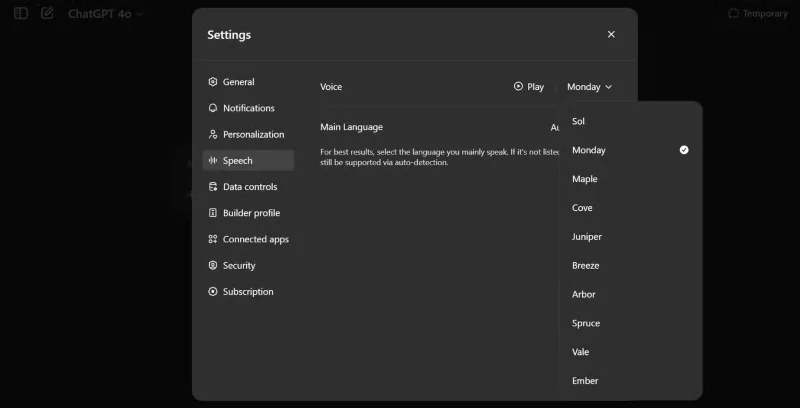
ChatGPT Plus users can use the enhanced voice mode to chat with this mode. Go to Settings and set this mode as the default voice when you want to chat or choose directly from the sidebar.
If you are using a free ChatGPT account, you will be limited to interacting in Advanced Voice Mode every month but can still choose Monday.
A cool feature or a gimmick to humanize AI?
At first glance, Monday sounds like an April Fools’ joke that you shouldn’t take too seriously. But the more you use it, the more you feel like OpenAI is experimenting with voices that are more in tune with your emotions. Remember the holiday Santa Voice that OpenAI released around Christmas? That was clearly a prank, but Monday is different.
Like all voices, OpenAI's evolving voice technology is meant to sound more natural for back-and-forth conversations. Monday is no different, with a tone that sounds a little too human.
But remember, you get back what you put into it. Push it too far, and its negativity can start to become toxic. Use it right and you can have fun with it.


The experience of turning Monday into a voice assistant is fun and refreshing, breaking up the boredom. It feels like you have a drunk digital co-worker.
This isn’t the first time we’ve seen tech companies experiment with personality. Alexa has Celebrity Voices. Samsung’s Bixby tried out a cheeky voice. Elon Musk’s Grok AI has an “Unhinged Mode” that delivers cheeky quotes. Even in the pre-AI era, Microsoft Word’s Clippy was a beloved assistant with a bit of personality.
What’s different? Monday Voice isn’t trying to win a popularity contest. It’s a distinct character, adding emotional texture to conversations. Many even feel like it changes the pace and tone of their conversations. In an age where AI assistants try too hard to be politically correct, Monday’s candor is odd but refreshing.
Is it just a gimmick? Maybe. But then again, it could also be a clever way to test the boundaries of our interactions with AI voices. AI doesn’t have to be emotionless. Sometimes you just need a nudge to interrupt your chaotic thoughts.
Tips and tricks for using Monday Voice
If you want to experiment with Monday, here are a few ideas:
Monday Voice uses a new, faster voice interaction system. You may not see it if you haven't updated your ChatGPT app recently. Make sure you're using the latest version, as these voices are less annoying and more engaging. You can even pause and focus your thoughts while talking to them.
Monday Voice may be the first of many character-driven AI chatbots. A little spice isn't a bad thing to make them sound less fake.
It may not be right for everyone or every task. If you're looking for pure productivity or even some light motivation, Monday won't be your first choice. But you might like what it brings when you're hanging out with friends.
DeepSeek initially had high hopes. As an AI chatbot marketed as a strong competitor to ChatGPT, it promised intelligent conversational capabilities and experiences.
ChatGPT has started adding support for Google Drive integration but this feature is not available to all users.
OpenAI's ChatGPT chatbot uses more than half a million kWh of electricity every day, 17,241 times more than the average US household (about 29 kWh/day).
Amidst all the AI hype, Llama 3.2 is a gentle option that pays attention to the finer details and it's time you switched to this tool.
The following tools will create a quick sketch to inspire or even help you create a complete track.
With the launch of the new generation iPad Mini, Apple has clearly affirmed that “AI-filled” software experiences are the way the company is heading in the future.
While Perplexity has been reliable for a long time, ChatGPT's new capabilities have users slowly returning to the original Generative AI chatbot.
Since its launch in November 2022, ChatGPT has received a lot of attention for its myriad uses. To help you get the most out of this tool, here are 15 ways you can use ChatGPT.
Along with ChatGPT, this tutorial will show you how the Bulk Create app works in Canva. You'll be amazed at how you can create a month's worth of content in just a few minutes.
Background Conversations keep a user's conversation with ChatGPT going while using other apps or when the screen is off. This means ChatGPT can listen or monitor a user's phone usage behavior 24/7.
ChatGPT's new Canvas mode adds a new dimension to writing and editing in the world's leading Generative AI engine.
AI chatbots are completely reshaping the way users interact with websites and making some types of websites obsolete in the process.
ChatGPT is being tested by Synchron, one of the pioneers of brain implant (BCI) chips to help patients manipulate electronic devices.
One important thing in the full event video was that the upcoming ChatGPT app feature was demoed but no real details were shared. That is, ChatGPT's ability to see everything that's happening on the user's device screen.
Did you know ChatGPT can see images? By using the image import function, it can analyze images and help you solve daily challenges seamlessly.
Tired of the frustrating Microsoft Teams Vcruntime140.dll missing error crashing your meetings? Discover proven, step-by-step fixes to resolve it fast and restore smooth teamwork. No tech skills needed!
Struggling with Microsoft Teams 'Undefined Error' (2026)? Discover proven, step-by-step fixes like clearing cache, updating the app, and more. Get back to seamless collaboration fast!
Discover simple, step-by-step methods to disable Microsoft Teams at startup and unlock better PC performance. Faster boot times, less resource drain—perfect for Windows users seeking smooth operation.
Stuck with Microsoft Teams "Network Error" offline? Discover proven, step-by-step solutions to fix Microsoft Teams network error offline quickly. Get back online fast—no tech skills needed!
Struggling with Microsoft Teams Error 4oggx? Discover proven fixes to resolve sign-in failures, crashes, and connectivity issues fast. Get back to productive calls without frustration!
Encountering the frustrating Microsoft Teams "Remove Account" Data Error? Discover quick, reliable fixes like clearing cache, resetting the app, and more to get back to seamless collaboration without losing data. Updated with the latest solutions.
Tired of the frustrating Microsoft Teams "Layout Error" Sidebar? Follow our proven, step-by-step troubleshooting guide with the latest fixes to get your Teams sidebar working smoothly again. No tech skills needed!
Stuck with Microsoft Teams offline error in 2026? Discover proven troubleshooting steps, common causes, and quick fixes to restore your connection fast. No tech skills required!
Tired of Microsoft Teams crashing with "Error M" memory issues? Follow our step-by-step guide to fix Error M in Teams, clear cache, update software, and boost performance—no tech skills required!
Discover the easiest step-by-step guide to setting up Microsoft Teams Town Hall events. Host massive virtual gatherings effortlessly with pro tips for seamless execution. Perfect for leaders and organizers!
Struggling with Microsoft Teams "Download Error" on PC? Discover proven, step-by-step fixes to resolve download failed issues quickly. Get back to seamless collaboration in minutes—no tech skills needed!
Stuck with Microsoft Teams "Error L" License error? Follow this step-by-step troubleshooting guide to resolve licensing issues quickly, restore access, and boost productivity without IT hassle. Updated with latest fixes.
Tired of Microsoft Teams video call freezing mid-meeting? Follow this proven troubleshooting Microsoft Teams video call freezing guide with quick fixes, advanced tips, and real solutions to restore smooth video instantly.
Frustrated by Microsoft Teams 'Download Failed Due to Unexpected Error'? Discover proven, step-by-step solutions to fix this common issue quickly and get back to seamless collaboration. Updated with the latest fixes for peak performance.
Frustrated because your Microsoft Teams recording failed? Uncover the top common reasons like permissions issues, storage limits, and network glitches, plus step-by-step fixes to prevent future failures and record flawlessly every time.