Desk Decorating Ideas for a Spooky Office Cubicle

Create a spooky office cubicle with Halloween desk decor ideas that keep your workspace usable, tidy, and mindful of workplace safety.
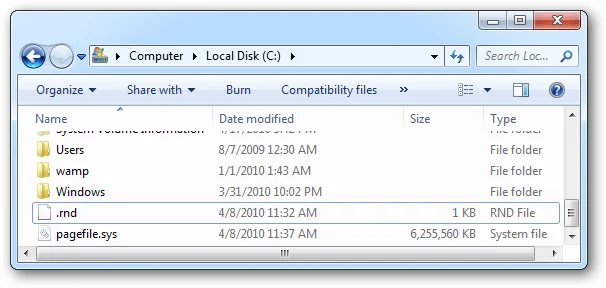
One of the ways to increase storage capacity on Windows is to turn off hibernation mode, reducing the space used by the Hiberfil.sys hibernation file. When you enable hibernation mode on Windows, the system will transfer your open applications and documents to the Hiberfil.sys file to save and start immediately when we need it. Below are instructions for deleting the Hiberfil.sys file.
What is Hibernation File in Windows?
The hibernation file is called hiberfil.sys and Windows uses it to store the current state of your PC. When you hibernate your PC, Windows moves your open applications and documents to this file. Then, when you turn on your computer, the system loads your activity from hiberfil.sys, allowing you to resume your tasks instead of opening applications and documents from scratch.
Hibernation saves you time, but if you're not using it, turn it off to remove files that are taking up gigabytes of your disk space. You can then use that space to store other apps and files.
Disabling hibernation also helps fix problems with some drivers not working properly in this mode.
Instructions to delete Hiberfil.sys file Windows 11
Step 1:
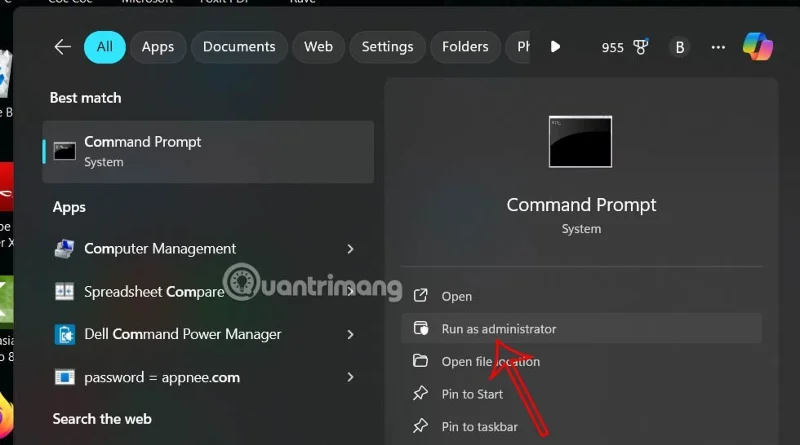
First, the user types Command Prompt in the search bar and then selects Run as Administrator to open Command Prompt as administrator.
Step 2:
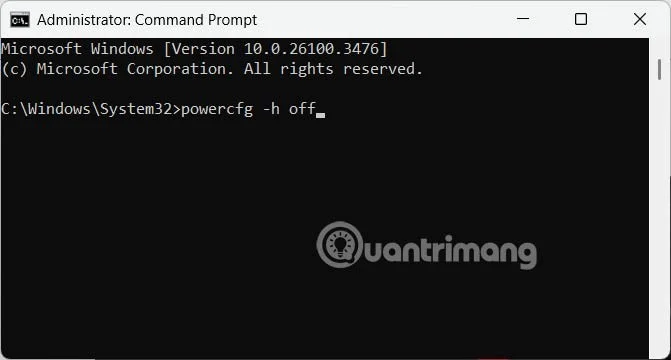
Switch to the command input interface, we enter the command powercfg -h off to turn off hibernation mode on Windows 11.
In case you want to re-enable hibernation on your computer, enter the command below.
powercfg.exe /hibernate onInstructions to delete Hibernate files on Windows 10
To disable hibernation mode on Windows 7, 8, 10 or Vista, first open Command Prompt under Admin rights by typing cmd in the Start Menu (or Start Screen), then right-clicking on the Command Prompt icon and selecting Run as administrator .
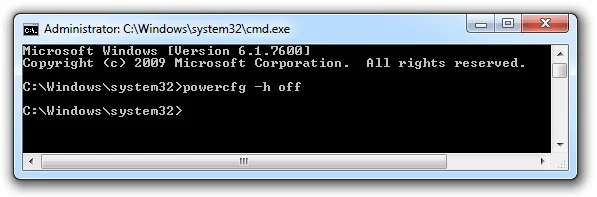
Then enter the following command into the Command Prompt window you just opened:
powercfg -h off
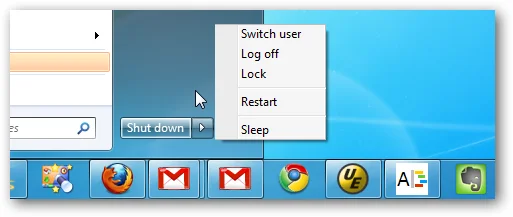
Now on the screen you can see that Hibernate mode no longer appears on the Shut down Menu.
And the Hiberfil.sys file is gone too.
Create a spooky office cubicle with Halloween desk decor ideas that keep your workspace usable, tidy, and mindful of workplace safety.
Plan a recognizable Halloween 2026 look with pop culture costumes inspired by Spider-Man, Supergirl, Toy Story 5, Moana, Mario, and Wednesday.
Sort leftover Halloween candy safely, share or repurpose sealed treats, and choose food use or compost for pumpkins based on their condition.
Compare workplace Halloween costume choices by respect, dress code, mobility, and safety—and learn when a subtle accessory or a policy check is the better option.
Find a couples costume that fits your style, budget, and comfort level, from Addams Family classics to original inside-joke duos.
Need a last-minute high school Halloween costume? Compare 10 easy closet-based ideas by prep time, comfort, school-day practicality, and simple safety checks.
Use a simple 2026 Halloween decorating timeline for indoor décor, outdoor displays, and fresh pumpkins, with practical adjustments for weather and events.
Mix five vivid, approachable Halloween cocktails with measured recipes, simple prep tips, and an alcohol-free option for your party guests.
Find 15 office-friendly Halloween costume ideas for 2026, with practical checks for dress codes, respectful themes, comfort, and workplace safety.
Plan a fun elementary school Halloween party with easy crafts, games, inclusive treats, costume tips, and a sample 75-minute classroom schedule.








