Summerween Explained: What It Is and How to Celebrate

Learn how the Gravity Falls-inspired summer Halloween works, choose a date and celebration style, and plan a low-stress Summerween party.
If you are wondering why the CPU splits between cores and threads, many products will have the same cores as threads, but with the addition of hyper threading technology, the number of threads will double. So what is Hyper threading? Let's find out with WebTech360 why Hyper threading plays an important role in creating a good CPU!
Hyper threading , also known as hyperthreading technology, is known as Intel HT technology by the globally famous technology manufacturer Intel.
Hyper-threading is built into the CPU to help computers process smoother and work more efficiently with an increasingly massive amount of volume in this day and age.
Why is Hyper threading called another hyperthreading? Because with this technology, the manufacturer can completely perform division into different threads to separately perform different CPU workloads.
We can also understand more simply that with this advanced technology, it will turn one physical CPU into two CPUs, and this will quickly optimize the processing time many times more efficiently.
According to official information, hyper-threading technology will be integrated on Core i CPUs and Xeon CPUs as well as on laptops or workstations.
- The integration on these computers will bring great features, including:
- Increase the number of programs, applications can run at the same time
- Increase efficiency, reduce time at the same time do not slow down, freeze the system
- Improve customer experience, increase fast response time for applications on the Internet, e-commerce sites.
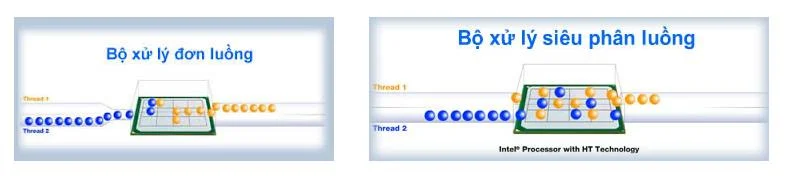
CPU integrated with Hyper-Threading technology
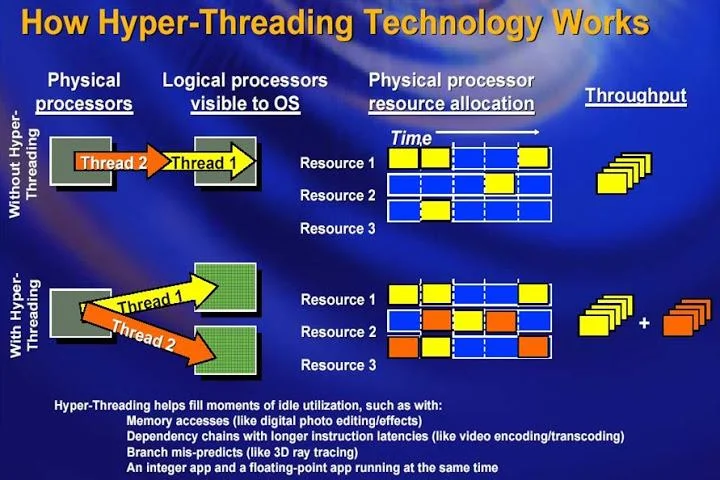
When the computer is integrated with Hyper-Threading technology, the CPU will divide into separate threads to process work in parallel and continuously with each other. Therefore, it will help minimize response time and improve the quality of system resources.
For example, a CPU with a total of 4 cores, integrated with Hyper threading technology will help the computer process at 8 threads, when observing the CPU parameters you can completely know that the computer can be integrated. whether the technology is available or not.
CPU does not integrate Hyper threading technology
With a CPU that does not have built-in Hyper threading technology, when you multitask, open too many applications at the same time, your computer can only display one thread at a time. First come first processing, later applications will accept later processing.
Without Hyper threading, what will the CPU performance be like?
Apart from the problem what is Hyper threading? Then surely the problem without Hyper threading CPU performance will be like? This is also a question that many tech enthusiasts are interested in. Have any of you ever thought about how much performance or CPU performance the addition of Hyper-Threading technology will bring?
- Hyper threading technology produced by Intel is an extremely advanced technology that fools the system while doubling the actual number of cores.
- This also helps partially explain why the price of Core i7 CPU is much more expensive than the price of Core i5 CPU . And without Hyper threading technology , the performance of desktops, laptops or workstations will be significantly reduced.
When your computer is operating at low capacity, users only use a few light software, the Hyper-Threading technology feature will not be too noticeable. However, only when users use many heavy applications at the same time that need parallel tasks, Hyper threading technology is now very clearly displayed.
This can be seen most clearly through 3D program applications, audio transcoding applications, heavy video combinations, there will be times when hyperthreading helps increase system performance by more than 30%. .
In addition to saving processing time of the computer system, Hyper-Threading technology also helps to maximize CPU power usage, helping to maximize the amount of heat that the computer has to bear compared to CPU lines. similar without technology integration.
Currently, Hyper threading technology and Turbo boost are two advanced technologies that are of great interest in CPU lines.
Hoping for an explanation of what is Hyper threading definition ? You have understood how the CPU works as well as finding yourself what is a quality CPU as well as learning how the CPU's processing ability depends on the number of cores and threads. If you need advice on building a PC configuration or buying a good CPU for your computer, contact WebTech360 for advice.
Learn how the Gravity Falls-inspired summer Halloween works, choose a date and celebration style, and plan a low-stress Summerween party.
Plan an inclusive virtual Halloween party for remote teams with time-zone-friendly scheduling, simple games, accessible options, and a practical hosting checklist.
Explore seven Halloween team building games for the workplace, with quick rules, hybrid-friendly options, accessibility tips, and practical safety guidance.
Mix a glossy prop-only fake blood batch, choose safer products for skin and costumes, and test cleanup before Halloween night.
Create a gentle Halloween look with pastel colors, friendly ghosts, easy no-carve accents, and practical safety tips for your home.
Create a spooky office cubicle with Halloween desk decor ideas that keep your workspace usable, tidy, and mindful of workplace safety.
Plan a recognizable Halloween 2026 look with pop culture costumes inspired by Spider-Man, Supergirl, Toy Story 5, Moana, Mario, and Wednesday.
Sort leftover Halloween candy safely, share or repurpose sealed treats, and choose food use or compost for pumpkins based on their condition.
Compare workplace Halloween costume choices by respect, dress code, mobility, and safety—and learn when a subtle accessory or a policy check is the better option.
Find a couples costume that fits your style, budget, and comfort level, from Addams Family classics to original inside-joke duos.