Couples Costume Ideas for 2026: Iconic Pairs and Clever Tropes

Find a couples costume that fits your style, budget, and comfort level, from Addams Family classics to original inside-joke duos.
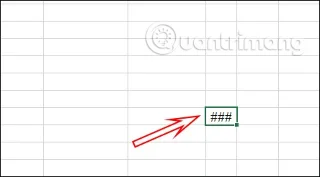
#### in Excel is a common Excel error and appears in many different cases when we enter data in Excel, functions in Excel , enter formulas in Excel or when displaying results. There are many causes of the ### error in Excel and the way to fix this error is also different, depending on the cause of the error. The following article will guide readers to fix the #### error in Excel.
1. Error #### in Excel due to insufficient space in the cell
When a cell in an Excel table is not wide enough to display its content, the ### error will also be displayed, such as when entering a date or any other content.
The simplest way to fix it is to just extend the length of the cell to display the content.
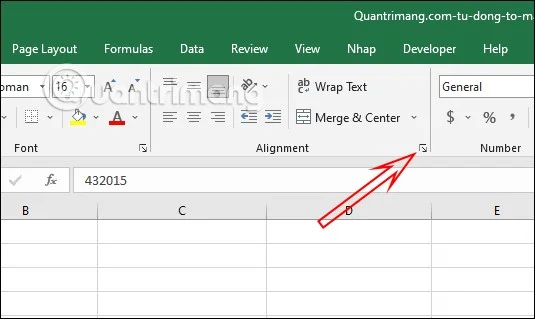
You can also adjust the content in the cell to be smaller by looking up at the Ribbon bar, in the Alignment group, click on the arrow icon .
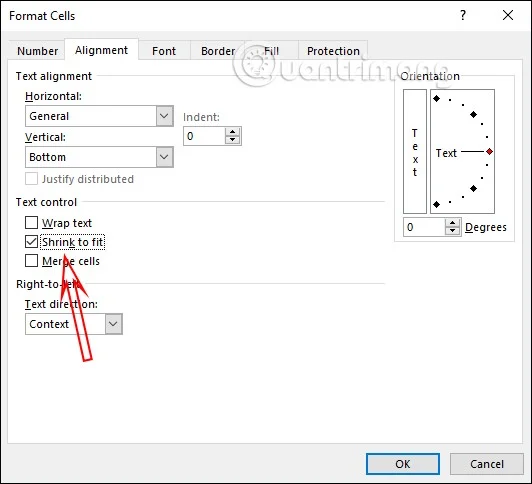
Now click on the Alignment tab , then select Shrink to fit and click OK to save. Immediately the content in the cell automatically shrinks to fit the width of the cell.
2. Fix #### error in Excel due to decimal numbers
In case you enter a decimal number with many numbers after the comma, the #### error may also occur in Excel.
We will use the round number function in Excel to shorten the unit after the decimal point. You can see how to round numbers in the article How to round numbers in Excel .
3. How to fix #### error in Excel due to date
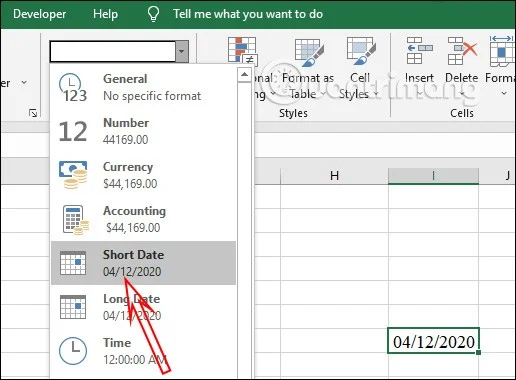
When entering dates in Excel, if you leave the long date format, the error ### will be displayed , or when the date or time value is negative, the same error will appear.
You click on the cell and look up at the Number section , we click on the Date format cell and select the short date display style , if you are using the long date format and there is a ### error in Excel.
To see more ways to format dates in Excel, see the article How to format dates in Excel .
In case you enter a negative date and time, Excel will not recognize this data cell and display ####. At this point, you need to check if you have entered the data correctly, use formulas to subtract days or add days to get the correct positive result.
Find a couples costume that fits your style, budget, and comfort level, from Addams Family classics to original inside-joke duos.
Need a last-minute high school Halloween costume? Compare 10 easy closet-based ideas by prep time, comfort, school-day practicality, and simple safety checks.
Use a simple 2026 Halloween decorating timeline for indoor décor, outdoor displays, and fresh pumpkins, with practical adjustments for weather and events.
Mix five vivid, approachable Halloween cocktails with measured recipes, simple prep tips, and an alcohol-free option for your party guests.
Find 15 office-friendly Halloween costume ideas for 2026, with practical checks for dress codes, respectful themes, comfort, and workplace safety.
Plan a fun elementary school Halloween party with easy crafts, games, inclusive treats, costume tips, and a sample 75-minute classroom schedule.
Compare realistic side hustles for 2026 by startup cost, fees, flexibility, and income control, with current tax and scam guidance from official sources.
Upgrade your home office ergonomics with current OSHA and NIOSH guidance on chair fit, monitor height, laptop setup, lighting, and movement.
Learn why emotional intelligence matters in leadership, where it helps most, how to strengthen it, and how to tell whether your approach is working.
A practical roadmap for moving into tech without a degree: choose an accessible role, build job-ready skills, prove them with projects, and use hiring feedback to improve.








