The ISO format is the format that is being used very popularly on the internet these days when CD / DVD drives are in decline. To open files in this format, you need to download a software called UltraISO. This article will introduce you to better understand what UltraISO is? Things to know about UltraISO software.
1. What is UltraISO?
UltraISO Virtual Drive is a popular and easy to use virtual drive software. If we download games, movies, and Windows installers on the internet to our computer , usually the files will be in .iso format.
Regarding the ISO file, this file is considered a perfect copy of a CD / DVD. All contents of a CD / DVD can be completely copied to an ISO file, then just ejected to the internet and downloaded and then used as a real CD / DVD.
UltraISO software's first release on 20/4/2002 , its author EZB Systems maintain and control.
2. Features of the software UltraISO
- Copy CDs and DVDs to ISO file.
- Create ISO file from files on CD / DVD-ROM or hard drive .
- Create bootable CDs, DVDs and floppy images.
Convert formats: BIN, IMG, CIF, NRG, BWI, DAA, dmg, HFS and other formats with ISO image .
- Optimize ISO image file structure to save disk space.
- Create checksums to verify ISO's data.

3. Instructions on how to download and install UltraISO on a computer
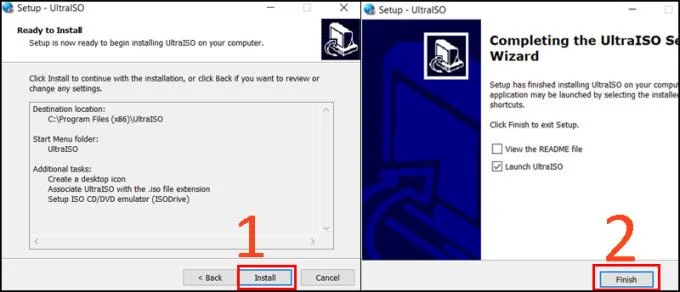
- Step 1 : Download UltralSO software: HERE > Select FREE TRIAL .

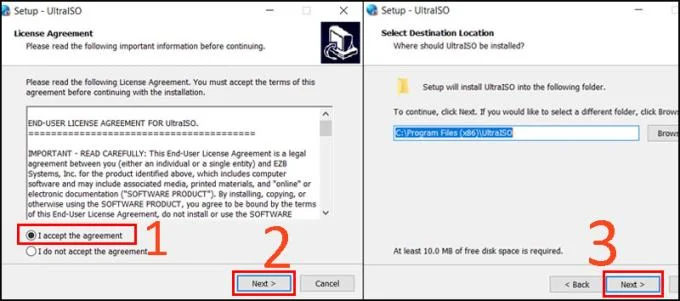
- Step 2 : Select the line I accept the agreement > Click Next > In the green box, that is the position where we want to install the software. After selecting the installation location> Click Next to continue.

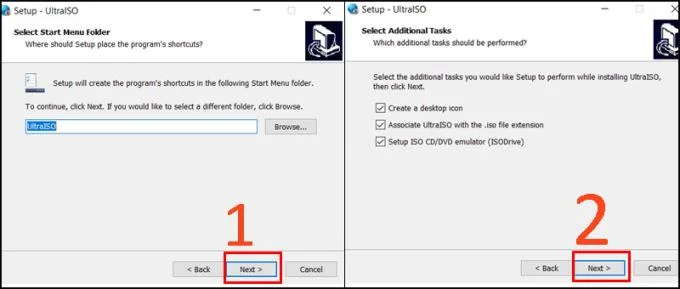
- Step 3 : Continue to click Next > Click Next .

- Step 4 : We click Install for the program to be installed, we wait a moment for the program to install> Click Finish to finish the installation.

4. What file formats does the UltraISO software support?
Since UltraISO can handle the boot information of compact discs, it allows you to directly delete, add or extract the boot image of the standard ISO image. In addition, the program supports many DVD / CD file formats, including BIN , NRG , IMG , CCD , CIF , MDS , DMG , BWI , ISZ , UIF , HFS, and DAA .
Furthermore, you can use the program to convert all these formats to an industry-accepted ISO image format. This should not take more than a few seconds.

5. Does UltraISO software have other supporting utilities?
UltraISO focuses on managing ISO files, it comes with a lot of add-ons to provide other benefits.
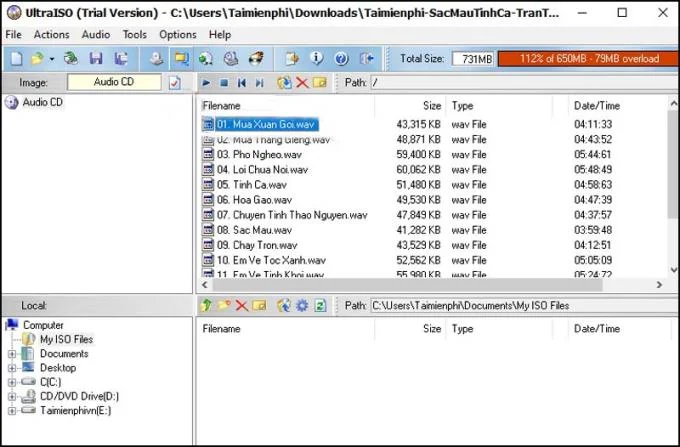
You can access various options from " New Menu " under " File ". It includes mixed media features, audio CDs, and DVDs, and leverages the UDF file system to accommodate large files. When you use the tool to create an ISO image, you can access a file browser to add more content.
UltraISO allows you to burn disc images without any problems. To avoid unwanted problems, you can go to the menu "Tools" or click the F8 key to make a DVD / CD copy on the hard disk.
Considering the audio CDs, you can extract WMV, WAV and MP3 files and preview tracks in the program.
With a number of features, UltraISO not only focuses on creating and editing ISO files, but also allows you to view with DVD / CD and files on the hard disk with ease.

6. Is the UltraISO software difficult to use?
Although the program comes with a complex interface, you can get used to the features in a short amount of time.
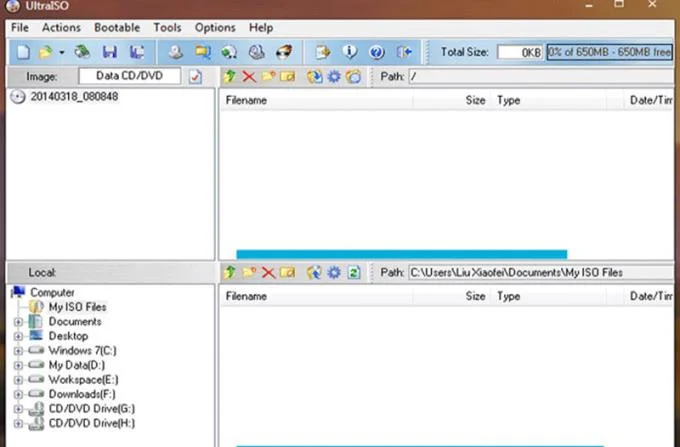
- Interface merge two window focused on two command options, ie move to drag and drop and the quick button. As such, you can easily handle DVD / CD image files.
- Unlike Magic ISO Maker and WinCDEmu and other applications, UltraISO supports common shell document type integration. With this feature, it allows you to access image files by right-clicking menu popup or accessing files with double click.

7. Downloading UltraISO software takes a lot of space?
UltraISO is available in only 3MB size . Therefore, the download and install package is not causing server issues, and you don't need to worry about crashes or lags.
In most PCs running Windows 10, Windows 8, and Windows 7, setup shouldn't take more than a few seconds. While the trial version comes with limited features, it is ideal for those who need to try the program out.
It's worth mentioning that the CD image archive is fully bootable from disk. Since the generally accepted standard is ISO: 9660 , DVD / CD image files are commonly referred to as ISO files. Whether you consider extracted ISO files, edited files, or bootable information, this tool doesn't take up a lot of space on your hard disk.
You can perform a variety of functions. While it directly edits ISO image files, you can even rename, delete and create new folders for files. In addition, the program allows you to extract folders and files from image files and create ISO files from various hard disk documents.

What is the above article to guide you about UltraISO? Things to know about UltraISO software. Hope this article helps you.