Whitespace character, whitespace character, whitespace character

The space character is a character that we use every day in millions of documents, articles, chat content with friends... There are many contents that we can use this space character.

In some online games, like Free Fire, using some special characters or spaces is acceptable. But most of them are not accepted for use in character renaming .

Because if they violate, it will be difficult for you to track this player to report or when you make friends with them, it will also take time to contact them. However, they are still used by many players to name their characters. You can use the space character table below for your character name.

Whitespace character table, whitespace character

Copy the space characters in the table below, then use them with other characters you want. Remember that not all space characters can be used in the game.

Symbol HTML Describe Space character
U+0020   Space [ ]
U+00A0   No-Break Space [ ]
U+2000   En Quad [   ]
U+2001 Quad [ ]
U+2002 En Space [ ]
U+2003 Em Space [ ]
U+2004 Three-Per-Em Space [ ]
U+2005 Four-Per-Em Space [ ]
U+2006 Six-Per-Em Space [ ]
U+2007 Figure Space [ ]
U+2008 Punctuation Space [ ]
U+2009 Thin Space [ ]
U+200A Hair Space [ ]
U+2028 Line Separator [ ]
U+205F Medium Mathematical Space [ ]
U+3000   Ideographic Space [   ]

Why do many games prohibit players from using spaces in their names?

Perhaps only many gamers try to insert spaces into their character names to attract attention. Especially games like Free Fire or Lien Quan or PUBG Mobile. Of course, game publishers will limit many spaces in their character names, and at the same time prevent users from using spaces in their names.
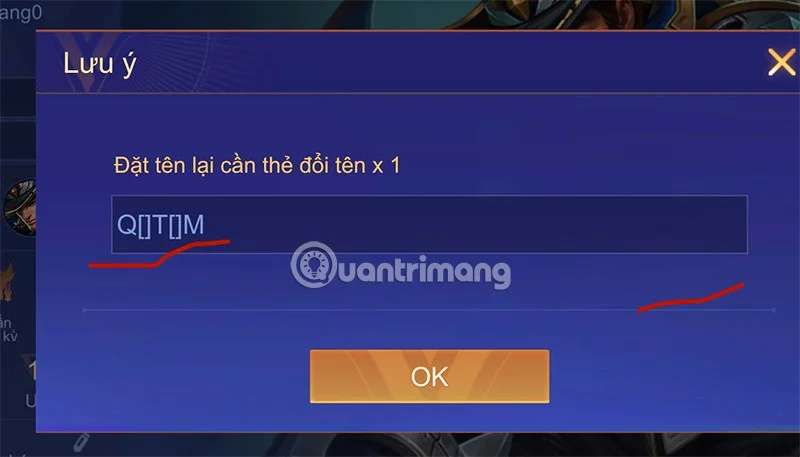
whitespace character, whitespace character, whitespace character

The reasons why game publishers prohibit users from using spaces in character names are:

  • Data Management: Banning players from using spaces in character names may also be a good decision by the developers as it will help them manage player information and process data in the system better.
  • Avoid errors: Some game systems and databases may limit or disallow the use of whitespace characters to avoid errors when processing data, especially when filtering character names in the list that violate the game's rules and regulations.
  • Avoid confusion: Not allowing spaces in character names helps avoid confusion and makes data easier to process. Players or developers can use features or check for system errors more easily.

Name characters with special characters and spaces

The special character generator below can generate a list of many special names for you to choose from.

You can use the available character names here and paste them into the name generator above. Or you can write your own name, the list below will generate names for you that use the space character.

  1. Shadow Knight
    2. Luna Guardian
    3. Frost Nova
    4. Phoenix Fury
    5. Iron Sentinel
    6. Thunder Warden
    7. Ember Storm
    8. Mystic Voyager
    9. Storm Striker
    10. Celestial Phantom
    11. Crimson Reaper
    12. Dark Hunter
    13. Frostbite Assassin
    14. Blade Master
    15. Inferno Sorcerer
    16. Serpent Warrior
    17. Spectral Wizard
    18. Arcane Enchantress
    19. Thunderbolt Rogue
    20. Celestial Guardian
    21. Luna Frost
    22. Frosty Archer
    23. Ember Spirit
    24. Iron Fist
    25. Mystic Shifter
    26. Shadow Dancer
    27. Stormbringer
    28. Nightshade Assassin
    29. Nova Knight
    30. Venom Shadow
    31. Ice Phoenix
    32. Thunder Serpent
    33. Mystic Phoenix
    34. Dark Specter
    35. Frosty Ninja
    36. Blade Sorceress
    37. Celestial Hunter
    38. Ember Warlock
    39. Ironclad Paladin
    40. Storm Sentinel
    41. Crimson Mage
    42. Nightfall Rogue
    43. Frost Archer
    44. Mystic Guardian
    45. Thunder Wraith
    46. Serpent Siren
    47. Celestial Mage
    48. Dark Fury
    49. Nova Sentinel
    50. Blade Voyager
    51. Ember Shadow
    52. Iron Frost
    53. Storm Phoenix
    54. Frosty Guardian
    55. Mystic Ninja
    56. Thunder Shifter
    57. Celestial Knight
    58. Dark Sorcerer
    59. Nightshade Hunter
    60. Frost Enchantress
    61. Ember Striker
    62. Blade Warden
    63. Ironclad Phoenix
    64. Stormblade
    65. Crimson Sorceress
    66. Mystic Rogue
    67. Thunder Spirit
    68. Nova Guardian
    69. Celestial Frost
    70. Dark Archer
    71. Luna Warden
    72. Frosty Siren
    73. Ember Guardian
    74. Shadow Sorcerer
    75. Iron Frostbite
    76. Stormy Voyager
    77. Celestial Ninja
    78. Crimson Sentinel
    79. Dark Striker
    80. Nova Sorcerer
    81. Frosty Phoenix
    82. Mystic Shadow
    83. Thunder Knight
    84. Luna Guardian
    85. Blade Storm
    86. Ember Spirit
    87. Stormy Sorcerer
    88. Celestial Shifter
    89. Crimson Voyager
    90. Dark Phoenix
    91. Frosty Guardian
    92. Ironclad Warden
    93. Mystic Frost
    94. Thunderblade
    95. Serpent Sorcerer
    96. Arcane Guardian
    97. Celestial Spirit
    98. Dark Enchantress
    99. Frosty Ninja
    100. Ember Sentinel

If you don't mind, you can just use a - or _ character to create a space between letters and numbers. It's still a character, but at least you don't have to struggle to find or use features related to character names later.

Leave a Comment

Troubleshooting Microsoft Teams How Download Error

Troubleshooting Microsoft Teams How Download Error

Struggling with the Microsoft Teams "How Download" error? Discover step-by-step fixes for smooth file downloads, app updates, and more. Get back to collaborating without frustration!

How to Fix Microsoft Teams Error Code 2603 (2026)

How to Fix Microsoft Teams Error Code 2603 (2026)

Frustrated by Microsoft Teams Error Code 2603? Get instant relief with our step-by-step guide to fix installation failures, crashes, and more in the latest 2026 updates. Works for all users!

Solving Microsoft Teams Wiki in Teams Error Loading

Solving Microsoft Teams Wiki in Teams Error Loading

Tired of the frustrating Microsoft Teams "Wiki in Teams" error loading? Get step-by-step fixes for Wiki not loading in Teams, clear cache, reset settings, and more. Resolve it fast with our expert guide.

How to Keep Microsoft Teams Active and Available All Day

How to Keep Microsoft Teams Active and Available All Day

Master how to keep Microsoft Teams active and "Available" all day. Proven tips, tools, and settings to avoid "Away" status, boost productivity, and never miss a beat in your workday.

How to Download Microsoft Teams for Windows 11 in 2026

How to Download Microsoft Teams for Windows 11 in 2026

Discover how to download Microsoft Teams for Windows 11 in 2026 with our ultimate guide. Official methods, troubleshooting, and pro tips for seamless installation and instant collaboration.

How to Fix Microsoft Teams Groups Visibility Error

How to Fix Microsoft Teams Groups Visibility Error

Tired of missing groups in Microsoft Teams? Discover how to fix the "Groups" Visibility Error with simple, up-to-date steps. Restore your teams visibility fast and frustration-free.

The Best Vitamins and Minerals for Your Eyes

The Best Vitamins and Minerals for Your Eyes

The eyes are the windows to the soul. So take good care of them with the following eye vitamins.

Solving Microsoft Teams For School Login Error

Solving Microsoft Teams For School Login Error

Stuck with Microsoft Teams "For School" login error? Follow our expert, step-by-step guide to solve it fast – no tech skills needed. Get back to classes without frustration!

How to Fix Microsoft Teams Media Error During Playback

How to Fix Microsoft Teams Media Error During Playback

Struggling with Microsoft Teams media error during playback? Discover step-by-step fixes for smooth video and audio in meetings. Updated with the latest troubleshooting tips for seamless collaboration.

Troubleshooting Microsoft Teams Where is Teams Folder Search

Troubleshooting Microsoft Teams Where is Teams Folder Search

Frustrated with Troubleshooting Microsoft Teams "Where is Teams" Folder Search issues? Follow our expert, step-by-step guide to locate hidden folders, fix search glitches, and restore smooth collaboration in the latest Teams updates. Quick fixes that work!

How to Fix Microsoft Teams Error AADSTS70008: Security Token Expired

How to Fix Microsoft Teams Error AADSTS70008: Security Token Expired

Struggling with Microsoft Teams Error AADSTS70008: Security Token Expired? Discover proven, step-by-step fixes to get back to seamless collaboration. Clear cache, re-authenticate, and prevent future issues fast!

How to Resolve Microsoft Teams Error Code 0x80070005

How to Resolve Microsoft Teams Error Code 0x80070005

Tired of Microsoft Teams Error Code 0x80070005 blocking your meetings? Follow our expert, step-by-step guide with quick fixes like permission resets, cache clears, and reinstalls to resolve access denied errors fast and get back to collaborating seamlessly.

Troubleshooting Microsoft Teams Error Message 80080005

Troubleshooting Microsoft Teams Error Message 80080005

Stuck with Microsoft Teams Error 80080005? This comprehensive guide delivers proven, step-by-step fixes for audio glitches, mic failures, and more. Restore seamless collaboration today!

Solving Microsoft Teams Error Code 404 on Web

Solving Microsoft Teams Error Code 404 on Web

Tired of Microsoft Teams Error Code 404 on web blocking your meetings? Follow our proven, step-by-step guide to clear cache, troubleshoot browsers, and resolve the "Not Found" error fast for seamless collaboration. Updated with the latest fixes!

Why is the Microsoft Teams Add-in Missing from My Outlook?

Why is the Microsoft Teams Add-in Missing from My Outlook?

Frustrated because the Microsoft Teams add-in is missing from Outlook? Uncover the top reasons and easy step-by-step fixes to bring back seamless Teams-Outlook integration without hassle. Works for latest versions!









