Home
» Wiki
»
Why are horizontal tabs better than vertical tabs in browsers?
Why are horizontal tabs better than vertical tabs in browsers?
Vertical tabs are one of the most popular browser design trends, but not all new things are good. After trying vertical tabs in every browser imaginable, many people still stick with horizontal tabs.
Vertical tabs don't work well with multiple monitors
Vertical tabs open on Arc and Zen browsers
If you're someone who works with multiple monitors, your browser needs to have good multi-monitor support. Browsers like Chrome or Edge work without any problems here - just drag the tabs you want to the other screen and a new browser window will be waiting for you.
However, vertical tabs don’t work well in this case. The two best vertical tab implementations are the Arc and Zen browsers . However, opening browser windows on multiple monitors and managing them can quickly become a huge hassle.
If your monitors are lined up side by side, vertical tabs can disrupt the flow of two websites you might be switching between. If you hide the vertical tab bar to maintain this flow, you’ll quickly lose track of your tabs. That’s not ideal, since the whole point of using multiple monitors is to keep tabs across multiple windows.
Organizing tabs can be a challenge
Organizing tabs vertically can also be a bit of a pain. You can group tabs horizontally and open or collapse them for easier tab management. While you can see more named tabs when using vertical tabs, not being able to group them means you have to sort through an extra list.
How you want to organize your tabs is a matter of personal preference, but considering that almost everyone using the Internet used horizontal tabbed browsers before vertical tabs became popular, it's easier to organize them to your liking.
Browsers like Arc and Zen give you the option to pin tabs to the browser sidebar, but they take up a lot of space. This leaves little room for regular tabs and often requires scrolling to find your tabs.
They will waste screen space.
Split screen browser tabs open in Zen browser
Vertical tabs can waste valuable screen space, especially if you’re working on a 14- or 13-inch device. This is especially true if you like to open tabs in split-screen windows, as the vertical tab bar can take up half of the window space. Unless you’re willing to collapse the tab bar, you’re likely wasting screen space.
However, this is another area where personal preference outweighs the potential downside. Some people may find that vertical tabs offer a better alternative, especially when reading. However, if you regularly have to juggle between three or more tabs open in a split-screen browser window, screen space will quickly become an issue.
Websites may or may not work with them
Grouped tabs in Microsoft Edge
You’ll find that a lot of websites don’t take full advantage of the screen width, and they also tend to not work well with vertical tabs. Depending on how your browser displays elements and vertical tab bars, you may see some weird behavior when using vertical tabs.
None of these issues should completely break a particular website, but collapsing and expanding the vertical tab bar multiple times can sometimes break a website. You can easily run into overlapping menus and icons, especially when visiting vertically scrolling sites like X or Instagram , as they often have options and links around the edges of the viewport.
A quick page refresh might fix these issues, but you still run the risk of accidentally clicking or losing a link, button, or control altogether. And if a site doesn't work with vertical tabs, you'll have to switch to horizontal tabs or change browsers entirely.
Horizontal tab is more convenient
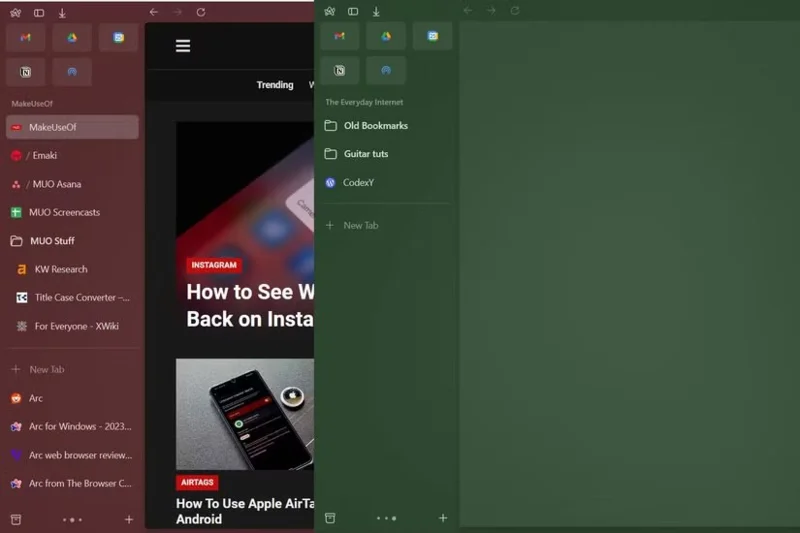
Comparing vertical tab implementation between Arc and Zen browsers
In the quest for the perfect Windows browser, dozens of browsers were tested, including Arc, Opera GX , and Zen. There are advantages to using vertical tabs, but horizontal tabs are much more convenient. Tabs are easier to move around, group them more simply, and don't cause any problems with any website.
Again, this is a personal preference and you may find vertical tabs easier to handle. However, considering all the UI elements that are frequently interacted with in the browser window, horizontal tabs seem easier to handle. And since they are always in one place, it is hard to lose track of a tab unless you have a lot of tabs open.
Regardless, vertical tabs can still work if implemented properly. Its current implementations in Arc and Zen leave a lot to be desired, especially if you work with multiple monitors and on Windows. While vertical tabs can be useful, I’d stick with horizontal tabs for as long as I can.