
Why are social media still flooded with scam ads? How to detect them?

Social media platforms have become fertile ground for scammers, exploiting their massive user bases with legitimate services and marketing tools. Despite efforts to curb fraudulent activity, scams continue to thrive. Here’s why that happens and how to spot them.

Table of Contents

Why are scam ads so prevalent on social media platforms?

Social media platforms are fertile ground for scammers because they create an ideal environment for scammers. With billions of users sharing personal information online, scammers can easily target specific demographics with sophisticated advertising tools. Social media platforms also allow anyone to create an account and start advertising with minimal verification, making it easy for scammers to quickly create and distribute fake ads.

According to the Federal Trade Commission, social media scams accounted for more than $2.7 billion in losses in 2023 alone. These scams exploit the legitimate marketing tools provided by social media platforms, leveraging their algorithms to amplify the reach of fraudulent ads to a large number of users. Ultimately, it becomes a numbers game—the more people are exposed to these scams, the more people fall victim and lose money.

How do scam ads pass the review?

While there are policies in place to prevent fraudulent advertising, social media platforms often struggle to enforce them effectively. Fraudulent ads can bypass reviews through a combination of tactics including:

  • Exploiting loopholes : Some scammers exploit the platforms’ own ad creation tools, using them to mimic legitimate businesses or products. By creating ads that look professional and trustworthy, they can fool both the platform’s review system and potential victims.
  • Too many ads to moderate : Social media platforms host millions of ads every day. The sheer volume makes it difficult for moderators and automated systems to detect every scam. Even with sophisticated algorithms, some scams slip through due to the sheer volume of submissions.
  • Layers between advertisers and social media companies : Many social media ads are placed through intermediaries like third-party advertising agencies or platforms. These layers create a gap between the actual advertiser and the social media company, making it harder to trace the origin of fraudulent ads.
  • Deceptive ads are made to look legitimate : Deceptive ads often mimic well-known brands by using familiar logos, color schemes, fonts, etc. Moderators can have difficulty evaluating ads if they don't fully understand the context or cultural nuances behind the ad. For example, an ad may seem normal to someone unfamiliar with a particular product, but to a smart user, it may be an obvious scam.
  • Deepfake AI complicates moderation : The rise of AI-generated content, including deepfakes, has added another layer of complexity. Fraudsters use AI to create realistic but fake videos, images, and even voices that can fool both users and moderation systems. These tools make it easy for fraudsters to create high-quality, convincing ads that are difficult to distinguish from genuine content.
  • Continuous adaptation : Scammers frequently change their ad content, making it difficult for automated systems to spot patterns. They may use slightly altered images or text to avoid filters designed to detect known scams.
  • Local targeting : Scammers may target specific regions or smaller groups where ad review policies may be less strict, increasing the chance of them slipping through undetected.

How to spot social media scams

Recognizing scam ads is crucial to protecting yourself on social media. Ad moderation efforts often fail because there are too many ads to moderate. Luckily, you don’t have to. Checking whether an ad is legitimate or a scam only takes a few seconds. Here’s how you can verify.
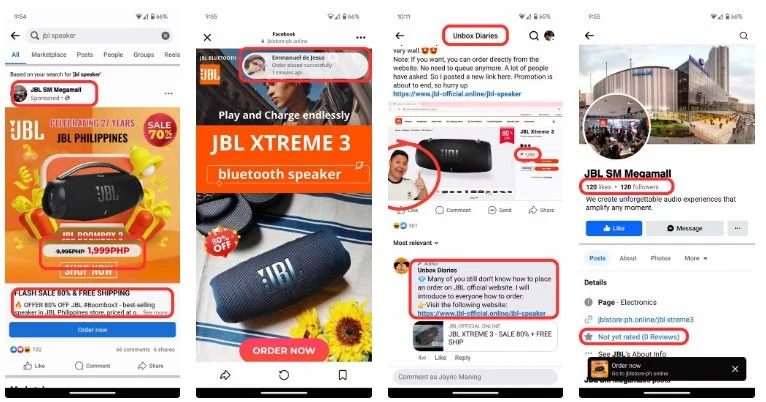
Why are social media still flooded with scam ads? How to detect them?

1. Suspicious price

When you see an ad, check to see if the price is right. A common warning sign is deals that seem too good to be true—ads promising big discounts or free products are often scams. If something seems too generous to be true, it probably is. If you don’t know the usual price range for a product, you can always check with your favorite online store.

2. Poster is not verified

Another telltale sign is that scam ads are often posted by unverified accounts or pages. Most social media platforms now offer some form of verification badge. This usually takes the form of a blue check mark next to the poster’s name. If a brand is particularly popular, you’ll see a verification badge.

3. Confirm fake

Scammers also use fake endorsements, falsely claiming to be endorsed by celebrities or reputable organizations. Always verify such claims through official channels. Also, suspicious URLs are a telltale sign. Scammers often create URLs that closely resemble legitimate sites but include misspellings or extra characters.

4. Poor grammar

Poor grammar and spelling in ads are also warning signs to watch out for, as many scams are hastily created. Legitimate ads are usually created and posted by professionals and have gone through a grammar and spelling check.

5. Negative reviews

Finally, check the comments and reviews. If you see complaints or warnings from other users, that’s usually a clear sign of a scam. You may also see fake reviews. If the ad is full of warning signs and overly positive comments, you’re probably looking at a scam.

What to do when encountering fraudulent advertising?

Why are social media still flooded with scam ads? How to detect them?

If you encounter a scam ad, here's a step-by-step guide on what you should do:

  1. Report an ad : Most platforms have the option to report an ad. Doing so can help the platform take action against the scammer and prevent others from falling victim.
  2. Avoid interaction : Don't click on ads or any related links. Even interacting with ads can redirect you to a scam site or expose you to more scams.
  3. Share your experience with others : Share your experience with your friends and family to make them aware of the scam. The more people who know about the scam, the less effective the scam will be.
  4. Review your Privacy Settings : Limiting the information you share on social media can make it harder for scammers to target you with personalized ads.

Staying informed and vigilant is the best defense against social media scams. By understanding how these scams work and taking steps to protect yourself, you can navigate social media with more confidence.

Leave a Comment

Information you should not share on social networks

Information you should not share on social networks

In this age of information explosion, some people don't think about what they share on Facebook. However, there are some things you should not share on Facebook.

16 common errors on Zalo, causes and quick fixes

16 common errors on Zalo, causes and quick fixes

Discover solutions for 16 common errors on Zalo! This guide covers causes and quick fixes to ensure a smooth experience on the app.

5 smartphone settings to tweak before posting photos on social media

5 smartphone settings to tweak before posting photos on social media

Even the best smartphone photographers among us should edit our photos before posting them online. Here's what to do!

Decoding strange words on Facebook: B, BH, BHH, B Ho, SB is what?

Decoding strange words on Facebook: B, BH, BHH, B Ho, SB is what?

If you regularly surf the web, especially the social network Facebook, you will surely encounter super teen words such as B, BH, BHH, B Ho, SB, TB of young people. These teenage words make many people wonder what they mean. So what are B, BH, BHH, B Household, SB? This article will decode it all for you!

How to download and install Hago on the computer

How to download and install Hago on the computer

Hago is an application that allows players to connect with other players to play existing games on Hago, we can say this is a game social network that helps connect users with each other.

What is OTP? There are several types? What to do? 4 notes when using OTP

What is OTP? There are several types? What to do? 4 notes when using OTP

Those who regularly transact online payment services or transact with a bank card account will often be asked to enter an OTP code. So what exactly is OTP? There are several types? What to do? What should I pay attention to when using OTP? All questions will be clarified through the article below!

TOP 10 largest social networks in Vietnam today

TOP 10 largest social networks in Vietnam today

What is Social Networking? How many social networks are there in Vietnam? Or which social networks are thriving, you know?

How to create a question on Facebook

How to create a question on Facebook

As soon as Instagram followers spread a word about a new feature on this online photo storage and sharing service, allowing users to use Question Sticker to ask questions on Instagram, immediately the largest social network. gender also appears credit

Instructions for finding users on Tik Tok by ID

Instructions for finding users on Tik Tok by ID

How to find users by ID on Tik Tok will help you save time and be more accurate.

Where to Find the Microsoft Teams Installation Folder on Your PC

Where to Find the Microsoft Teams Installation Folder on Your PC

Struggling to locate the Microsoft Teams Installation Folder on your PC? This step-by-step guide reveals exact paths for new and classic Teams, per-user & per-machine installs. Save time troubleshooting!

Troubleshooting Microsoft Teams Proxy Error Settings Fix

Troubleshooting Microsoft Teams Proxy Error Settings Fix

Struggling with Microsoft Teams Proxy Error? Discover proven Troubleshooting Microsoft Teams "Proxy Error" Settings Fix steps. Clear cache, adjust proxy settings, and get back to seamless calls in minutes with our expert guide.

Solving Microsoft Teams OneDrive Error File Sync

Solving Microsoft Teams OneDrive Error File Sync

Tired of Microsoft Teams OneDrive Error blocking file sync? Follow our step-by-step guide to solve Microsoft Teams "OneDrive Error" File Sync issues quickly. Proven fixes for smooth collaboration in Teams channels. Get your files syncing error-free today!

How to Fix Microsoft Teams Workflows and Power Automate Errors

How to Fix Microsoft Teams Workflows and Power Automate Errors

Tired of Microsoft Teams workflows and Power Automate errors halting your productivity? Get step-by-step solutions to common issues like authentication failures, timeouts, and flow errors. Fix them in minutes and automate effortlessly!

Troubleshooting Microsoft Teams Download Error on Macbook

Troubleshooting Microsoft Teams Download Error on Macbook

Facing Microsoft Teams "Download Error" on MacBook? Discover proven troubleshooting steps to resolve download failures quickly, from cache clears to reinstalls, and get back to smooth teamwork.

Troubleshooting Microsoft Teams Where is Teams Folder Error

Troubleshooting Microsoft Teams Where is Teams Folder Error

Tired of the frustrating Microsoft Teams "Where is Teams" Folder Error? Discover proven, step-by-step troubleshooting fixes to resolve it quickly and restore smooth teamwork. Latest methods included!

How to Fix Microsoft Teams JavaScript Error on Desktop App

How to Fix Microsoft Teams JavaScript Error on Desktop App

Frustrated by Microsoft Teams JavaScript Error on desktop app? Discover proven steps to fix it fast: clear cache, update, reset, and reinstall. Get back to seamless collaboration in minutes!

How to Fix Microsoft Teams Guest Login Error

How to Fix Microsoft Teams Guest Login Error

Struggling with Microsoft Teams "Guest Login" Error? Discover step-by-step fixes, from quick cache clears to admin settings, to resolve guest access issues fast and collaborate seamlessly. Updated with the latest tips!

How to Fix Microsoft Teams For PC Download Error

How to Fix Microsoft Teams For PC Download Error

Tired of the Microsoft Teams "For PC" download error blocking your work? Follow our proven, step-by-step guide to resolve it quickly and get Teams running smoothly on your PC today.

Solving Microsoft Teams Windows 7 Login Error

Solving Microsoft Teams Windows 7 Login Error

Struggling with Microsoft Teams "Windows 7" login error? Discover step-by-step fixes for this frustrating issue on Windows 10/11. Clear cache, edit registry, and more – get back to seamless collaboration today!

How to Fix Microsoft Teams Error Code 0x80070005 (2026 Guide)

How to Fix Microsoft Teams Error Code 0x80070005 (2026 Guide)

Tired of Microsoft Teams Error Code 0x80070005 blocking your meetings? Follow this 2026 guide with step-by-step fixes for access denied issues. Get Teams running smoothly in minutes!

How to Install the Microsoft Teams Add-in for Outlook 2026

How to Install the Microsoft Teams Add-in for Outlook 2026

Master the installation of the Microsoft Teams Add-in for Outlook 2026 effortlessly. Boost your productivity with seamless scheduling and meetings. Follow our proven, up-to-date steps for instant success!

How to Fix Microsoft Teams License Error 2026

How to Fix Microsoft Teams License Error 2026

Struggling with Microsoft Teams "License Error" 2026? Discover proven, step-by-step solutions to resolve it fast. Clear cache, check licenses, and get back to seamless collaboration—no IT help needed!

The Best Exercises for 50+

The Best Exercises for 50+

Whether youre in your 50s, 60s, or even 70s, its not too late to prioritize your health and put yourself first. Here are the best exercises for people 50 and older.

Solving Microsoft Teams Error Caa50024 on Windows 10/11

Solving Microsoft Teams Error Caa50024 on Windows 10/11

Struggling with Microsoft Teams Error Caa50024 on Windows 10/11? Follow our step-by-step fixes to resolve crashes and launch issues quickly. Latest proven solutions for seamless teamwork.









