Make Realistic Fake Blood Without a Cleanup Surprise

Mix a glossy prop-only fake blood batch, choose safer products for skin and costumes, and test cleanup before Halloween night.
Jet engines can spit out different colors of fire . Why is that? Let's find out together!
If you've ever seen a fighter jet from behind as it takes off, you've probably noticed that the jet engine spits out a certain color of fire. This fire color is due to something called the afterburner, but what exactly is it?
An afterburner, also known as a reheater in some countries, is an additional component added to some jet engines to increase thrust. The primary use of an afterburner is to enable these aircraft, usually military fighter jets, to achieve supersonic flight.
What is an afterburner?
Afterburners are additional components added to the top of a jet engine. They work by injecting fuel directly into the engine's exhaust before the spark ignites the fuel (which is now mixed with oxygen remaining in the exhaust).
This spark creates a stream of flame (not too different from the flame emitted from a blowtorch tip) which is then confined and expelled through a sealed nozzle.
Most Russian fighter jet engines emit blue flames during afterburning for takeoff or acceleration, while American jet engines emit red-yellow flames. This difference in color makes many people wonder. Many Russian pilots often joke that the extremely eye-catching blue flames are created by burning... vodka in the engine compartment.
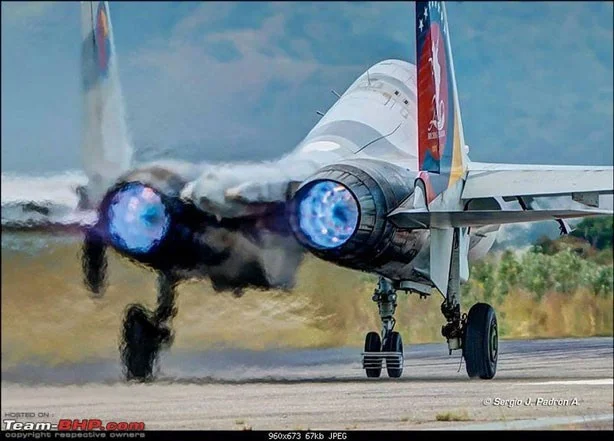
Aviation expert David Cenciotti has given an explanation for this difference. According to him, the reason is due to the different technology and way of manufacturing jet engines in the two countries.
All the fuel in the Russian fighters was burned in the chamber, the molecules in the air were ionized at high temperature combined with the fuel waste after burning to create a blue flame.
There are some cases where Russian fighters, even when old, will still emit red or yellow flames because the combustion system is not working effectively and cannot completely burn the fuel injected into the engine.
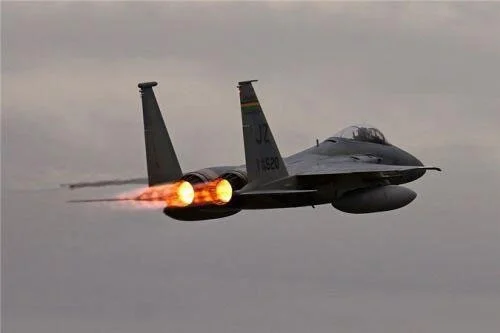
With American fighter jets, the afterburner flame is red-yellow because their engine manufacturing technology does not allow for complete combustion of fuel in the combustion chamber. Basically, red-yellow is the color of the fire when it is burning due to excess fuel mixed with air blown out after the plane has burned internally.
However, the performance of the US fighter jet engine is as good or even better than that of the Russian jet engine, even though it does not burn fuel cleanly. It is also possible that the type of gasoline that the US and Russia use for their jets is different.
Mix a glossy prop-only fake blood batch, choose safer products for skin and costumes, and test cleanup before Halloween night.
Create a gentle Halloween look with pastel colors, friendly ghosts, easy no-carve accents, and practical safety tips for your home.
Create a spooky office cubicle with Halloween desk decor ideas that keep your workspace usable, tidy, and mindful of workplace safety.
Plan a recognizable Halloween 2026 look with pop culture costumes inspired by Spider-Man, Supergirl, Toy Story 5, Moana, Mario, and Wednesday.
Sort leftover Halloween candy safely, share or repurpose sealed treats, and choose food use or compost for pumpkins based on their condition.
Compare workplace Halloween costume choices by respect, dress code, mobility, and safety—and learn when a subtle accessory or a policy check is the better option.
Find a couples costume that fits your style, budget, and comfort level, from Addams Family classics to original inside-joke duos.
Need a last-minute high school Halloween costume? Compare 10 easy closet-based ideas by prep time, comfort, school-day practicality, and simple safety checks.
Use a simple 2026 Halloween decorating timeline for indoor décor, outdoor displays, and fresh pumpkins, with practical adjustments for weather and events.
Mix five vivid, approachable Halloween cocktails with measured recipes, simple prep tips, and an alcohol-free option for your party guests.








