Why flagship phones should have mini versions

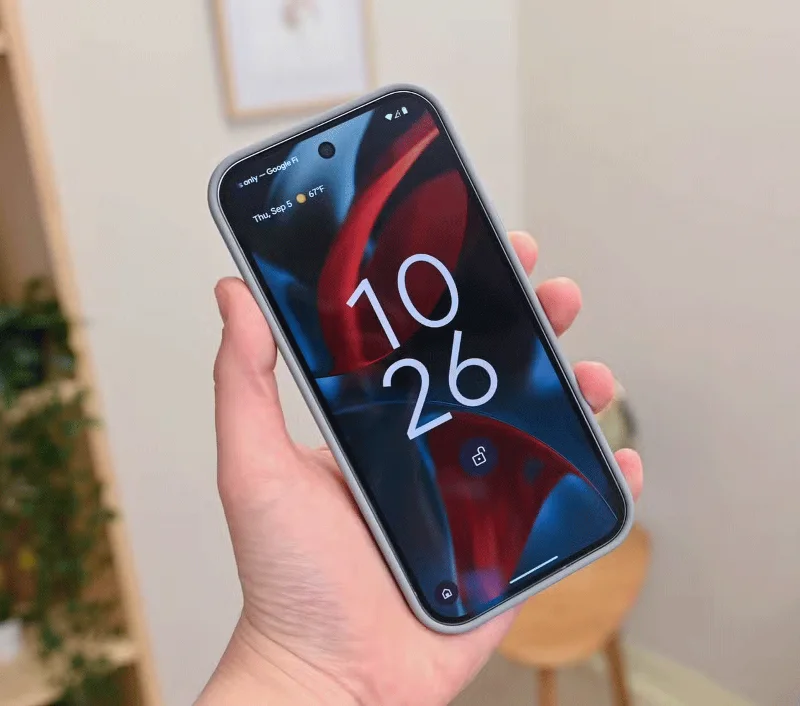
Over the years, flagship smartphones have gotten much better, but they have also gotten bigger. However, not everyone likes large phones. That's why flagship phones should have mini versions.

1. The mini version is relatively compact and easy to carry in your pocket

Why flagship phones should have mini versions
Google Pixel 9 Pro

People love big phones these days. But that's not the only reason flagship phones are getting bigger. Bigger camera systems, bigger batteries to power high-resolution screens, and additional cooling systems to counteract increasingly powerful processors all require more space.

But some people still prefer smaller phones. They're more compact and fit better in your pocket - in fact, that's what modern foldable phones are all about! They're much easier to use, especially with one hand.

The weight is also moderate (which can be a relief for people with carpal tunnel syndrome). Plus, many women prefer smaller phones because their clothes often don't have pockets big enough to hold them.

2. Cheaper than larger versions

This may seem obvious, but it highlights the greater value that a smaller version offers. The Pixel 9 Pro XL costs $1,099, while the Pixel 9 Pro with nearly identical internals costs just $999. The obvious differences are the screen size and battery — however, battery life ends up being similar in both cases because the smaller screen consumes less power.

3. Less distractions help users focus better

Why flagship phones should have mini versions

Contrary to the claim that large screen size is reasonable, a small phone makes you more productive.

Yes, a big phone makes it fun to consume media or play games. We often hear the word “immersive” used in this context. But this immersive experience also makes us spend more time on our devices. People want to focus on getting things done on their phones and move on to the good things in life, rather than aimlessly scrolling through social media or wasting time searching for YouTube recommendations.

A smaller phone doesn't hold you back as long, allowing you to be more productive and reduce screen time without having to consciously make an effort.

While some brands do offer relatively small phones, they're mostly entry-level variants of their flagship lineups — like the Pixel 8 or the Galaxy S24 or S24+. Companies often reserve top-of-the-line camera setups and other advanced features for their oversized flagships.

Hopefully more phone makers will take a cue from Google and offer mini flagships for those who prefer compact smartphones. Sure, they may not sell as well as the larger variants, but companies can keep customers happy by giving them options instead of forcing them to buy a larger phone to get flagship features.
Leave a Comment

How to Disable Microsoft Teams at Startup for Better PC Performance

How to Disable Microsoft Teams at Startup for Better PC Performance

Discover simple, step-by-step methods to disable Microsoft Teams at startup and unlock better PC performance. Faster boot times, less resource drain—perfect for Windows users seeking smooth operation.

How to Fix Microsoft Teams Network Error Offline

How to Fix Microsoft Teams Network Error Offline

Stuck with Microsoft Teams "Network Error" offline? Discover proven, step-by-step solutions to fix Microsoft Teams network error offline quickly. Get back online fast—no tech skills needed!

Solving Microsoft Teams Error 4oggx

Solving Microsoft Teams Error 4oggx

Struggling with Microsoft Teams Error 4oggx? Discover proven fixes to resolve sign-in failures, crashes, and connectivity issues fast. Get back to productive calls without frustration!

How to Fix Microsoft Teams Remove Account Data Error

How to Fix Microsoft Teams Remove Account Data Error

Encountering the frustrating Microsoft Teams "Remove Account" Data Error? Discover quick, reliable fixes like clearing cache, resetting the app, and more to get back to seamless collaboration without losing data. Updated with the latest solutions.

Troubleshooting Microsoft Teams Layout Error Sidebar

Troubleshooting Microsoft Teams Layout Error Sidebar

Tired of the frustrating Microsoft Teams "Layout Error" Sidebar? Follow our proven, step-by-step troubleshooting guide with the latest fixes to get your Teams sidebar working smoothly again. No tech skills needed!

Troubleshooting Microsoft Teams Offline Error in 2026

Troubleshooting Microsoft Teams Offline Error in 2026

Stuck with Microsoft Teams offline error in 2026? Discover proven troubleshooting steps, common causes, and quick fixes to restore your connection fast. No tech skills required!

How to Fix Microsoft Teams Error M Memory

How to Fix Microsoft Teams Error M Memory

Tired of Microsoft Teams crashing with "Error M" memory issues? Follow our step-by-step guide to fix Error M in Teams, clear cache, update software, and boost performance—no tech skills required!

Step-by-Step: Setting Up Microsoft Teams Town Hall Events

Step-by-Step: Setting Up Microsoft Teams Town Hall Events

Discover the easiest step-by-step guide to setting up Microsoft Teams Town Hall events. Host massive virtual gatherings effortlessly with pro tips for seamless execution. Perfect for leaders and organizers!

How to Fix Microsoft Teams Download Error for PC

How to Fix Microsoft Teams Download Error for PC

Struggling with Microsoft Teams "Download Error" on PC? Discover proven, step-by-step fixes to resolve download failed issues quickly. Get back to seamless collaboration in minutes—no tech skills needed!

Troubleshooting Microsoft Teams Error L License

Troubleshooting Microsoft Teams Error L License

Stuck with Microsoft Teams "Error L" License error? Follow this step-by-step troubleshooting guide to resolve licensing issues quickly, restore access, and boost productivity without IT hassle. Updated with latest fixes.

Troubleshooting Microsoft Teams Video Call Freezing

Troubleshooting Microsoft Teams Video Call Freezing

Tired of Microsoft Teams video call freezing mid-meeting? Follow this proven troubleshooting Microsoft Teams video call freezing guide with quick fixes, advanced tips, and real solutions to restore smooth video instantly.

How to Fix Microsoft Teams Download Failed Due to Unexpected Error

How to Fix Microsoft Teams Download Failed Due to Unexpected Error

Frustrated by Microsoft Teams 'Download Failed Due to Unexpected Error'? Discover proven, step-by-step solutions to fix this common issue quickly and get back to seamless collaboration. Updated with the latest fixes for peak performance.

Why Did My Microsoft Teams Recording Fail? Common Reasons

Why Did My Microsoft Teams Recording Fail? Common Reasons

Frustrated because your Microsoft Teams recording failed? Uncover the top common reasons like permissions issues, storage limits, and network glitches, plus step-by-step fixes to prevent future failures and record flawlessly every time.

Solving Microsoft Teams Error B Connection

Solving Microsoft Teams Error B Connection

Struggling with Microsoft Teams "Error B" connection? Discover step-by-step fixes for smooth connectivity. Clear cache, check networks, and more in this ultimate guide to resolving Error B instantly.

How to Fix Microsoft Teams Application Is In A Bad State Error

How to Fix Microsoft Teams Application Is In A Bad State Error

Tired of the frustrating Microsoft Teams "Application Is In A Bad State" error crashing your meetings? Discover proven, step-by-step fixes to resolve it quickly and restore smooth teamwork. Updated with the latest solutions.









