
Pop Culture Costume Ideas That Will Dominate Halloween 2026

Plan a recognizable Halloween 2026 look with pop culture costumes inspired by Spider-Man, Supergirl, Toy Story 5, Moana, Mario, and Wednesday.
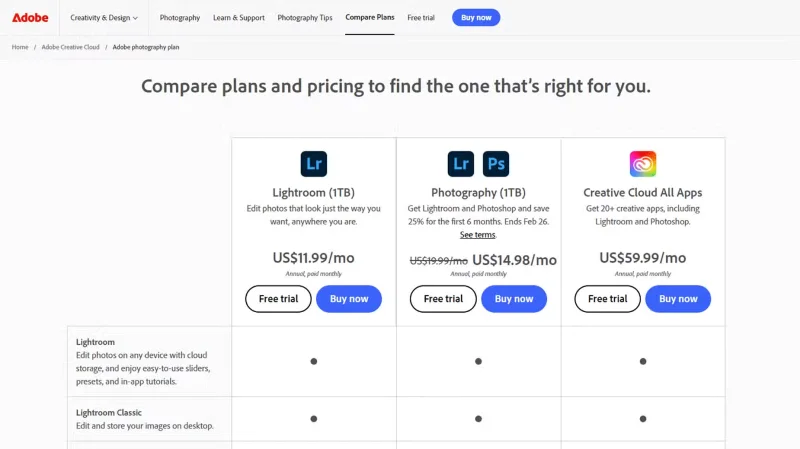
Adobe’s increased subscription costs have driven many users to look for alternatives—especially since the days of one-time purchases are long gone. But despite the price hike, many people are still paying for the Photography plan. In fact, some have even upgraded from the old $10 plan to the $20 subscription.
1. This package includes the latest versions of Photoshop and Lightroom
People subscribe to Adobe’s Photography package because it includes Adobe Photoshop and Lightroom—two of the most important apps in a photo-editing workflow. About 15 years ago, these apps could be purchased as a one-time purchase with Adobe Creative Suite, which cost more than $1,000.
This was beyond the budget of many people, so they had to use company computers to edit personal projects (if allowed). However, when Adobe launched its subscription program, many people were excited about the new option because it only cost $10/month—a much more affordable price.
Even if it were possible to save a little money and buy Creative Suite (which includes all Adobe apps), some people only need Photoshop and Lightroom, which is about 8 years and 4 months of paying for a subscription.
But subscribing to the latest versions of Photoshop and Lightroom essentially means you get a free upgrade every time Adobe introduces new features: Users don’t have to shell out an extra $1,000 for the latest version, which the company releases every two to three years. Even if you upgrade your apps after each release, you’re still saving more by subscribing.
What’s more, Adobe doesn’t increase its subscription prices very often. A subscription to the Photography plan cost $10 in 2015; it will remain that way until 2024. Unfortunately, the Photography plan has recently increased in price, and some are suggesting alternatives to Adobe to get around this. However, many people are still loyal to it and have even upgraded their plans.
2. You get 1TB of cloud storage for photos
The basic Photography plan that you sign up for the first time comes with 20GB of cloud storage, which isn't enough for all the raw photos you take, especially when you spend days or weeks in one location.
So many people choose to upgrade to the Photography plan (1TB), which includes 1TB of cloud storage. This means you can work with Adobe Lightroom almost anywhere without having to save your raw images to portable storage.
This plan costs $19.99/month, which is double the cost of the original subscription, but it’s still a great option because it simplifies your workflow. Plus, it means you don’t have to store your image files on other cloud storage services, which are already full of other files and data.
Many people have also switched to Lightroom Creative Cloud instead of Lightroom Classic because its simple interface means they don't have to think about loading new albums every time they work on a new project - just keep them all in the main library and split them into albums.
3. Adobe offers premium features on every device
Another great thing about Adobe’s subscription features is that you can install them on multiple devices without having to buy multiple licenses. Before the company offered this subscription method, you had to pay for a license per device. However, with Adobe Creative Cloud, you can install and activate these apps on two devices at the same time (though you can’t use them simultaneously).
This makes it easy to switch between your laptop and workstation with a single subscription. It also works on macOS and Windows, so you don't have to worry about having a different license for your M2 MacBook Air and your Windows 11 workstation.
If you want to use it on another device (like a MacBook Air), you can remotely sign out of one of your other devices and start working. This makes it very convenient to move devices around.
The Photography plan also gives you access to Adobe's premium apps on iPad, iPhone, and Samsung phones. You can continue your photo editing work almost anywhere. Since Adobe provides the apps you need in a dedicated subscription, there's no need to subscribe to Adobe All Apps.
So if the company keeps this price the same for the next 10 years without removing features, many people will happily continue to pay for it because it greatly improves their workflow. But if you’re not a professional photographer, there are a few things to consider before paying for a Creative Cloud subscription.
Plan a recognizable Halloween 2026 look with pop culture costumes inspired by Spider-Man, Supergirl, Toy Story 5, Moana, Mario, and Wednesday.
Sort leftover Halloween candy safely, share or repurpose sealed treats, and choose food use or compost for pumpkins based on their condition.
Compare workplace Halloween costume choices by respect, dress code, mobility, and safety—and learn when a subtle accessory or a policy check is the better option.
Find a couples costume that fits your style, budget, and comfort level, from Addams Family classics to original inside-joke duos.
Need a last-minute high school Halloween costume? Compare 10 easy closet-based ideas by prep time, comfort, school-day practicality, and simple safety checks.
Use a simple 2026 Halloween decorating timeline for indoor décor, outdoor displays, and fresh pumpkins, with practical adjustments for weather and events.
Mix five vivid, approachable Halloween cocktails with measured recipes, simple prep tips, and an alcohol-free option for your party guests.
Find 15 office-friendly Halloween costume ideas for 2026, with practical checks for dress codes, respectful themes, comfort, and workplace safety.
Plan a fun elementary school Halloween party with easy crafts, games, inclusive treats, costume tips, and a sample 75-minute classroom schedule.
Compare realistic side hustles for 2026 by startup cost, fees, flexibility, and income control, with current tax and scam guidance from official sources.








