Why is YouTube Premium Lite worth subscribing to?

Many people canceled YouTube Premium forever, believing it was no longer worth it. But now, YouTube Premium Lite has them rethinking everything. Maybe it's time to subscribe again!

Why People Stop Using YouTube Premium

YouTube Premium offers a number of perks over regular YouTube , which is why people subscribe to the service. Its key features include an ad-free experience across the platform, video downloads, free access to YouTube Music, and the ability to play in the background.

These are all valuable features, but they don’t stop people from canceling their YouTube Premium subscriptions. They do so mainly because they don’t use all of them. For example, you always have an available internet connection, whether you’re at home or away, so there’s no need to download YouTube videos to watch offline. As for music, you don’t need YouTube Music if you prefer Spotify , which also includes video.

The second reason people stop using Premium is that YouTube keeps increasing the subscription price. But there are still people who are willing to continue paying for YouTube Premium despite the price increase .

Why is YouTube Premium Lite different?

Why is YouTube Premium Lite worth subscribing to?
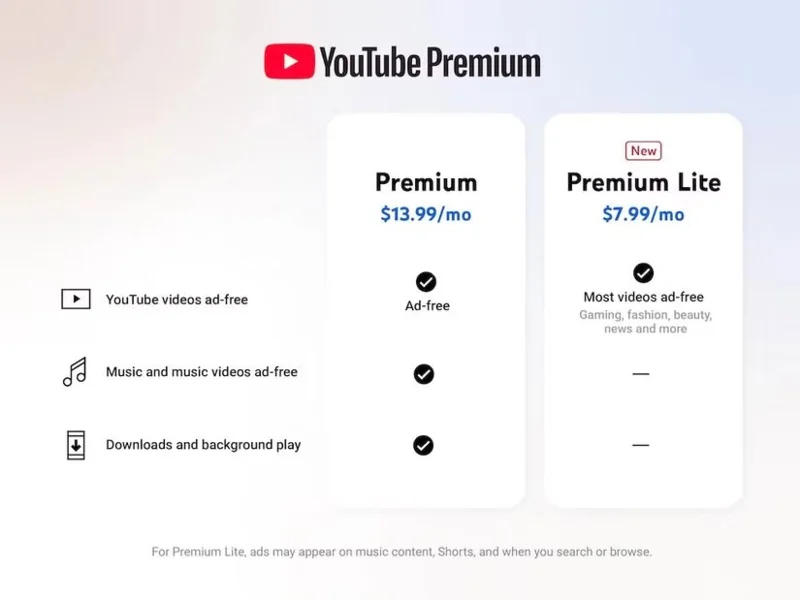
Compare YouTube subscription plans.

YouTube has released a new subscription plan, YouTube Premium Lite , which strips away some features from the current Premium plan and is cheaper. The main advantage is that it allows you to watch most of the platform's ad-free videos, such as gaming and educational content.

The main exclusion here is ad-free access to music and YouTube Music. You may also see ads in other places, like when you search for something or in YouTube Shorts. You also won’t be able to play content in the background or download it for offline viewing. As for price, it’s just $7.99/month, which is nearly 50% cheaper than YouTube Premium’s $13.99.

Why are people willing to pay for YouTube Premium Lite?

YouTube Premium Lite is essentially a cheaper, limited, ad-free version of YouTube Premium. It cuts down on ads, which is a good thing since the free version is full of ads (the only problem with the platform since the discontinuation of Premium).

People can pay for Premium, but it doesn't make sense to pay the full price just to remove ads while not using any other features, especially given YouTube's rising price trend. That's why YouTube Premium Lite is the perfect choice for many people's needs.

Leave a Comment

What Young Riders Should Know About Moving Their Motorcycles Across Cities

What Young Riders Should Know About Moving Their Motorcycles Across Cities

Long-distance travel can involve heavy traffic, changing weather conditions, and rider fatigue. If you are also dealing with the responsibilities of moving home, such as packing belongings or coordinating accommodation, a long ride may add unnecessary pressure to an already busy schedule.

Solving Microsoft Teams Shortcut Error Not Opening

Solving Microsoft Teams Shortcut Error Not Opening

Tired of Microsoft Teams shortcut error preventing you from opening the app? Follow our expert, step-by-step guide with the latest fixes for instant resolution. Works on Windows, Mac & web – no tech skills needed!

Solving Microsoft Teams Task Management Sync Error

Solving Microsoft Teams Task Management Sync Error

Tired of Microsoft Teams Task Management Sync Error halting your workflow? Follow our proven, step-by-step fixes to resolve sync issues fast and restore seamless task collaboration. No tech expertise needed!

Troubleshooting Microsoft Teams Wiki Error Formatting

Troubleshooting Microsoft Teams Wiki Error Formatting

Struggling with Microsoft Teams Wiki Error Formatting? This step-by-step guide reveals proven fixes for common wiki tab issues, ensuring smooth editing and collaboration in Teams. Get back to productive wikis fast!

How to Fix Microsoft Teams Installation Error for Linux

How to Fix Microsoft Teams Installation Error for Linux

Struggling with Microsoft Teams installation error on Linux? Discover step-by-step fixes for Ubuntu, Fedora & more. Resolve dependency issues, crashes, and errors quickly with our ultimate guide. Get Teams running smoothly today!

Solving Microsoft Teams Error Page Not Loading

Solving Microsoft Teams Error Page Not Loading

Struggling with Microsoft Teams "Error Page" not loading? Get step-by-step fixes for desktop, web, and mobile. Solve Microsoft Teams Error Page issues quickly and resume seamless teamwork today.

Solving Microsoft Teams Error Screenshot Issues

Solving Microsoft Teams Error Screenshot Issues

Tired of Microsoft Teams "Error Screenshot" blocking your workflow? Get proven, step-by-step solutions to resolve screenshot errors in Teams instantly and boost productivity. No tech skills needed!

How to Fix Microsoft Teams Error U User

How to Fix Microsoft Teams Error U User

Tired of Microsoft Teams "Error U" User blocking your chats? Get proven, step-by-step fixes to clear cache, reset, and restore seamless collaboration instantly.

Where are Microsoft Teams Registry Keys Located on Windows 11?

Where are Microsoft Teams Registry Keys Located on Windows 11?

Unlock the precise locations of Microsoft Teams registry keys on Windows 11. Step-by-step guide to find, access, and safely tweak them for optimal performance and troubleshooting. Essential for IT pros and Teams enthusiasts.

How to Fix Microsoft Teams Training Error Video Lag

How to Fix Microsoft Teams Training Error Video Lag

Tired of Microsoft Teams "Training Error" Video Lag ruining your meetings? Follow our step-by-step guide with the latest fixes for smooth video calls—no more frustration!