Make Realistic Fake Blood Without a Cleanup Surprise

Mix a glossy prop-only fake blood batch, choose safer products for skin and costumes, and test cleanup before Halloween night.
Now, users have a new way to watch Netflix with subtitles.
Dialogue-only subtitles will remove audio cues, speaker names, etc.
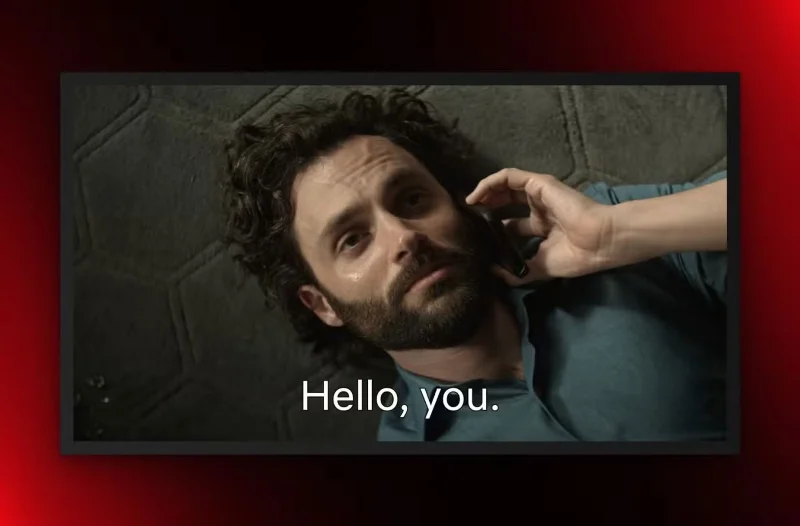
You've probably heard of the closed captioning option for the deaf and hard of hearing, also known as SDH/CC. When you read that option, you'll see audio cues like [phone ringing] along with the speaker's name.
That's not helpful if you just want to better understand what's being said in your favorite TV show or movie.
Netflix is adding a new way to use subtitles. Starting with the new season of You, you can also choose a new subtitles option that only shows dialogue.
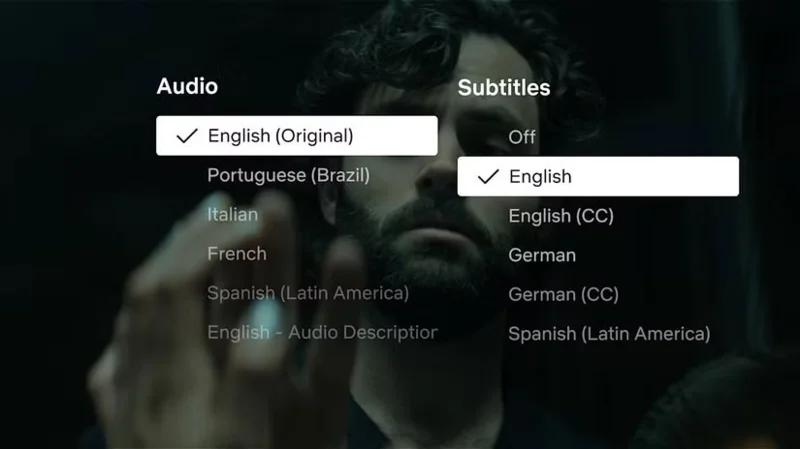
To do this, open the language picker and select English as the subtitle option instead of English (CC) .
Netflix says the new subtitle type will be available on all new Netflix originals in all languages offered going forward, along with the SDH/CC option.
All of Netflix’s current subtitle options can also be customized by changing both the size and font of the on-screen information. To do this on your TV or streaming device, select the player controls at the bottom of the screen. Then select Settings to adjust the subtitle size and font. If Settings doesn’t appear on the screen, your device doesn’t support customization options.
Netflix should offer new subtitle options across its entire catalog
Subtitles are popular with Netflix users, with the streaming giant saying that nearly half of all viewing hours are done with them enabled. Even if you don't have a hearing problem, there are a number of reasons to use subtitles, including having a roommate, wanting to follow dialogue better, or having poor quality home theater equipment.
While it's great to see Netflix starting to add dialogue-only subtitles, they should also push to roll this out to all of their existing content. That would make the feature much more useful, especially if users are looking for something other than Netflix originals to watch.
Many families debate whether or not to use subtitles when watching TV. Some people avoid subtitles for a more immersive experience while still focusing on the dialogue. You also benefit from less screen clutter and exercise your memory and comprehension. On the other hand, many people prefer subtitles so they don’t miss a word of dialogue and have a modern sound mix.
If you're a fan of subtitles, the new captioning option on Netflix sounds great. Be sure to check it out instead of just using AirPods for private listening without disturbing the rest of the family.
Mix a glossy prop-only fake blood batch, choose safer products for skin and costumes, and test cleanup before Halloween night.
Create a gentle Halloween look with pastel colors, friendly ghosts, easy no-carve accents, and practical safety tips for your home.
Create a spooky office cubicle with Halloween desk decor ideas that keep your workspace usable, tidy, and mindful of workplace safety.
Plan a recognizable Halloween 2026 look with pop culture costumes inspired by Spider-Man, Supergirl, Toy Story 5, Moana, Mario, and Wednesday.
Sort leftover Halloween candy safely, share or repurpose sealed treats, and choose food use or compost for pumpkins based on their condition.
Compare workplace Halloween costume choices by respect, dress code, mobility, and safety—and learn when a subtle accessory or a policy check is the better option.
Find a couples costume that fits your style, budget, and comfort level, from Addams Family classics to original inside-joke duos.
Need a last-minute high school Halloween costume? Compare 10 easy closet-based ideas by prep time, comfort, school-day practicality, and simple safety checks.
Use a simple 2026 Halloween decorating timeline for indoor décor, outdoor displays, and fresh pumpkins, with practical adjustments for weather and events.
Mix five vivid, approachable Halloween cocktails with measured recipes, simple prep tips, and an alcohol-free option for your party guests.








