Desk Decorating Ideas for a Spooky Office Cubicle

Create a spooky office cubicle with Halloween desk decor ideas that keep your workspace usable, tidy, and mindful of workplace safety.
Most AI editors promise miracles but fail to deliver. Topaz Labs is an AI-powered toolkit that actually delivers. With powerful sharpening, denoising, and upscaling tools, it turns “unusable” photos into stunning images – effortlessly.
Table of Contents
Topaz Labs has built-in image enhancement and enhancement tools: Topaz Photo AI and Topaz Gigapixel. These tools let you sharpen your images, but there is also a great denoising feature from Topaz. There are specific tools for denoising, face restoration, sharpening, and image enhancement using Topaz AI.
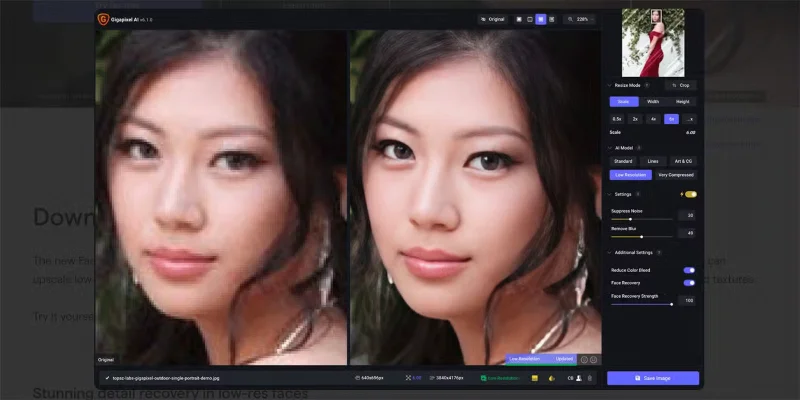
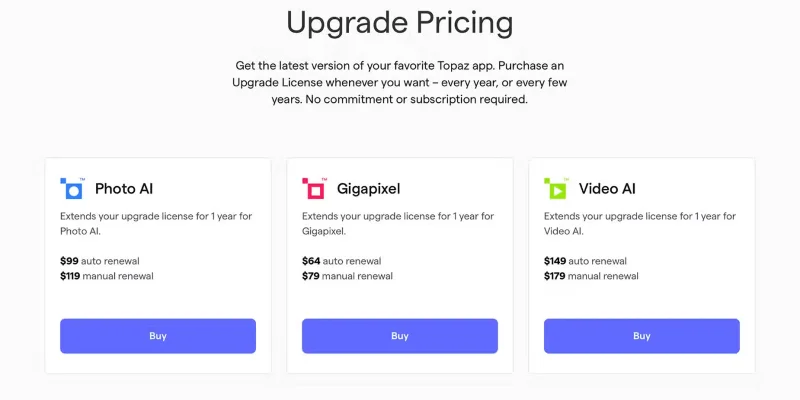
Gigapixel 8 is available for $99 as a standalone tool for Windows or MacOS or as a plugin for Adobe Lightroom or Photoshop. It's an AI upscaling tool that can upscale and improve original images by up to 16 times.
Topaz Photo AI costs $199, again as a standalone tool or plugin. With Photo AI 3, you can do more than just sharpen and enhance—but those features are built into the tool.
Most AI tools require an Internet connection to process AI-based actions. For Topaz Labs tools, all software is installed on your local drive, including the artificial neural networks that enable AI editing. Since Topaz Labs AI features do not use Generative AI , an Internet connection is not required to display results.
Unlike AI photo editing tools like Luminar Neo , which require a constant internet connection, you can edit on the go with Topaz AI tools — whether you're connected or not.
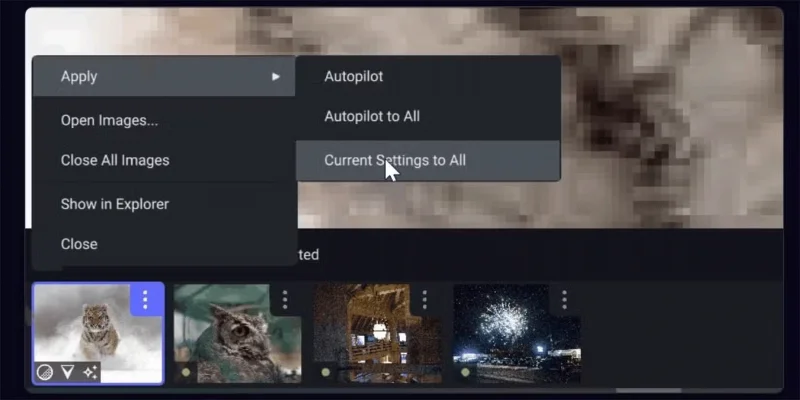
Topaz's AI tools are smart in more ways than just editing photos; they can also analyze your photos to suggest edits you should apply. These suggestions are temporarily applied to your photos so you can decide whether or not to apply them.
Tip : Photos with autopilot applied will have a small green dot when uploaded.
You can tweak them if you like some of the suggestions, but not all of them. They're easy to tweak, and overall, autopilot saves time and effort when faced with how or what to edit in a photo.
Topaz Labs is not only a photo editing suite but also offers video editing AI tools in Topaz Video AI. Like other tools from Topaz Labs, it is available as standalone software and plugins that can be used in Adobe After Effects and DaVinci Resolve video editing software .
Alongside Topaz Video AI is a professional video editor: Topaz Video AI Pro. It’s the first commercial AI video enhancement tool built for professionals. It’s pricey ($1,099/user), but the results are of an incredibly high standard, and have been used by professional video editors and production teams at the BBC, Amazon, and NASA.
Topaz Video AI 6 offers an enhanced interface, updated models for upscaling video footage, and the ability to convert from SDR to HDR in video.
Like many other photo editing tools, Topaz Labs software is available as a standalone application as well as a plugin for use in Adobe Lightroom and Photoshop . Similarly, you'll find Retouch4Me 's AI plugin suite and standalone tools for portrait editing.
Having the option to use Topaz Labs products on their own as well as plugins allows you to customize your workflow much better. While Topaz AI’s tools are very similar to many of the tools found in Lightroom or Photoshop, there are times when you need to use Adobe features to complete your edits. Using Topaz as a plugin creates a seamless editing flow, rather than having to open, close, and send files from one program to another.
Having the option to use Topaz Labs' tools as standalone products means you don't have to rely on Adobe – or other photo editing tools like Affinity Photo or Pixelmator Pro – if you don't want to. The standalone tools allow you to be a more independent photo or video editor. You can also use Skylum's Aperty for portrait editing.
Using Topaz's tools, you can batch edit your photos. Not only can you batch edit photos, but you can do it quickly. Many other tools get slow when batch editing, but Topaz Labs applies your edits with virtually no wait time.
You can batch edit up to 1000 photos at once, which is a huge job and saves hours compared to applying each edit yourself.
Topaz Labs tools are not only available for a one-time fee, but also come with a lifetime license for complete ownership of your product. The lifetime license comes with one year of updates, with renewal options available for purchase after the year has passed.
This makes the nearly $200 price tag more affordable when you split it up over multiple years of use — compared to the price of an Adobe Photography subscription, you'd pay around $240 for just one year of use.
Topaz Labs offers premium AI tools that will enhance your creative workflow when editing high-quality images and videos. With 3 different products available for purchase or subscription, you can decide how much to spend or what type of purchase you want. With many subscription-only options costing more for similar editing tools, Topaz Labs’ lifetime license is a great idea to get such consistent results.
Create a spooky office cubicle with Halloween desk decor ideas that keep your workspace usable, tidy, and mindful of workplace safety.
Plan a recognizable Halloween 2026 look with pop culture costumes inspired by Spider-Man, Supergirl, Toy Story 5, Moana, Mario, and Wednesday.
Sort leftover Halloween candy safely, share or repurpose sealed treats, and choose food use or compost for pumpkins based on their condition.
Compare workplace Halloween costume choices by respect, dress code, mobility, and safety—and learn when a subtle accessory or a policy check is the better option.
Find a couples costume that fits your style, budget, and comfort level, from Addams Family classics to original inside-joke duos.
Need a last-minute high school Halloween costume? Compare 10 easy closet-based ideas by prep time, comfort, school-day practicality, and simple safety checks.
Use a simple 2026 Halloween decorating timeline for indoor décor, outdoor displays, and fresh pumpkins, with practical adjustments for weather and events.
Mix five vivid, approachable Halloween cocktails with measured recipes, simple prep tips, and an alcohol-free option for your party guests.
Find 15 office-friendly Halloween costume ideas for 2026, with practical checks for dress codes, respectful themes, comfort, and workplace safety.
Plan a fun elementary school Halloween party with easy crafts, games, inclusive treats, costume tips, and a sample 75-minute classroom schedule.








