Windows 10 super light Tiny10 x64 23H1, optimized for PC with only 2GB RAM

NTDEV released Tiny10 2303, a super-lite version of Windows 10 available only in 32-bit x86 versions, earlier this year for users with low-end hardware that isn't capable of running Windows 10 or 11.

NTDEV has recently released the tiny10 2303 version in x64 format, allowing users to use more functions and RAM than the previous 32-bit x86 version.
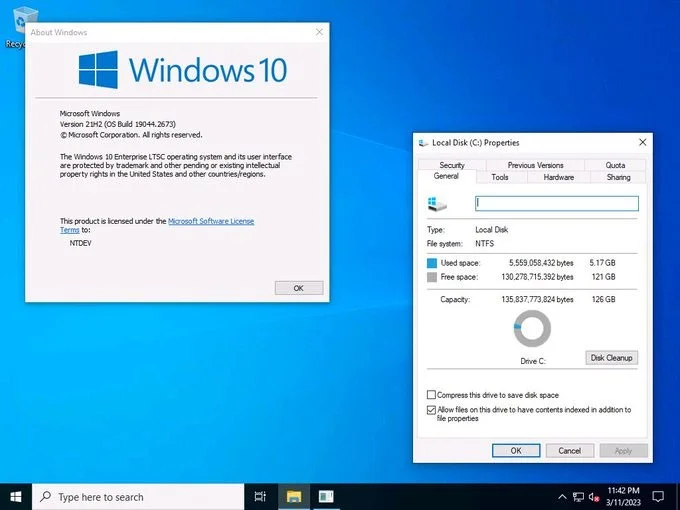
Windows 10 super light Tiny10 x64 23H1, optimized for PC with only 2GB RAM

The new version is based on the same Windows 10 LTSC 21H2 build (19044.3031) as tiny10 2303 x86. Its main highlight is that it supports users to download monthly updates while still maintaining a low configuration and super light capacity.

NTDEV said that the purpose of developing tiny10 23H1 is to help users who want to experience Windows 10 with full features but still smooth and optimized. Simply put, this version has all the good things from the original Windows 10 without requiring more than 20 GB of space and a minimum of 2 GB of RAM.

Another highlight of the new tiny10 release is the upgradeability. Users who are running older tiny10 releases can update to tiny10 23H1 without reinstalling.

Tiny 10: Super light Windows 10 version for low-configuration computers, only needs 2 GB RAM and 16 GB hard drive

Tiny 10 is the latest minimalist operating system version just announced by NTDEV. This is the solution for old or weak computer configurations that do not meet the minimum hardware requirements of the operating system to be able to run the latest versions of Microsoft Windows.

https://twitter.com/NTDEV_/status/1634672202699218945

Windows 10 super light Tiny10 x64 23H1, optimized for PC with only 2GB RAM

NTDEV has removed almost all unnecessary features, bloatware that requires a relatively low configuration to install Windows 10 from the Windows installation ISO. The result is an operating system that only has the most important core features to run a computer, extremely basic. This system only needs 2 GB of RAM to install Windows 10, and 16 GB of storage space is needed to install Tiny10.

In build 2303 x86, Tiny10 includes Windows Defender to protect your computer from malware without having to install heavy antivirus software.

In addition to Tiny10, NTDEV has also released Tiny11, based on Windows 11 Pro 22H2. This minimalist operating system version only requires 8GB of storage to install, and has been tested and run on the tiny computer Raspberry Pi 4. This minimalist version of Windows 11 allows installation and operation on very low-performance systems, so sometimes it does not work with the desired performance.

Tiny10 and Tiny11 are just modified versions, not pirated versions, so to install, users still need a genuine Windows key.

Leave a Comment

How to Use Microsoft Teams Copilot for AI-Powered Meetings

How to Use Microsoft Teams Copilot for AI-Powered Meetings

Master how to use Microsoft Teams Copilot for AI-powered meetings. Step-by-step guide with latest tips to generate recaps, answer questions, and boost productivity effortlessly. Transform your Teams experience today!

Microsoft Teams Breakout Rooms Tutorial for Beginners (2026)

Microsoft Teams Breakout Rooms Tutorial for Beginners (2026)

Master Microsoft Teams Breakout Rooms with this beginner-friendly tutorial. Step-by-step guide to creating, managing, and optimizing breakout rooms for dynamic 2026 meetings and workshops. Boost engagement now!

Solving Microsoft Teams Recording Save Error

Solving Microsoft Teams Recording Save Error

Stuck with Microsoft Teams Recording Save Error? Get instant, step-by-step fixes for saving recordings effortlessly. Proven solutions for all common issues – no tech skills needed!

How to Create a Wiki Page in Microsoft Teams

How to Create a Wiki Page in Microsoft Teams

Discover how to create a Wiki page in Microsoft Teams effortlessly. This ultimate guide covers step-by-step instructions, tips, and best practices to boost your team's knowledge sharing and productivity. Perfect for beginners!

How to Fix Microsoft Teams Error S Screen

How to Fix Microsoft Teams Error S Screen

Stuck on Microsoft Teams "Error S" screen? Discover proven, step-by-step solutions to fix Microsoft Teams Error S fast. Clear cache, restart, update & more for seamless teamwork. Works on latest versions!

How to Fix Microsoft Teams Proxy Error on Windows 10

How to Fix Microsoft Teams Proxy Error on Windows 10

Struggling with Microsoft Teams proxy error on Windows 10? Discover step-by-step fixes to resolve proxy authentication issues, connection failures, and more. Get Teams running smoothly in minutes with our expert guide.

Solving Microsoft Teams Town Hall Event Error

Solving Microsoft Teams Town Hall Event Error

Tired of Microsoft Teams Town Hall Event Error ruining your events? Get step-by-step fixes for scheduling, access, and registration issues. Restore seamless virtual town halls today with our ultimate guide.

How to Download Microsoft Teams for Mac and MacBook Air/Pro

How to Download Microsoft Teams for Mac and MacBook Air/Pro

Discover the simplest way to download Microsoft Teams for Mac, MacBook Air, and MacBook Pro. Step-by-step instructions, system requirements, and troubleshooting tips for seamless installation in the latest version. Get started now!

How to Fix Microsoft Teams Web Login Error

How to Fix Microsoft Teams Web Login Error

Stuck with Microsoft Teams Web Login Error? Get instant fixes for common issues like "Something went wrong" or login loops. Step-by-step guide to resolve Teams web login problems and stay productive. Updated with latest browser tweaks.

How to Fix Microsoft Teams Error 657rx Update Failed

How to Fix Microsoft Teams Error 657rx Update Failed

Struggling with Microsoft Teams Error 657rx Update Failed? Discover step-by-step fixes, from quick restarts to advanced troubleshooting, to get your Teams app updated and running smoothly in minutes. No tech skills required!

Solving Microsoft Teams VDI Error Lag

Solving Microsoft Teams VDI Error Lag

Tired of Microsoft Teams "VDI Error" Lag freezing your video calls? This ultimate guide delivers step-by-step fixes for VDI environments like Citrix and VMware. Optimize performance now for lag-free collaboration!

Solving Microsoft Teams Join Meeting Error via Direct Link

Solving Microsoft Teams Join Meeting Error via Direct Link

Struggling with Microsoft Teams "Join Meeting Error"? Discover proven steps to solve it via direct links. Quick fixes for seamless joining – no tech skills needed!

How to Test Your Microsoft Teams Audio and Camera Before a Call

How to Test Your Microsoft Teams Audio and Camera Before a Call

Discover simple steps to test your Microsoft Teams audio and camera before a call. Ensure crystal-clear sound and video for professional meetings every time with our easy guide. Perfect for desktop, mobile, and web users.

How to Fix Microsoft Teams Error 53003: Access Denied

How to Fix Microsoft Teams Error 53003: Access Denied

Struggling with Microsoft Teams Error 53003 Access Denied? Discover proven, step-by-step fixes to resolve it quickly. Clear cache, update Teams, bypass proxies & more for seamless collaboration. Works on Windows, Mac & web!

Step-by-Step: Uploading Custom Backgrounds to Microsoft Teams

Step-by-Step: Uploading Custom Backgrounds to Microsoft Teams

Master uploading custom backgrounds to Microsoft Teams with this easy step-by-step guide. Personalize your meetings effortlessly on desktop, web, or mobile for a professional edge.








