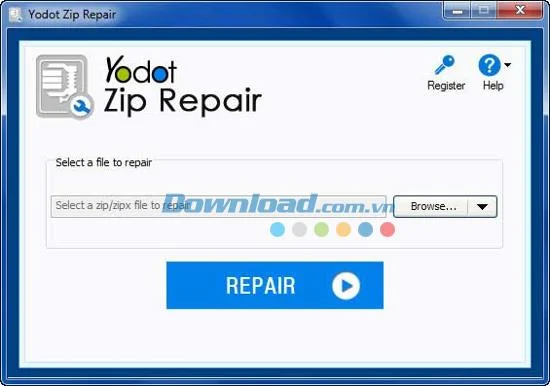
Yodot ZIP Repair - Latest Version Updates for 2024 and 2025

A ZIP file serves as a data container tool that allows one or more files to be archived in a compressed format, significantly reducing their size. This mechanism facilitates easier sharing and transfer of large files over networks, minimizing transmission times.

However, the prevalence of file compression increases the risk of data corruption. Corrupted ZIP files may arise from various errors, including CRC errors, virus infections, download failures, power outages, or unexpected system shutdowns, all of which can hinder your access to ZIP files.

Main Features of Yodot ZIP Repair

Feature Description
Repair ZIP / ZIPX files Fix corrupt ZIP / ZIPX archives, including files created with WinZIP and others.
Password recovery Capable of repairing password-protected ZIP files.
Data recovery support Retrieve lost files from repaired ZIP archives.
Powerful decompression tool Read and extract content from damaged ZIP files without altering the original file.
Preview functionality Preview the contents of repaired files post-scan completion.
Regular updates Enjoy free updates that keep the software up-to-date without changing essential features.
24/7 Technical Support Access free customer support whenever needed.
Free trial version Try the demo version to understand software capabilities before purchasing.

Yodot ZIP Repair - Software to repair damaged ZIP files

Common Causes of ZIP File Corruption

Cause Description
Decompression errors Errors during the extraction process due to insufficient memory can lead to data corruption.
CRC error Changes to raw data while sharing ZIP files can produce CRC errors.
Incomplete downloads Partially downloaded ZIP archives are inaccessible.
Virus infections Malware attacks can corrupt ZIP files rendering them unopenable.
Unknown compression methods Using incompatible compression techniques may damage ZIP file structures.
Improper shutdown Sudden shutdowns during file processing can damage ZIP files.

System Requirements

  • RAM: Minimum 1GB
  • Free Disk Space: At least 50MB
  • File Format: ZIP / ZIPX

Steps to Repair ZIP Files Using Yodot ZIP Repair

  1. Download and install the free demo version of Yodot ZIP Repair.
  2. Run the application and follow on-screen instructions to start the repair process.
  3. Select the damaged ZIP or ZIPX file you wish to repair.
  4. The software will then scan the selected ZIP archive for errors.
  5. Upon completion, a message will confirm the successful repair.
  6. Review the file structure of the recovered items.
  7. Choose a destination to save the repaired ZIP file.

Leave a Comment

How to Fix Microsoft Teams Download Error on Phone

How to Fix Microsoft Teams Download Error on Phone

Encountering Microsoft Teams "Download Error" on your phone? Get instant fixes for Android & iOS. Clear cache, update apps, and more—back to chatting in minutes without frustration!

Solving Microsoft Teams VOIP Connection Error

Solving Microsoft Teams VOIP Connection Error

Struggling with Microsoft Teams VOIP connection error? Discover step-by-step fixes to solve Microsoft Teams VOIP connection error instantly. Network tweaks, cache clears, and more for seamless video calls.

Solving Microsoft Teams Unexpected Error on Startup

Solving Microsoft Teams Unexpected Error on Startup

Tired of the frustrating Microsoft Teams 'Unexpected Error' on startup? Discover step-by-step fixes, from clearing cache to advanced resets, to get Teams running smoothly again. Quick, reliable solutions for Windows and Mac users.

How to Fix Microsoft Teams Download Error Unexpected

How to Fix Microsoft Teams Download Error Unexpected

Tired of Microsoft Teams "Download Error" Unexpected blocking your workflow? Follow our expert, step-by-step guide with quick fixes and advanced tips to resolve it instantly. No reinstall needed!

Causes of oil heater noise, oil leakage and no heating when in use

Causes of oil heater noise, oil leakage and no heating when in use

Oil heaters make noise, leak oil, and do not heat up. These are all problems that arise when using a heater. So what are the causes of these problems? Read our article below!

How to Assign Participants to Breakout Rooms in Microsoft Teams

How to Assign Participants to Breakout Rooms in Microsoft Teams

Master how to assign participants to breakout rooms in Microsoft Teams with this step-by-step guide. Boost meeting engagement, automate assignments, and troubleshoot like a pro for seamless virtual collaboration.

How to Fix Microsoft Teams Giá Error Pricing Update

How to Fix Microsoft Teams Giá Error Pricing Update

Struggling with Microsoft Teams "Price Error" after the latest pricing update? Discover step-by-step fixes to resolve it quickly, restore seamless collaboration, and avoid subscription headaches. Updated with the newest solutions.

Solving Microsoft Teams Background Error Transparency

Solving Microsoft Teams Background Error Transparency

Struggling with Microsoft Teams Background Error Transparency? Discover proven step-by-step fixes for blurry, glitchy virtual backgrounds. Restore perfect transparency in Teams meetings effortlessly. Updated with the latest solutions.

How to Fix Microsoft Teams Đăng nhập Error (Login)

How to Fix Microsoft Teams Đăng nhập Error (Login)

Struggling with Microsoft Teams "Đăng nhập" login error? Discover step-by-step fixes for smooth sign-in. Clear cache, update app, and more – no tech skills needed! Works on Windows, Mac, and web.

Solving Microsoft Teams Web Error 503 Service Unavailable

Solving Microsoft Teams Web Error 503 Service Unavailable

Tired of Microsoft Teams Web Error 503 Service Unavailable blocking your meetings? Discover quick, step-by-step fixes to resolve the 503 error fast – no tech skills needed! Clear cache, check status, and get back to collaborating seamlessly.

Troubleshooting Microsoft Teams Update Error 0x80070002

Troubleshooting Microsoft Teams Update Error 0x80070002

Stuck with Microsoft Teams Update Error 0x80070002? Discover proven troubleshooting steps to resolve this frustrating issue quickly and get your Teams app updated seamlessly for uninterrupted collaboration.

Solving Microsoft Teams Error AADSTS50020: User Account Conflict

Solving Microsoft Teams Error AADSTS50020: User Account Conflict

Tired of Microsoft Teams Error AADSTS50020 blocking your sign-in? Discover step-by-step fixes for user account conflicts, backed by the latest Azure AD solutions. Get back to work fast!

How to Fix Microsoft Teams Microphone Error No Sound

How to Fix Microsoft Teams Microphone Error No Sound

Tired of Microsoft Teams microphone error with no sound? Discover quick, step-by-step fixes for Teams mic not working on Windows, Mac, and more. Restore crystal-clear audio in minutes!

How to Fix Microsoft Teams Task Management Error

How to Fix Microsoft Teams Task Management Error

Tired of the Microsoft Teams "Task Management" Error disrupting your workflow? Discover proven fixes like clearing cache, updating Teams, and troubleshooting permissions to get back to seamless collaboration in minutes. Updated with the latest solutions.

How to Fix Microsoft Teams How to Teams Help Error

How to Fix Microsoft Teams How to Teams Help Error

Frustrated by the Microsoft Teams 'How to Teams' Help Error? Discover proven, step-by-step solutions to fix it quickly and restore smooth help access. Latest 2026 updates included for seamless teamwork.