Updated Tips to Play Fruit Ninja in 2024-2025 for High Scores

Fruit Ninja is a timeless classic in the mobile gaming world, captivating players with its simple yet challenging fruit slashing mechanics. While learning to play the game takes little time, mastering the tips to achieve high scores in Fruit Ninja is a different story. This guide will provide you with updated strategies for 2024-2025 that will help you excel in the game!

>>> Download Fruit Ninja game for free for iOS.

>>> Download Fruit Ninja game for free for Android.

>>> Download Fruit Ninja game for PC.

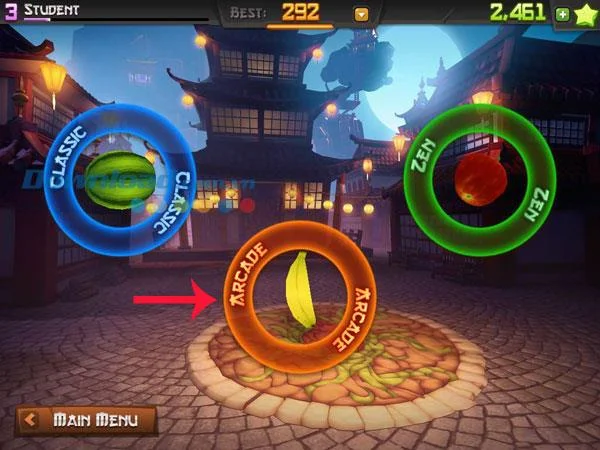
Fruit Ninja offers three main game modes: Classic, Arcade, and Zen. In this guide, we will focus on how to play Fruit Ninja using Arcade mode for beginners. This mode allows for offline play where you have 60 seconds to slice as many fruits as possible, giving you a platform for impressive high scores.
Tips to play Fruit Ninja score high

1. Choose Your Game Mode

From the main menu, select Game Mode to navigate to the Fruit Ninja game options. Tap the Arcade box with the banana icon to start your game with a 60-second timer.

Tips to play Fruit Ninja score high

2. Slash as Many Combos as Possible

A combo happens when you cut three or more fruits in one continuous motion. Keep your finger on the screen to maintain the combo for extra points!

Tips to play Fruit Ninja score high

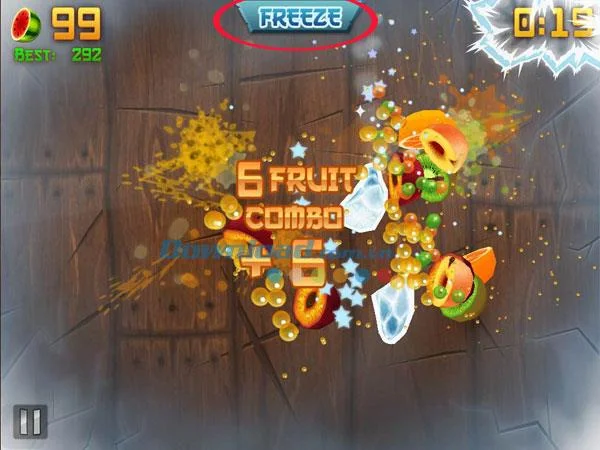
Each time you create a combo, the game will display the message Fruit Combo + amount of sliced fruit. You can receive 5 to 30 points depending on your combo score, especially if you achieve 18 continuous combos!

3. Make Use of Bananas for Extra Points

Bananas play a crucial role in improving your score. When you see one, slash it as quickly as possible to unlock special features:

Banana Type Effect
Orange Banana Launches multiple fruits for additional combos.
Light Green Banana Freezes time, giving you a slower pace for better slicing.
Dark Green Banana Double your points until it expires.

Be cautious of bombs; hitting them will remove the bonuses from your bananas!
Tips to play Fruit Ninja score high

4. Other Effective Tips to Maximize Your Score

Here are additional strategies that can significantly boost your performance:

  1. Slash bombs cautiously to avoid losing points and achieve bonuses for multiple hits.
  2. Continuous slashing on the end-of-game pomegranates can yield up to 50 bonus points.
  3. Use devices with better graphics capabilities to slow down fruit and facilitate easier cutting.
  4. Experiment with cutting fruit using 2 or 3 fingers for increased chances of higher scores.

Tips to play Fruit Ninja score high

In conclusion, while Fruit Ninja is primarily a game of skill and strategy, luck also plays a role in achieving high scores. By following these updated tips, you can enhance your skills and enjoy a more rewarding gaming experience. Good luck, and happy slashing!

Leave a Comment

Step-by-Step: How to Make Breakout Rooms Before a Meeting Starts

Step-by-Step: How to Make Breakout Rooms Before a Meeting Starts

Unlock seamless collaboration with this ultimate step-by-step guide on how to make breakout rooms before a meeting starts in Zoom. Pre-assign participants effortlessly for maximum engagement. Perfect for educators, teams, and leaders.

How to Fix Microsoft Teams Down Server Status 2026

How to Fix Microsoft Teams Down Server Status 2026

Is Microsoft Teams down in 2026? Discover proven steps to fix "Down" server status, troubleshoot outages, and get back to seamless collaboration fast. Quick fixes inside!

Troubleshooting Microsoft Teams Error H Updates

Troubleshooting Microsoft Teams Error H Updates

Struggling with Microsoft Teams "Error H" during updates? Discover step-by-step troubleshooting for Microsoft Teams "Error H" updates, common causes, and quick fixes to restore seamless collaboration. Updated with the latest solutions.

Solving Microsoft Teams Unexpected Error on Mobile Login

Solving Microsoft Teams Unexpected Error on Mobile Login

Tired of the frustrating Microsoft Teams "Unexpected Error" blocking your mobile login? Follow our expert, step-by-step guide with the latest fixes for Android and iOS to regain seamless access fast—no tech skills needed!

Solving Microsoft Teams Unexpected Error Startup

Solving Microsoft Teams Unexpected Error Startup

Tired of Microsoft Teams "Unexpected Error" crashing your startup? Follow our step-by-step guide with the latest fixes for Solving Microsoft Teams "Unexpected Error" Startup. Get back to productive meetings in minutes!

How to Fix Microsoft Teams For Linux Installation Error

How to Fix Microsoft Teams For Linux Installation Error

Frustrated by Microsoft Teams "For Linux" installation error? Discover proven, step-by-step solutions for Ubuntu, Debian, Fedora & more. Fix it fast and get seamless collaboration now!

How to Fix Microsoft Teams Password Error Forgot

How to Fix Microsoft Teams Password Error Forgot

Struggling with Microsoft Teams "Password Error" because you forgot your password? Follow our step-by-step guide on how to fix Microsoft Teams password error forgot issues quickly and securely. No tech skills needed!

Troubleshooting Microsoft Teams Image Error in Chat

Troubleshooting Microsoft Teams Image Error in Chat

Struggling with Microsoft Teams "Image Error" in chat? Discover proven step-by-step troubleshooting tips to resolve image display issues fast. No more frustration—get your chats working smoothly today!

How to Fix Microsoft Teams Free Subscription Error

How to Fix Microsoft Teams Free Subscription Error

Tired of the frustrating Microsoft Teams "Free" Subscription Error blocking your meetings? Discover proven, step-by-step solutions to resolve it fast and restore smooth teamwork. Works on latest versions!

How to Fix Microsoft Teams Web App Browser Error

How to Fix Microsoft Teams Web App Browser Error

Struggling with Microsoft Teams "Web App" Browser Error? Discover proven, step-by-step solutions to resolve it fast. Clear cache, update browser, and more for seamless Teams web app access. Works on latest browsers!

Troubleshooting Microsoft Teams Group Chat Not Loading

Troubleshooting Microsoft Teams Group Chat Not Loading

Struggling with Troubleshooting Microsoft Teams Group Chat Not Loading? Discover proven, step-by-step fixes for the most common issues to get your chats loading smoothly again. Quick wins for desktop, web, and mobile.

How to Fix Microsoft Teams Proxy Error Connection

How to Fix Microsoft Teams Proxy Error Connection

Tired of Microsoft Teams proxy error blocking your calls? Discover simple, step-by-step fixes to resolve proxy connection issues instantly. No tech expertise required – get back to seamless teamwork!

How to Fix Microsoft Teams Time Limit Error

How to Fix Microsoft Teams Time Limit Error

Tired of Microsoft Teams "Time Limit" Error crashing your meetings? Follow our proven, step-by-step guide to fix it quickly—update app, clear cache, and more for seamless collaboration. Works on latest versions!

How to Fix Microsoft Teams Layout Error After Update

How to Fix Microsoft Teams Layout Error After Update

Facing Microsoft Teams Layout Error after the latest update? Discover proven step-by-step fixes to resolve layout glitches, restore perfect UI, and boost productivity fast. No tech skills needed!

How to Fix Microsoft Teams Error K Security

How to Fix Microsoft Teams Error K Security

Struggling with Microsoft Teams "Error K" Security? Follow our step-by-step guide to fix it quickly—no tech expertise needed. Get back to seamless collaboration today!









