Latest Update: How to Retrieve Zalo Password in 2024 and 2025
Learn how to retrieve your Zalo password fastest. If you have forgotten your Zalo password, don
Not long ago, WebTech360 used to guide you how to block messages on Skype, and today, you can also do this with the Zalo software to avoid inconvenience from unwanted accounts.
Zalo for Android | Zalo for iOS
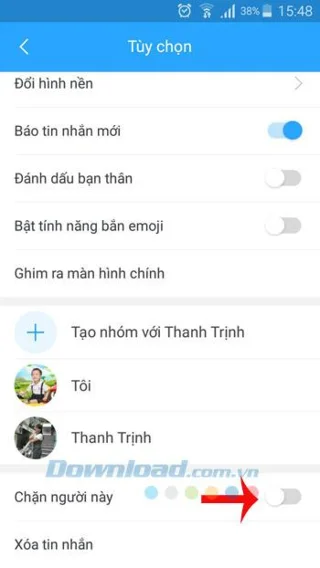
Step 1: Open Zalo on your phone, go to your friends list, click on the name of the person you want to block messages from. Then click on the 3 horizontal dots icon in the top right corner of the screen, drag to the bottom, and slide the slider at Block this person to the right.

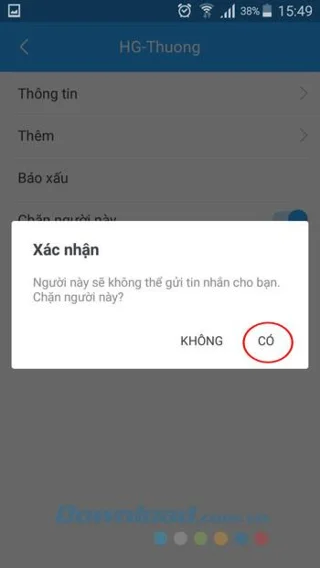
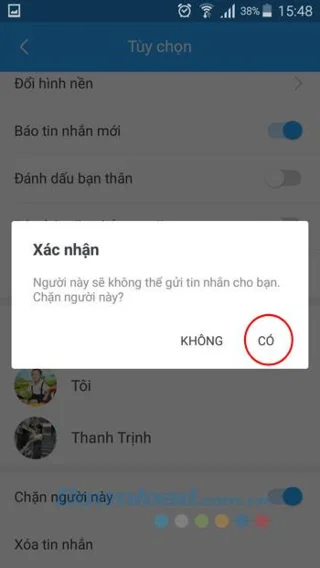
Step 2: A confirmation window appears, click Yes. A blocking success message will appear, indicating that the person can no longer send you messages.

Step 1: To block spam messages from strangers, click the Contacts tab and then click Suggest for making friends. Choose the user you want to block and visit their profile.
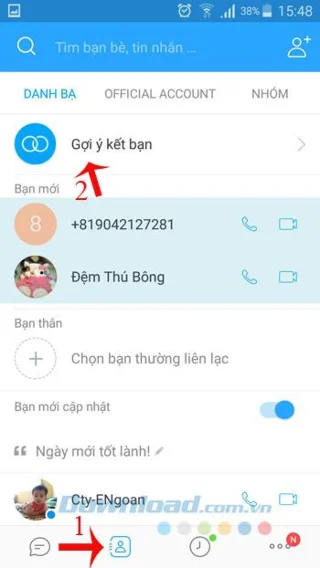

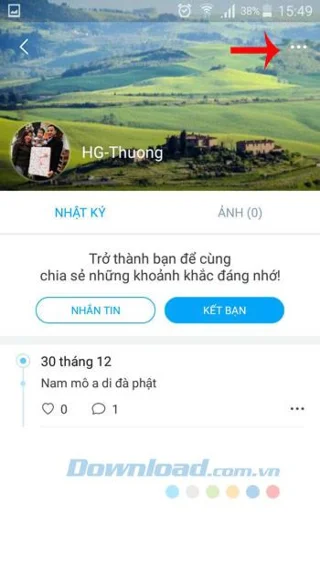
Step 2: On the stranger's personal page, click on the 3 horizontal dots icon in the top right corner, slide the slider at Block this person to the right. Confirm by clicking Yes.

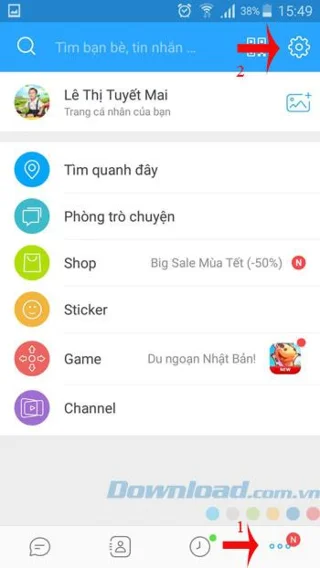
Step 1: To review the block list, click on the 3 horizontal dots icon in the bottom right corner of Zalo's main interface. Then, tap the gear icon in the top right corner and select Messages.
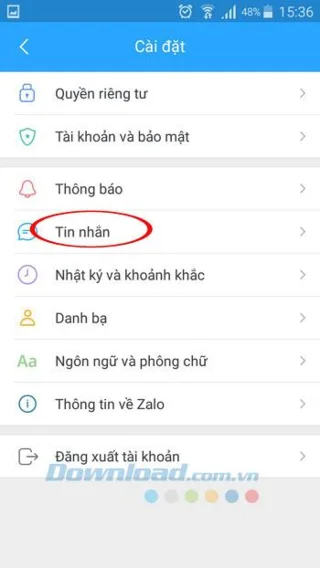
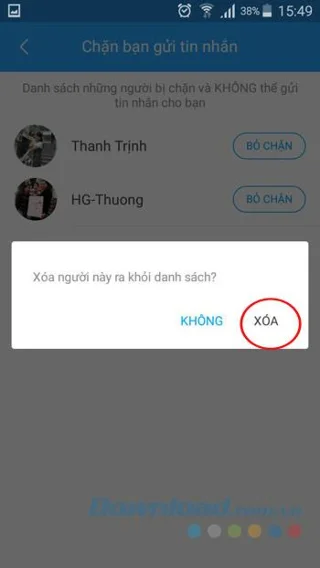
Step 2: Scroll down to the Chat section, tap Block you from sending messages. Here you will see a list of people who are blocked from messaging you. If you wish to unblock, just click the Unblock button next to the person's name, then click Delete to finish.


With these updated steps in 2024 and 2025, you can efficiently block spam messages from both friends and strangers. You won't have to be bothered anymore! Additionally, you can also block strangers from viewing your information and create chat groups on this Zalo software with ease.
I wish you all success!
Learn how to retrieve your Zalo password fastest. If you have forgotten your Zalo password, don
Learn the latest methods to recover and delete Zalo messages on your phone in 2024 and 2025. Explore features and tips to manage your chats effectively.
Updated instructions to change information, account name Zalo that include new features. Learn how to modify your Zalo details effectively.
Discover the fastest methods to find and connect with friends on Zalo in 2024 and 2025. Experience new features and enhancements for user connectivity.
Learn how to delete your Zalo account on your mobile device. Our updated guide for 2024 offers simple steps to permanently delete your account quickly.
Updated instructions for installing Zalo and using it on computers in 2024 and 2025. The latest version brings enhanced features for users.
Learn how to change the chat background on Zalo, especially with special wallpaper updates for 2024 and 2025. Enjoy unique and seasonal designs to enhance your conversations.
Discover how to change your avatar and cover photo on Zalo to express your personality. Follow our easy guide and optimize your Zalo profile image.
Learn how to easily restore deleted messages on Zalo with our step-by-step instructions. Quickly recover your important chats on this popular messaging app.
Discover how to easily add background music to your personal Zalo page with our comprehensive guide on using Zalo for Android and iOS devices.
Discover how to effectively <strong>share QR code on Zalo</strong>. QR codes enhance connectivity, enabling easy friend requests and more on Zalo.
Discover effective strategies to deal with being blocked on Zalo by a lover. Explore insights into the emotional impacts of being blocked in a relationship.
Learn how to login and manage multiple Zalo accounts on the same device effectively.
Learn the latest methods to share contacts using Zalo, the leading free chat application featuring practical contact sharing options.
Struggling with Microsoft Teams Proxy Error? Discover proven Troubleshooting Microsoft Teams "Proxy Error" Settings Fix steps. Clear cache, adjust proxy settings, and get back to seamless calls in minutes with our expert guide.
Tired of Microsoft Teams OneDrive Error blocking file sync? Follow our step-by-step guide to solve Microsoft Teams "OneDrive Error" File Sync issues quickly. Proven fixes for smooth collaboration in Teams channels. Get your files syncing error-free today!
Tired of Microsoft Teams workflows and Power Automate errors halting your productivity? Get step-by-step solutions to common issues like authentication failures, timeouts, and flow errors. Fix them in minutes and automate effortlessly!
Facing Microsoft Teams "Download Error" on MacBook? Discover proven troubleshooting steps to resolve download failures quickly, from cache clears to reinstalls, and get back to smooth teamwork.
Tired of the frustrating Microsoft Teams "Where is Teams" Folder Error? Discover proven, step-by-step troubleshooting fixes to resolve it quickly and restore smooth teamwork. Latest methods included!
Frustrated by Microsoft Teams JavaScript Error on desktop app? Discover proven steps to fix it fast: clear cache, update, reset, and reinstall. Get back to seamless collaboration in minutes!
Struggling with Microsoft Teams "Guest Login" Error? Discover step-by-step fixes, from quick cache clears to admin settings, to resolve guest access issues fast and collaborate seamlessly. Updated with the latest tips!
Tired of the Microsoft Teams "For PC" download error blocking your work? Follow our proven, step-by-step guide to resolve it quickly and get Teams running smoothly on your PC today.
Struggling with Microsoft Teams "Windows 7" login error? Discover step-by-step fixes for this frustrating issue on Windows 10/11. Clear cache, edit registry, and more – get back to seamless collaboration today!
Tired of Microsoft Teams Error Code 0x80070005 blocking your meetings? Follow this 2026 guide with step-by-step fixes for access denied issues. Get Teams running smoothly in minutes!
Master the installation of the Microsoft Teams Add-in for Outlook 2026 effortlessly. Boost your productivity with seamless scheduling and meetings. Follow our proven, up-to-date steps for instant success!
Struggling with Microsoft Teams "License Error" 2026? Discover proven, step-by-step solutions to resolve it fast. Clear cache, check licenses, and get back to seamless collaboration—no IT help needed!
Whether youre in your 50s, 60s, or even 70s, its not too late to prioritize your health and put yourself first. Here are the best exercises for people 50 and older.
Struggling with Microsoft Teams Error Caa50024 on Windows 10/11? Follow our step-by-step fixes to resolve crashes and launch issues quickly. Latest proven solutions for seamless teamwork.
Stuck with Microsoft Teams login error AADSTS50011? Discover proven, step-by-step fixes to resolve the reply URL mismatch issue and log in seamlessly. No tech skills needed!