Since the “last online” feature was removed from Roblox, finding an alternative has been challenging for the playerbase. Luckily, there are still a couple of ways to return the option and get the full game experience.

In this article, we’ll show you how to tell when someone was last online in Roblox, thus putting an end to all the uncertainty.
Adding the BTRoblox Extension
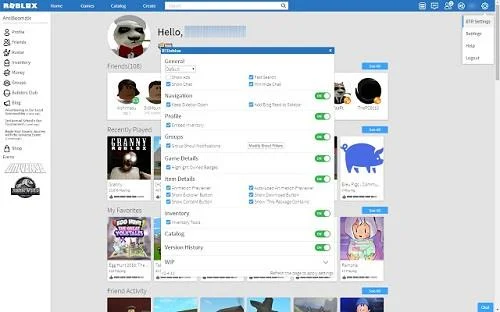
A quick means of retrieving the “last online” option is to enable the BTRoblox Chrome extension. The main purpose of the extension is to optimize your game experience by introducing a series of handy features, including the coveted option to check when someone was last online.

To enable the extension, here’s what you need to do:
- Access the extension menu on Google Chrome.
- Enter “BTRoblox” in the search bar.
- Click the link in the search results.
- Click “Add to Chrome”.
This particular feature was brought back in version 2.7.0 alongside a number of useful additions such as the option to disable “Copy asset id” context menu items.
What Else Does BTRoblox Bring to the Table?
If you install the BTRoblox extension, here are just some improvements and modifications you’ll get:
- A newer API.
- 10 more currency options.
- Enabled hover previews for animations and emotes.
- Updated fast search to use newer endpoints.
- Improved compatibility with RTrack.
- Additional support for aliases on player profiles.
Installing a Game to Access “Last Online” Information
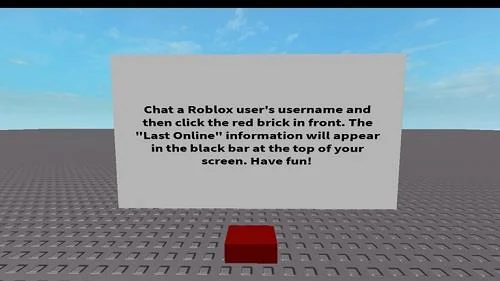
Another way of discovering a player’s most recent online activity is to install a game conveniently titled “Check a Roblox User’s Last Online Information”. It was created in 2018, a year after the removal of the original feature.

Once you install the game, it’s pretty straightforward to use. Here’s how to do it:
- Open a chat with the player you’re interested in
- Click or tap on the red box in front
Do this, and the information will appear on the screen.
And that’s all there is to it! You’ve now learned another method to find out when someone was last online in Roblox.
What If the Game Is Not Working?
While you might encounter glitches and crashes, these are usually not related to the game. Namely, the main culprits typically include technical issues in the Roblox API, an overloaded HttpService or a broader game issue. Although the creator of the game can’t fix these issues, they generally resolve themselves automatically within half an hour.
Is There a Game That Shows What Game Someone Last Played?
As of now, this isn’t doable. The reason being the lack of API that presents every player’s last-played game. Another obstacle to developing such a game would be the privacy settings of some users. In particular, some players have their Follow settings open to friends only or to no one. This prohibits other users from tracking their activity.
Can You Keep Track of Your Child’s Roblox Activity?
If you’re looking to find out about your child’s interaction with Roblox, there are various ways to do it. Here are some features you can access while logged in:
- Followers and friends (the “Friends” section).
- Trade and virtual item purchase history (“My Transactions”).
- Direct and small group chat (check out the Chat & Party option). Here, you can see individual chat histories of Friends, and Friends of Friends.
- Private message history (“Messages”).
Don’t Miss Out
Even though Roblox removed the official “last online” function from its features, it’s still possible to access the option. You can either add the BTRoblox extension to your Google Chrome or install the “Check a Roblox User’s Last Online Information” game on your PC or mobile device. Either one should do the trick and provide you with a better overall game experience.
Have you tried both of these methods? Did either BTRoblox or the game perform properly? Let us know which one worked better for you in the comments section below.