Pop Culture Costume Ideas That Will Dominate Halloween 2026

Plan a recognizable Halloween 2026 look with pop culture costumes inspired by Spider-Man, Supergirl, Toy Story 5, Moana, Mario, and Wednesday.
AI search engines are great for many types of research and finding simple answers to questions. But while they do a pretty good job in these areas, they will never completely replace classic Google Search.
5. AI Search Is Sometimes Outdated
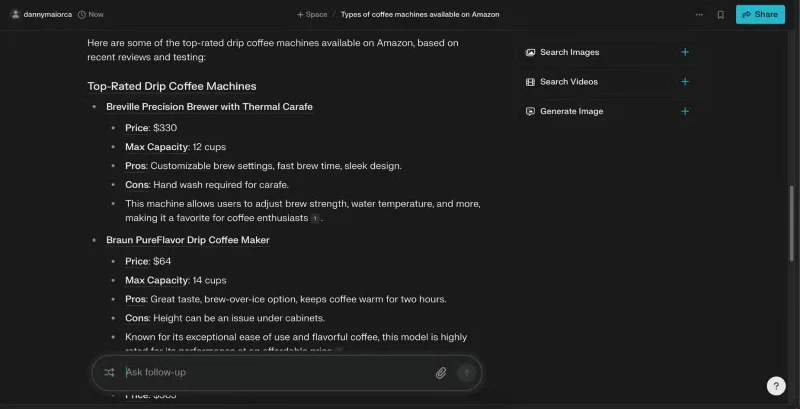
One of the biggest problems with AI searches is that sometimes the results are not up to date. For example, sometimes you will search for terms and get sources that haven't been updated in years.
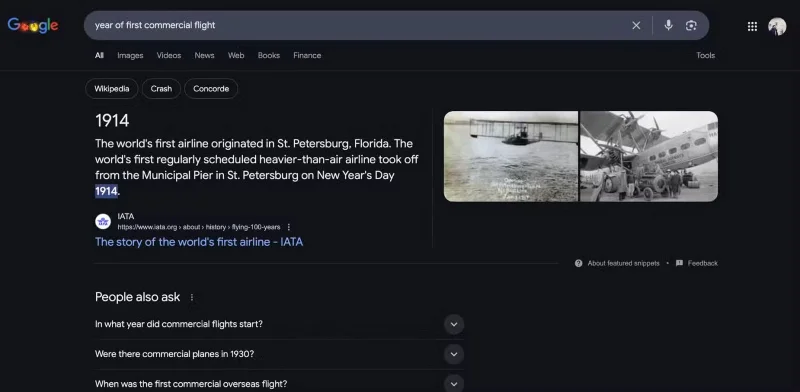
In contrast, Google searches are constantly updated; it’s not uncommon to see a newly published article or video appear at the top of the search engine results page (SERP). This timeliness is crucial when conducting research, and until AI tools catch up, they will always be a secondary option.
4. Google is better for fact checking
When testing Perplexity with Google , the results showed that Perplexity did not perform well and the results were more ambiguous. The information was often contradictory and you can never trust it 100%.
Google is still the best tool for fact-checking. Google excels at general knowledge, and people feel more comfortable verifying claims. While Google isn’t perfect, AI tools are sometimes notorious for providing inaccurate information.
3. AI search engines are not easily accessible
Any technology needs mass appeal to disrupt the way things are done. While tech watchers are well aware of the impact AI search engines can have, we often forget that the average user doesn’t think the same way.
By this point, many people have heard of programs like ChatGPT , but very few people use them (although those immersed in technology feel that way!). Without a large number of people starting to use AI search engines like Perplexity, it will be very difficult for AI search engines to completely replace classic Google Search.
Many people are also tired of the constant talk of AI, which is one of the signs that we have reached Peak AI. It is difficult to attract many people if they do not see these applications as anything more than a passing fad.
2. It is difficult to change people's habits
Even if AI search engines have mass appeal, it will be difficult to change people’s ingrained habits. Google has been the default search engine for many people since the early 2000s. Many people grew up not using anything other than Google and social media to find information.
Even if you convince many people to change, that doesn't mean everyone will change. For example, some people still read newspapers and watch cable TV - despite the advent of more modern forms of media.
The only way you’re going to change most people’s habits is by offering something that’s easy to use and does a better job than what’s already there. It’s hard to believe that AI tools will do that.
1. Google has a simpler interface
One of the reasons Google is so popular is because it is easy to use. The interface is a design masterclass; you simply type in a query and hit Enter before you get search results. When you do get those results, they are presented in an easy-to-navigate manner. There is no need to worry about AI; this is why Google stands out from most other search engines.
On the other hand, AI search engines require a learning curve. You have to learn how to start a conversation, and the app interface is a bit more complicated. These factors create resistance, making it difficult for many people to justify switching to an AI search engine.
AI search apps have their place in the search ecosystem, but they probably won’t replace classic Google Search entirely. Google is easier to use, and some people have a habit of using it all their lives. AI search will replace some functionality, but it won’t be a direct replacement for everything.
Plan a recognizable Halloween 2026 look with pop culture costumes inspired by Spider-Man, Supergirl, Toy Story 5, Moana, Mario, and Wednesday.
Sort leftover Halloween candy safely, share or repurpose sealed treats, and choose food use or compost for pumpkins based on their condition.
Compare workplace Halloween costume choices by respect, dress code, mobility, and safety—and learn when a subtle accessory or a policy check is the better option.
Find a couples costume that fits your style, budget, and comfort level, from Addams Family classics to original inside-joke duos.
Need a last-minute high school Halloween costume? Compare 10 easy closet-based ideas by prep time, comfort, school-day practicality, and simple safety checks.
Use a simple 2026 Halloween decorating timeline for indoor décor, outdoor displays, and fresh pumpkins, with practical adjustments for weather and events.
Mix five vivid, approachable Halloween cocktails with measured recipes, simple prep tips, and an alcohol-free option for your party guests.
Find 15 office-friendly Halloween costume ideas for 2026, with practical checks for dress codes, respectful themes, comfort, and workplace safety.
Plan a fun elementary school Halloween party with easy crafts, games, inclusive treats, costume tips, and a sample 75-minute classroom schedule.
Compare realistic side hustles for 2026 by startup cost, fees, flexibility, and income control, with current tax and scam guidance from official sources.








