5 unique features of the Pixel 9 Pro Fold

Google launched the Pixel 9 Pro Fold at its Made by Google event in August 2024. While it has a few improvements over its predecessor to compete with the Galaxy Z Fold 6 and OnePlus Open, these are the features that many people are most excited to try.

1. Performance of Tensor G4 Chip

5 unique features of the Pixel 9 Pro Fold
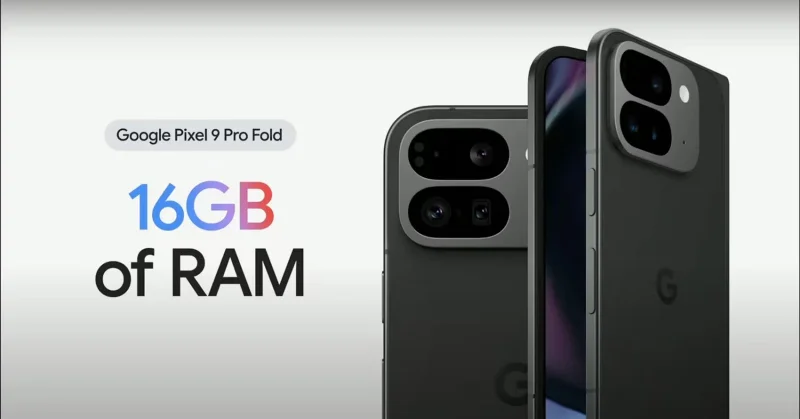
Google Pixel 9 Pro with 16GB RAM

The Pixel 9 Pro Fold is powered by Google's most efficient chip yet, the Tensor G4 processor. Google claims the 4nm chip is 20% faster at web browsing and 17% faster at launching apps than its predecessor.

While many Android flagships, like the Galaxy Z Fold 6, offer 12GB of RAM, the Pixel 9 Pro Fold has 16GB of RAM to ensure smooth performance for its AI-powered features. Power users are eager to see how much they can take advantage of the foldable phone's multitasking capabilities.

2. Professional camera features

5 unique features of the Pixel 9 Pro Fold
Taking a selfie with the Google Pixel 9 Pro Fold

One thing many people look for when buying a new smartphone in 2024 is a good camera. The Pixel 9 Pro Fold’s camera hardware isn’t much different from its predecessor, but some of the features Google introduced make up for that.

If you're the type who likes to take photos of fireworks or the moon late at night, the Pixel's Night Sight Video feature won't disappoint. Even when you're shooting video in low light, Google's AI applies noise reduction to ensure you get the highest quality video.

One of the iPhone camera settings used to shoot better videos is Macro Control, which lets you take photos of objects as close as 2cm away. With the Pixel 9 Pro Fold, Google is offering Macro Focus, which lets you take high-quality photos of the smallest objects.

If you’ve ever tried to take a photo of a toddler who won’t stand still or look at the camera, you’ll appreciate the Made You Look feature on the Pixel 9 Pro Fold. It lets you display a colorful image on the device’s cover display to grab your child’s attention. When you see their smile, you can snap a photo and keep the memory forever!

3. Google's AI editing capabilities

5 unique features of the Pixel 9 Pro Fold
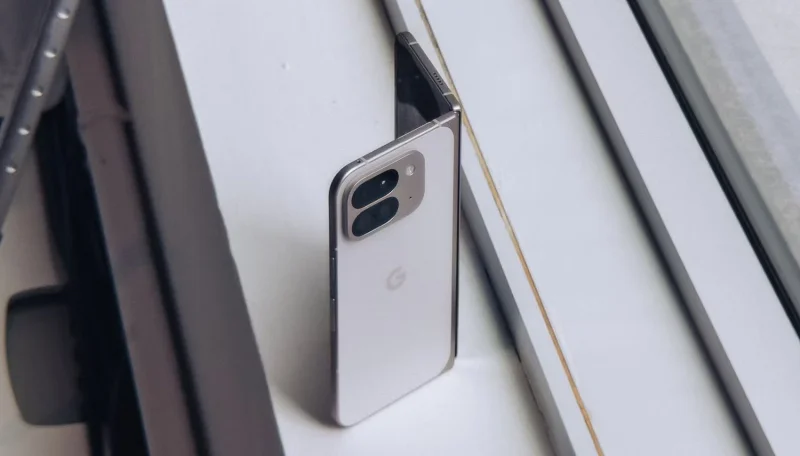
Pixel 9 Pro Fold in White

If you’re a regular photographer, chances are you don’t have many photos of yourself with your loved ones. That’s why many people are excited about Google’s Add Me feature, which essentially merges two images to make sure no one gets left out. All you have to do is take a group photo, then ask someone else to take another photo while you switch places with them, and let Add Me work its magic!

Another useful AI feature from Google is Magic Editor, which reframes your photo after you take it using Generative AI and techniques like the rule of thirds to suggest the best crop.

Reimagine is another feature that many people are excited about. It allows you to select a specific part of an image that you want to edit or enhance. Whether you want to add a new element or change an existing element, just describe the changes you want and you’re done!

4. Pixel Screenshots

While many people use apps like Google Tasks to organize their lives , they only cover a small portion of the task. Half of your device's library is filled with screenshots, and if you never delete old photos from your phone, finding screenshots when you need them is often a challenge. In those cases, Pixel Screenshots, a Pixel-exclusive app, can come in handy.

The AI ​​feature uses Gemini Nano to extract valuable details from screenshots and make them searchable. For example, if you take a screenshot of a graduation invitation, you can ask Google for details like the time, date, and location, and Pixel Screenshots will retrieve the information for you.

5. Battery life over 24 hours

5 unique features of the Pixel 9 Pro Fold
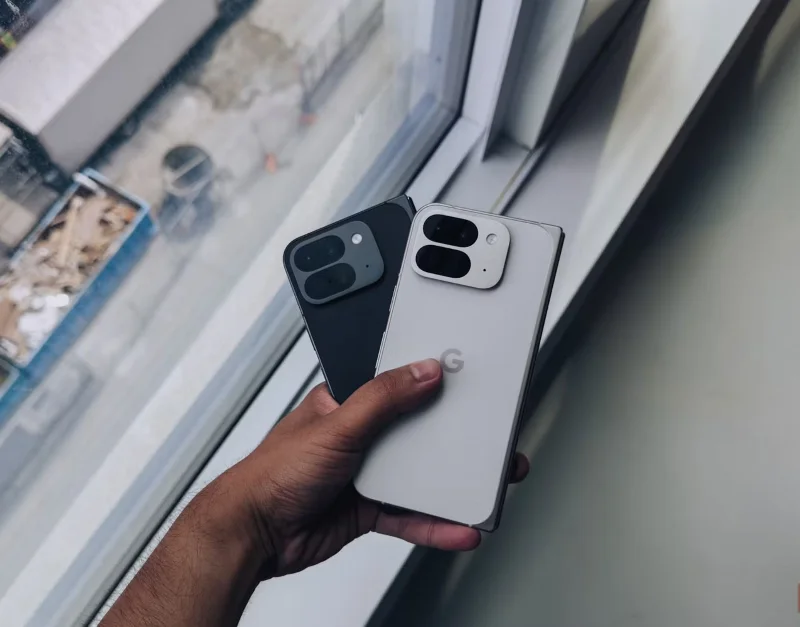
Pixel 9 Pro Fold in white and black

If you travel a lot every day, carrying a bulky power bank around with you at all times isn’t ideal, which is why choosing devices that promise great battery life is so important. Luckily, the Pixel 9 Pro Fold has a 4,650 mAh battery.

Google claims the Pixel 9 Pro Fold can last over 24 hours on a single charge, and up to 72 hours with Extreme Battery Saver enabled. While the battery is slightly smaller than its predecessor, the Tensor G4 chip consumes less power in everyday use, suggesting a single charge will last longer.

While these estimates are based on Google’s testing, it’s fun to put them to the test and reduce how often you need to charge your phone. If the battery life is close to what Google claims, the Pixel 9 Pro Fold will be impressive!

Starting at $1,799 for the 256GB version, the Google Pixel 9 Pro Fold is one of the best foldable phones you can buy in 2024. Google promises seven years of OS upgrades, security updates, and new features through Pixel Feature Drops, so if you’re thinking about buying your first foldable phone, now might be the perfect time to get started!

Leave a Comment

Causes of oil heater noise, oil leakage and no heating when in use

Causes of oil heater noise, oil leakage and no heating when in use

Oil heaters make noise, leak oil, and do not heat up. These are all problems that arise when using a heater. So what are the causes of these problems? Read our article below!

How to Assign Participants to Breakout Rooms in Microsoft Teams

How to Assign Participants to Breakout Rooms in Microsoft Teams

Master how to assign participants to breakout rooms in Microsoft Teams with this step-by-step guide. Boost meeting engagement, automate assignments, and troubleshoot like a pro for seamless virtual collaboration.

How to Fix Microsoft Teams Giá Error Pricing Update

How to Fix Microsoft Teams Giá Error Pricing Update

Struggling with Microsoft Teams "Price Error" after the latest pricing update? Discover step-by-step fixes to resolve it quickly, restore seamless collaboration, and avoid subscription headaches. Updated with the newest solutions.

Solving Microsoft Teams Background Error Transparency

Solving Microsoft Teams Background Error Transparency

Struggling with Microsoft Teams Background Error Transparency? Discover proven step-by-step fixes for blurry, glitchy virtual backgrounds. Restore perfect transparency in Teams meetings effortlessly. Updated with the latest solutions.

How to Fix Microsoft Teams Đăng nhập Error (Login)

How to Fix Microsoft Teams Đăng nhập Error (Login)

Struggling with Microsoft Teams "Đăng nhập" login error? Discover step-by-step fixes for smooth sign-in. Clear cache, update app, and more – no tech skills needed! Works on Windows, Mac, and web.

Solving Microsoft Teams Web Error 503 Service Unavailable

Solving Microsoft Teams Web Error 503 Service Unavailable

Tired of Microsoft Teams Web Error 503 Service Unavailable blocking your meetings? Discover quick, step-by-step fixes to resolve the 503 error fast – no tech skills needed! Clear cache, check status, and get back to collaborating seamlessly.

Troubleshooting Microsoft Teams Update Error 0x80070002

Troubleshooting Microsoft Teams Update Error 0x80070002

Stuck with Microsoft Teams Update Error 0x80070002? Discover proven troubleshooting steps to resolve this frustrating issue quickly and get your Teams app updated seamlessly for uninterrupted collaboration.

Solving Microsoft Teams Error AADSTS50020: User Account Conflict

Solving Microsoft Teams Error AADSTS50020: User Account Conflict

Tired of Microsoft Teams Error AADSTS50020 blocking your sign-in? Discover step-by-step fixes for user account conflicts, backed by the latest Azure AD solutions. Get back to work fast!

How to Fix Microsoft Teams Microphone Error No Sound

How to Fix Microsoft Teams Microphone Error No Sound

Tired of Microsoft Teams microphone error with no sound? Discover quick, step-by-step fixes for Teams mic not working on Windows, Mac, and more. Restore crystal-clear audio in minutes!

How to Fix Microsoft Teams Task Management Error

How to Fix Microsoft Teams Task Management Error

Tired of the Microsoft Teams "Task Management" Error disrupting your workflow? Discover proven fixes like clearing cache, updating Teams, and troubleshooting permissions to get back to seamless collaboration in minutes. Updated with the latest solutions.

How to Fix Microsoft Teams How to Teams Help Error

How to Fix Microsoft Teams How to Teams Help Error

Frustrated by the Microsoft Teams 'How to Teams' Help Error? Discover proven, step-by-step solutions to fix it quickly and restore smooth help access. Latest 2026 updates included for seamless teamwork.

Solving Microsoft Teams Room Error Syncing

Solving Microsoft Teams Room Error Syncing

Struggling with Microsoft Teams "Room Error" Syncing? This ultimate guide provides step-by-step fixes for Microsoft Teams Room Error Syncing issues, ensuring seamless meetings and quick resolutions. Updated with the latest tips.

Troubleshooting Microsoft Teams Workflows Power Automate

Troubleshooting Microsoft Teams Workflows Power Automate

Master troubleshooting Microsoft Teams Workflows Power Automate issues with step-by-step fixes for common errors. Get your automations running smoothly – no more frustration! Proven solutions for triggers, permissions, and more.

Solving Microsoft Teams Restart Error (2026)

Solving Microsoft Teams Restart Error (2026)

Struggling with Microsoft Teams "Restart Error" in 2026? Discover proven, step-by-step fixes to resolve the endless restart loop quickly. Clear cache, reset app, and more for seamless collaboration. Get back online fast!

How to Create Breakout Rooms in Microsoft Teams Before a Meeting

How to Create Breakout Rooms in Microsoft Teams Before a Meeting

Master how to create breakout rooms in Microsoft Teams before a meeting with this easy guide. Pre-assign participants, boost collaboration, and elevate your virtual sessions effortlessly.