Aurelion Sol DTCL season 8: Standard items, lineup, gameplay

ASol DTCL season 8 can be added to any squad you like, because this is a Monster that does not depend on any clan activation. Simply, if you lack damage, you just need to add him, along with a few suitable items and you will have a secondary carry.

Aurelion Sol DTCL season 8 will have skills unlike any ASol of any current DTCL version. Not as great as ASol season 7, ASol this season 8 will only call down meteors to deal random magic damage, you can prepare some items for ASol and the lineup that can suit him below.

Aurelion Sol DTCL Season 8 Stats and Skills

Clan
Aurelion Sol DTCL season 8: Standard items, lineup, gameplay

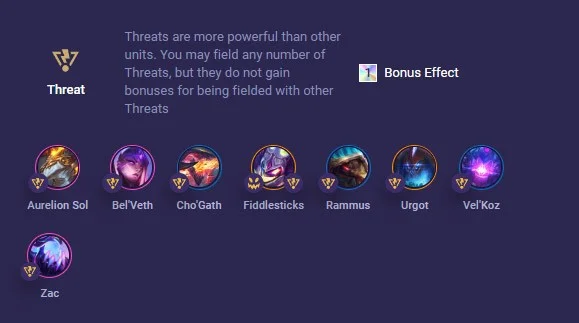
Aurelion Sol only has one Monster trait, so new players can put him in any team. Especially teams that need magic damage, or you can also put him in a team that is all Monsters.

Since he is a champion that only appears from mid to late game, if you use a champion that deals magic damage, you can ask someone to hold items for Aurelion Sol. These champions can be Lux, Jinx, Kai'Sa, Sona, Zoe.

  • Cost: 4 gold
  • Health: 850/1530/2754
  • Energy: 90
  • Armor: 30
  • Magic Resistance: 30
  • Damage: 28/50/91
  • Damage: 40/72/130
  • Attack speed: 0.7
  • Critical Rate: 25%
  • Range: 4 cells

Ability: Aurelion Sol summons 3/3/6 meteors to hit random enemies that explode on impact. Each meteor deals 90/150/1000 magic damage and burns for 10 seconds, dealing true damage equal to 10% of the target's max health and reducing healing received by 25%.

Position: Back Row

How to build Aurelion Sol DTCL, build Aurelion Sol season 8 DTCL

Still, the most suitable equipment for Aurelion Sol DTCL season 8 will still be familiar items like ASol season 7 such as: Blue Charm, Evil Tome, Sorcerer's Hat, Infinity Edge, Gem Gauntlet (x2), Giant Slayer, Hand of Justice, Hextech Gunblade, Electric Knife, Shojin Spear.

Prioritize component equipment like Oversized Rod > Tears > BF Sword > Sparring Gloves.

Aurelion Sol DTCL season 8: Standard items, lineup, gameplay

ASol DTCL season 8 lineup, ASol DTCL season 8 build

Monster

It would be difficult to assemble a team of only monsters, but even without benefiting from any buffs, Monster champions are still very strong because each champion has superior control or damage skills than other champions that benefit from other buffs.

Aurelion Sol DTCL season 8: Standard items, lineup, gameplay

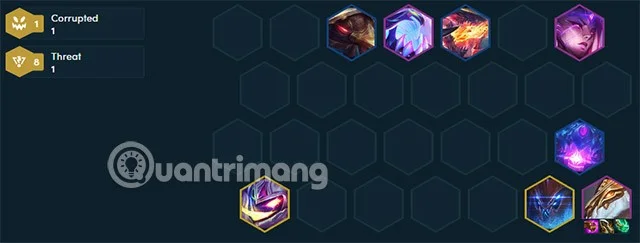
You should have a team that has built up a win streak early on and then switch to this team late if you see a lot of ASol and other tanky Monsters. Especially Cho'Gath and Rammus, Zac.

6 Minds

Or if you have Mind Seal, you can throw it to ASol. Mind Seal increases SMTP stacking, so it is very suitable to support more SMPT for ASol. Mage Seal is also a very suitable option because it supports increasing SMPT along with firing more attacks.

Aurelion Sol DTCL season 8: Standard items, lineup, gameplay

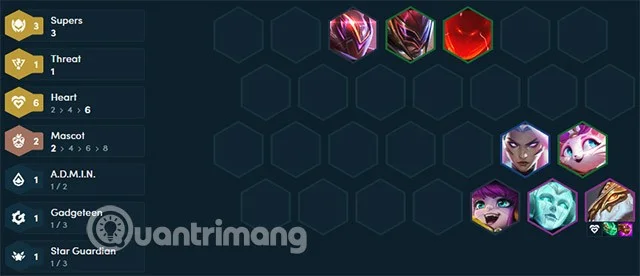
If you use Mind Seal, you can arrange 3 Supers in the front row and roll for them. Remember to add tank items for these 3, Gangplank can keep items that deal damage such as Hurricane, Blue Bow, Deathblade or Infinity Edge, Rageblade. The general who keeps items for Asol in this team can be Sona or Lulu. If you see Syndra, you can replace her with Lulu or Yuumi.

Although Asol in season 8 does not have the same great skills as Aurelion Sol in season 7. But because he is a free champion, he can enter and exit the formation flexibly. He just needs enough items and enough tanks to protect him so he can deal damage to the enemy's backline.

Leave a Comment

Solving Microsoft Teams Error R Restart

Solving Microsoft Teams Error R Restart

Tired of the endless Microsoft Teams "Error R" restart loop? Get step-by-step fixes to solve Microsoft Teams Error R quickly. Clear cache, reset, reinstall & more for smooth collaboration. Works on Windows, Mac & web.

Solving Microsoft Teams Bị lỗi Troubleshooting Guide

Solving Microsoft Teams Bị lỗi Troubleshooting Guide

Struggling with Microsoft Teams "Bị lỗi" issues? Discover proven fixes for crashes, sign-in errors, and more in this comprehensive troubleshooting guide. Get back to seamless collaboration!

Troubleshooting Microsoft Teams How Download Error

Troubleshooting Microsoft Teams How Download Error

Struggling with the Microsoft Teams "How Download" error? Discover step-by-step fixes for smooth file downloads, app updates, and more. Get back to collaborating without frustration!

How to Fix Microsoft Teams Error Code 2603 (2026)

How to Fix Microsoft Teams Error Code 2603 (2026)

Frustrated by Microsoft Teams Error Code 2603? Get instant relief with our step-by-step guide to fix installation failures, crashes, and more in the latest 2026 updates. Works for all users!

Solving Microsoft Teams Wiki in Teams Error Loading

Solving Microsoft Teams Wiki in Teams Error Loading

Tired of the frustrating Microsoft Teams "Wiki in Teams" error loading? Get step-by-step fixes for Wiki not loading in Teams, clear cache, reset settings, and more. Resolve it fast with our expert guide.

How to Keep Microsoft Teams Active and Available All Day

How to Keep Microsoft Teams Active and Available All Day

Master how to keep Microsoft Teams active and "Available" all day. Proven tips, tools, and settings to avoid "Away" status, boost productivity, and never miss a beat in your workday.

How to Download Microsoft Teams for Windows 11 in 2026

How to Download Microsoft Teams for Windows 11 in 2026

Discover how to download Microsoft Teams for Windows 11 in 2026 with our ultimate guide. Official methods, troubleshooting, and pro tips for seamless installation and instant collaboration.

How to Fix Microsoft Teams Groups Visibility Error

How to Fix Microsoft Teams Groups Visibility Error

Tired of missing groups in Microsoft Teams? Discover how to fix the "Groups" Visibility Error with simple, up-to-date steps. Restore your teams visibility fast and frustration-free.

The Best Vitamins and Minerals for Your Eyes

The Best Vitamins and Minerals for Your Eyes

The eyes are the windows to the soul. So take good care of them with the following eye vitamins.

Solving Microsoft Teams For School Login Error

Solving Microsoft Teams For School Login Error

Stuck with Microsoft Teams "For School" login error? Follow our expert, step-by-step guide to solve it fast – no tech skills needed. Get back to classes without frustration!

How to Fix Microsoft Teams Media Error During Playback

How to Fix Microsoft Teams Media Error During Playback

Struggling with Microsoft Teams media error during playback? Discover step-by-step fixes for smooth video and audio in meetings. Updated with the latest troubleshooting tips for seamless collaboration.

Troubleshooting Microsoft Teams Where is Teams Folder Search

Troubleshooting Microsoft Teams Where is Teams Folder Search

Frustrated with Troubleshooting Microsoft Teams "Where is Teams" Folder Search issues? Follow our expert, step-by-step guide to locate hidden folders, fix search glitches, and restore smooth collaboration in the latest Teams updates. Quick fixes that work!

How to Fix Microsoft Teams Error AADSTS70008: Security Token Expired

How to Fix Microsoft Teams Error AADSTS70008: Security Token Expired

Struggling with Microsoft Teams Error AADSTS70008: Security Token Expired? Discover proven, step-by-step fixes to get back to seamless collaboration. Clear cache, re-authenticate, and prevent future issues fast!

How to Resolve Microsoft Teams Error Code 0x80070005

How to Resolve Microsoft Teams Error Code 0x80070005

Tired of Microsoft Teams Error Code 0x80070005 blocking your meetings? Follow our expert, step-by-step guide with quick fixes like permission resets, cache clears, and reinstalls to resolve access denied errors fast and get back to collaborating seamlessly.

Troubleshooting Microsoft Teams Error Message 80080005

Troubleshooting Microsoft Teams Error Message 80080005

Stuck with Microsoft Teams Error 80080005? This comprehensive guide delivers proven, step-by-step fixes for audio glitches, mic failures, and more. Restore seamless collaboration today!