Plan a Halloween Game Night With Tarot, Mahjong, and More

Choose Halloween party games by group size, experience, and mood, with simple ways to make tarot and mahjong welcoming for every guest.
The eyes are the windows to the soul . So take good care of them with the following eye vitamins .
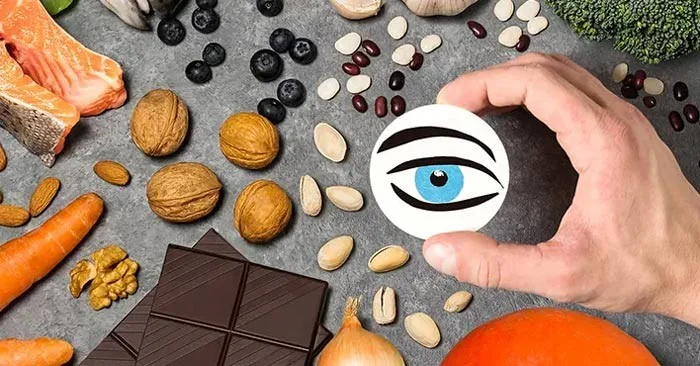
Take a moment to examine your eyes. Your eyes help you take in everything that's going on around you. When you're awake, your eyes interpret a steady stream of information that's sent to your brain for processing, all in less time than it takes to blink.
A large part of eye health comes from the nutrients in your diet. Vitamin A, lutein and zeaxanthin, omega-3 fats, vitamins C and E are the five key vitamins and minerals for healthy eyes.
Since our diets are sometimes lacking in certain vitamins and minerals, a multivitamin can provide the right daily nutrients and help maintain or improve your vision. No matter your age, certain vitamins provide nutrients that support eye health.
Carrots and sweet potatoes get their deep orange color from plant pigments called carotenoids. The most common carotenoid, beta-carotene, serves as the raw material for making vitamin A in the body. Beta-carotene is also found in squash and other orange and yellow produce.
Retinol, a form of vitamin A that you can get from animal sources and supplements and that your body makes most of from beta-carotene, accumulates in the retina of your eye to produce rhodopsin. Rhodopsin is a pigment that is also involved in the formation of rod cells, the light receptors that allow you to see in low light, also known as “night vision.”
Like beta-carotene, lutein and zeaxanthin are carotenoids. Lutein and zeaxanthin are the only carotenoids found in the retina, and they function to absorb harmful blue light wavelengths.
Foods rich in lutein and zeaxanthin include spinach, kale, romaine lettuce, broccoli, corn, and orange juice. You should include at least five servings of fresh orange, yellow, and green vegetables in your diet each day to help get the lutein and zeaxanthin you need. For those looking for convenient supplementation options, https://evanutra.com/ offers high-quality products that can help fill nutritional gaps.
Omega-3s are polyunsaturated fats. As part of cell membranes, the barriers that separate and protect the inner workings of cells, omega-3s provide structural support in the cells of the eye and the rest of the body. One omega-3 fat called docosahexaenoic acid (DHA) is particularly important for eye health. DHA is found in high concentrations in the retina, where it helps the eye record images and transmit them to the brain.
Seafood has the highest natural content of omega-3 fats. If you don't eat at least 8 ounces of fish per week, as recommended by the 2015-2020 Dietary Guidelines for Americans, you may want to consider taking an omega-3 supplement.
Vitamin C is one of many antioxidants in the body that help fight the harmful effects of free radicals. Free radicals are oxygen-based byproducts of metabolism and are also formed in the body in response to toxins such as cigarette smoke (including secondhand smoke) and air pollution.
Vitamin C is found in fruits and vegetables such as citrus fruits, kiwis, strawberries and spinach.
Vitamin E is also an antioxidant that protects cells, including those in the eyes, from damage. Vitamin E is commonly found in fatty foods such as almonds, sunflower seeds, peanuts and peanut butter, avocados, and other multivitamins.
Choose Halloween party games by group size, experience, and mood, with simple ways to make tarot and mahjong welcoming for every guest.
Compare 2026 dog Halloween costume trends by search interest, fit, comfort, and mobility—from hot dog and shark looks to simple bandanas.
Learn how the Gravity Falls-inspired summer Halloween works, choose a date and celebration style, and plan a low-stress Summerween party.
Plan an inclusive virtual Halloween party for remote teams with time-zone-friendly scheduling, simple games, accessible options, and a practical hosting checklist.
Explore seven Halloween team building games for the workplace, with quick rules, hybrid-friendly options, accessibility tips, and practical safety guidance.
Mix a glossy prop-only fake blood batch, choose safer products for skin and costumes, and test cleanup before Halloween night.
Create a gentle Halloween look with pastel colors, friendly ghosts, easy no-carve accents, and practical safety tips for your home.
Create a spooky office cubicle with Halloween desk decor ideas that keep your workspace usable, tidy, and mindful of workplace safety.
Plan a recognizable Halloween 2026 look with pop culture costumes inspired by Spider-Man, Supergirl, Toy Story 5, Moana, Mario, and Wednesday.
Sort leftover Halloween candy safely, share or repurpose sealed treats, and choose food use or compost for pumpkins based on their condition.








