Beautiful signature fonts to highlight your design

Want to turn an ordinary document into something unforgettable? Great signature fonts can transform your digital writing from simple to impressive in seconds. Whether you’re signing important documents or creating stunning designs, the right font makes all the difference.
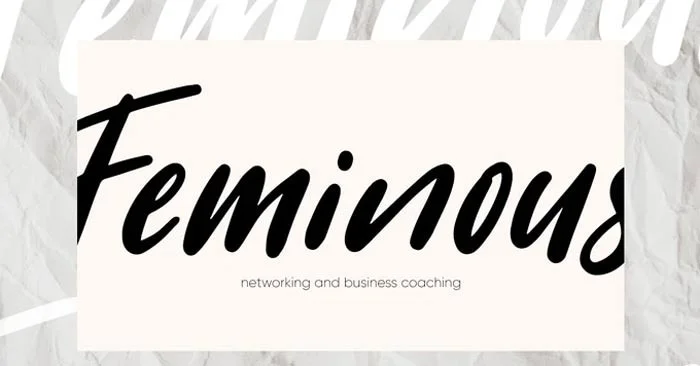
Beautiful signature fonts to highlight your design

Think about it – standard fonts like Times New Roman get the job done, but they lack personality. A signature-like font adds personality to your design through its smooth curves, natural imperfections, and modern calligraphy elegance. These little details make your signature authentic.

The best part? Adding that personal touch is easier than you think. No tools or hours of practice required – just pick the right signature font and you’re ready to make your mark. Here are the signature fonts that can take your creative projects from basic to awesome .

Things to know about signature fonts

What is a signature font?

Signature fonts are typefaces that capture the essence of a handwritten signature. They are characterized by elegant curves, natural rhythms, and a personal touch. These fonts strike a delicate balance between legibility and artistic expression, making them ideal for adding authenticity and sophistication to a variety of design projects.

Key features of signature fonts include:

  • Smooth, continuous writing
  • Variable stroke thickness
  • Organic curves and loops
  • Small irregularities for a more natural look
  • Elegant connecting letters

The appeal of signature fonts lies in their ability to convey personality and create an emotional connection with the viewer. They add a human touch to digital designs, bridging the gap between handcrafted and computer-generated aesthetics.

Beautiful signature fonts for content creation

Beautiful signature fonts to highlight your design

For technical documents

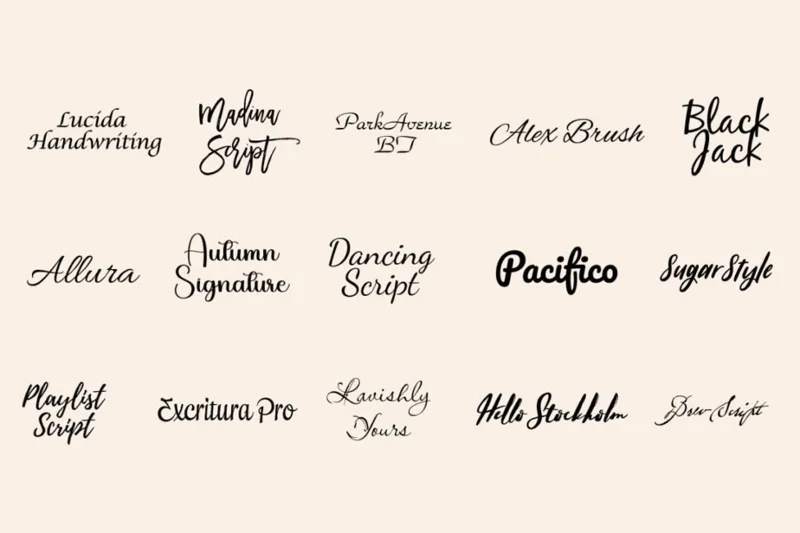
  • Lucida Handwriting – A top choice for business documents and professional signatures. Its clean strokes are easy to read while adding a personal touch.
  • Madina Script – Minimal signature font that brings modern professionalism to any document. Perfect for digital signatures and business cards.
  • ParkAvenue BT – Refined and elegant, ideal for executive communications and official documents.

For branding and marketing

  • Alex Brush – Simple yet elegant, this font works great for personal branding and creative businesses.
  • Allura – Modern and versatile, great for marketing materials across a variety of media.
  • Autumn Signature – Natural and authentic, perfect for lifestyle brands and wellness businesses.

For digital content

  • Dancing Script – Add energy and movement to social media posts and digital graphics.
  • Pacifico – Friendly and approachable, great for casual digital content and engaging social media posts.
  • Playlist Script – Young and dynamic, ideal for entertainment and media content.

For luxury and special events

  • ExcrituraPro – Classic elegance shines through in wedding invitations and formal events.
  • Lavishly Yours – Sophisticated and complex, perfect for luxury brands and premium materials.
  • Hello Stockholm – Contemporary luxury with a cutting-edge fashion style.

For creative projects

  • Blackjack – Bold and distinctive, making a strong impression on product packaging.
  • Sugar Style – Playful yet sophisticated, great for creative projects that need a personal touch.
  • Brew Script – Classic charm pairs perfectly with retro-inspired designs.

Where to use signature fonts?

Beautiful signature fonts to highlight your design

Signature fonts are versatile and can enhance a variety of design projects. Here are some common uses for these fonts:

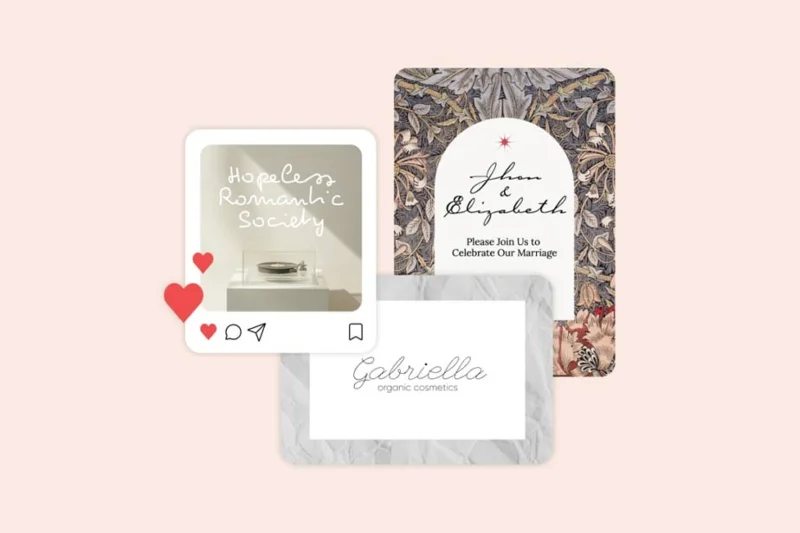
  • Certificates and Awards: Add credibility and authenticity to official documents.
  • Digital Signatures: Add a personal touch to emails and digital contracts.
  • Branding Materials: Enhance logos, business cards and marketing materials.
  • Wedding Stationery: Bring elegance to invitations, name cards and thank you notes.
  • Product Packaging: Add a premium feel to your label and packaging design.
  • Social Media Graphics: Create eye-catching quotes and headlines for online content.
  • Book Covers: Design catchy titles for novels and publications.

The key to using signature fonts effectively is to strike a balance between impact and readability. Use them as accent fonts to highlight important elements while maintaining overall readability in your design.
Leave a Comment

How to Assign Participants to Breakout Rooms in Microsoft Teams

How to Assign Participants to Breakout Rooms in Microsoft Teams

Master how to assign participants to breakout rooms in Microsoft Teams with this step-by-step guide. Boost meeting engagement, automate assignments, and troubleshoot like a pro for seamless virtual collaboration.

How to Fix Microsoft Teams Giá Error Pricing Update

How to Fix Microsoft Teams Giá Error Pricing Update

Struggling with Microsoft Teams "Price Error" after the latest pricing update? Discover step-by-step fixes to resolve it quickly, restore seamless collaboration, and avoid subscription headaches. Updated with the newest solutions.

Solving Microsoft Teams Background Error Transparency

Solving Microsoft Teams Background Error Transparency

Struggling with Microsoft Teams Background Error Transparency? Discover proven step-by-step fixes for blurry, glitchy virtual backgrounds. Restore perfect transparency in Teams meetings effortlessly. Updated with the latest solutions.

How to Fix Microsoft Teams Đăng nhập Error (Login)

How to Fix Microsoft Teams Đăng nhập Error (Login)

Struggling with Microsoft Teams "Đăng nhập" login error? Discover step-by-step fixes for smooth sign-in. Clear cache, update app, and more – no tech skills needed! Works on Windows, Mac, and web.

Solving Microsoft Teams Web Error 503 Service Unavailable

Solving Microsoft Teams Web Error 503 Service Unavailable

Tired of Microsoft Teams Web Error 503 Service Unavailable blocking your meetings? Discover quick, step-by-step fixes to resolve the 503 error fast – no tech skills needed! Clear cache, check status, and get back to collaborating seamlessly.

Troubleshooting Microsoft Teams Update Error 0x80070002

Troubleshooting Microsoft Teams Update Error 0x80070002

Stuck with Microsoft Teams Update Error 0x80070002? Discover proven troubleshooting steps to resolve this frustrating issue quickly and get your Teams app updated seamlessly for uninterrupted collaboration.

Solving Microsoft Teams Error AADSTS50020: User Account Conflict

Solving Microsoft Teams Error AADSTS50020: User Account Conflict

Tired of Microsoft Teams Error AADSTS50020 blocking your sign-in? Discover step-by-step fixes for user account conflicts, backed by the latest Azure AD solutions. Get back to work fast!

How to Fix Microsoft Teams Microphone Error No Sound

How to Fix Microsoft Teams Microphone Error No Sound

Tired of Microsoft Teams microphone error with no sound? Discover quick, step-by-step fixes for Teams mic not working on Windows, Mac, and more. Restore crystal-clear audio in minutes!

How to Fix Microsoft Teams Task Management Error

How to Fix Microsoft Teams Task Management Error

Tired of the Microsoft Teams "Task Management" Error disrupting your workflow? Discover proven fixes like clearing cache, updating Teams, and troubleshooting permissions to get back to seamless collaboration in minutes. Updated with the latest solutions.

How to Fix Microsoft Teams How to Teams Help Error

How to Fix Microsoft Teams How to Teams Help Error

Frustrated by the Microsoft Teams 'How to Teams' Help Error? Discover proven, step-by-step solutions to fix it quickly and restore smooth help access. Latest 2026 updates included for seamless teamwork.

Solving Microsoft Teams Room Error Syncing

Solving Microsoft Teams Room Error Syncing

Struggling with Microsoft Teams "Room Error" Syncing? This ultimate guide provides step-by-step fixes for Microsoft Teams Room Error Syncing issues, ensuring seamless meetings and quick resolutions. Updated with the latest tips.

Troubleshooting Microsoft Teams Workflows Power Automate

Troubleshooting Microsoft Teams Workflows Power Automate

Master troubleshooting Microsoft Teams Workflows Power Automate issues with step-by-step fixes for common errors. Get your automations running smoothly – no more frustration! Proven solutions for triggers, permissions, and more.

Solving Microsoft Teams Restart Error (2026)

Solving Microsoft Teams Restart Error (2026)

Struggling with Microsoft Teams "Restart Error" in 2026? Discover proven, step-by-step fixes to resolve the endless restart loop quickly. Clear cache, reset app, and more for seamless collaboration. Get back online fast!

How to Create Breakout Rooms in Microsoft Teams Before a Meeting

How to Create Breakout Rooms in Microsoft Teams Before a Meeting

Master how to create breakout rooms in Microsoft Teams before a meeting with this easy guide. Pre-assign participants, boost collaboration, and elevate your virtual sessions effortlessly.

How to Fix Microsoft Teams Layout Error: Sidebar Missing

How to Fix Microsoft Teams Layout Error: Sidebar Missing

Tired of Microsoft Teams sidebar missing? Get instant fixes for layout errors. Step-by-step guide with latest tips to restore your Teams sidebar fast and frustration-free.






