Bleach Rebirth of Souls PC Configuration

Bleach: Rebirth of Souls is an action fighting game based on the famous anime and manga series Bleach. And with the game's graphics considered heavy, you will need to pay attention to the configuration below.

Bleach: Rebirth of Souls Minimum System Requirements
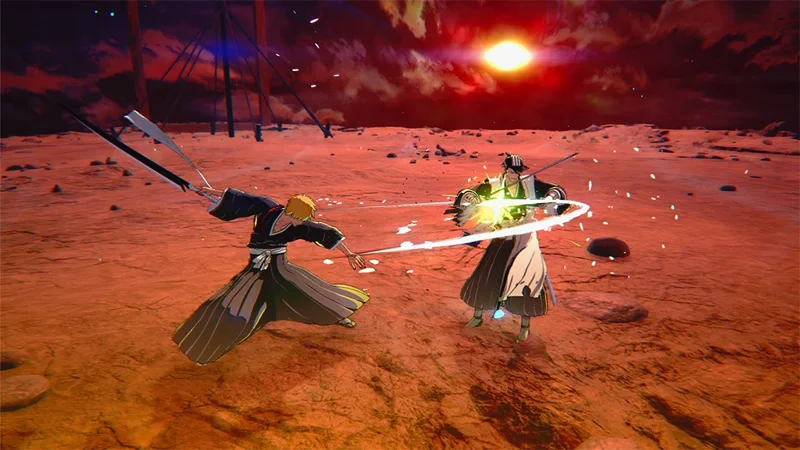
 Bleach Rebirth of Souls PC Configuration

  • Operating System: Windows 10 or Windows 11 (64-bit)
  • CPU: AMD Ryzen 5 3600 or Intel Core i7-9700K
  • RAM: 16 GB
  • Graphics Card: AMD Radeon VII or Nvidia GeForce RTX 2070
  • DirectX: Version 12
  • Connection: Broadband Internet
  • Free hard drive space: 75 GB
  • Note: Performance Mode allows for 1080p/60fps gameplay. With a CPU like the AMD Ryzen 3 3100 or Intel Core i3-8100 and an AMD Radeon RX 590 or Nvidia GeForce GTX 980 GPU, 1080p/30fps gameplay is still possible.

Bleach: Rebirth of Souls Recommended System Requirements

Bleach Rebirth of Souls PC Configuration

  • Operating System: Windows 10 or Windows 11 (64-bit)
  • Processor: AMD Ryzen 7 5800X / Intel Core i7-12700KF
  • RAM: 16 GB
  • Graphics Card: AMD Radeon RX 6700 XT / Nvidia GeForce RTX 2080 Ti
  • DirectX: Version 12
  • Connection: Broadband Internet
  • Free hard drive space: 75 GB (SSD required)
  • Note: Balanced Mode allows for 1080p/60fps gameplay. If you want to experience 1080p/60fps in Quality Mode, we recommend an AMD Ryzen 7 7700X or Intel Core i7-12700KF CPU and an AMD Radeon RX 7800 XT or Nvidia GeForce RTX 3070 Ti GPU.

Ultra Configuration (expected)

Bleach Rebirth of Souls PC Configuration

Although the developer has not announced the official Ultra configuration, to play the game at 4K with the highest graphics level, you can refer to the following configuration:

  • Processor: AMD Ryzen 9 5900X / Intel Core i9-12900K
  • RAM: 32 GB
  • Graphics Card: AMD Radeon RX 7900 XTX / Nvidia GeForce RTX 4080
  • Hard Drive: NVMe SSD with at least 75 GB free space

Note: This is just a suggestion based on current hardware trends. For the most accurate information, please refer directly to the developer when an official update is available.

Bleach: Rebirth of Souls recreates important events from the Substitute Soul Reaper Arc, when Ichigo became a substitute Shinigami, to the climactic battle against Sosuke Aizen in the Arrancar Arc. In addition, the game also features a Secret Story mode, allowing players to explore more behind-the-scenes stories about the characters.

Leave a Comment

What Young Riders Should Know About Moving Their Motorcycles Across Cities

What Young Riders Should Know About Moving Their Motorcycles Across Cities

Long-distance travel can involve heavy traffic, changing weather conditions, and rider fatigue. If you are also dealing with the responsibilities of moving home, such as packing belongings or coordinating accommodation, a long ride may add unnecessary pressure to an already busy schedule.

Solving Microsoft Teams Shortcut Error Not Opening

Solving Microsoft Teams Shortcut Error Not Opening

Tired of Microsoft Teams shortcut error preventing you from opening the app? Follow our expert, step-by-step guide with the latest fixes for instant resolution. Works on Windows, Mac & web – no tech skills needed!

Solving Microsoft Teams Task Management Sync Error

Solving Microsoft Teams Task Management Sync Error

Tired of Microsoft Teams Task Management Sync Error halting your workflow? Follow our proven, step-by-step fixes to resolve sync issues fast and restore seamless task collaboration. No tech expertise needed!

Troubleshooting Microsoft Teams Wiki Error Formatting

Troubleshooting Microsoft Teams Wiki Error Formatting

Struggling with Microsoft Teams Wiki Error Formatting? This step-by-step guide reveals proven fixes for common wiki tab issues, ensuring smooth editing and collaboration in Teams. Get back to productive wikis fast!

How to Fix Microsoft Teams Installation Error for Linux

How to Fix Microsoft Teams Installation Error for Linux

Struggling with Microsoft Teams installation error on Linux? Discover step-by-step fixes for Ubuntu, Fedora & more. Resolve dependency issues, crashes, and errors quickly with our ultimate guide. Get Teams running smoothly today!

Solving Microsoft Teams Error Page Not Loading

Solving Microsoft Teams Error Page Not Loading

Struggling with Microsoft Teams "Error Page" not loading? Get step-by-step fixes for desktop, web, and mobile. Solve Microsoft Teams Error Page issues quickly and resume seamless teamwork today.

Solving Microsoft Teams Error Screenshot Issues

Solving Microsoft Teams Error Screenshot Issues

Tired of Microsoft Teams "Error Screenshot" blocking your workflow? Get proven, step-by-step solutions to resolve screenshot errors in Teams instantly and boost productivity. No tech skills needed!

How to Fix Microsoft Teams Error U User

How to Fix Microsoft Teams Error U User

Tired of Microsoft Teams "Error U" User blocking your chats? Get proven, step-by-step fixes to clear cache, reset, and restore seamless collaboration instantly.

Where are Microsoft Teams Registry Keys Located on Windows 11?

Where are Microsoft Teams Registry Keys Located on Windows 11?

Unlock the precise locations of Microsoft Teams registry keys on Windows 11. Step-by-step guide to find, access, and safely tweak them for optimal performance and troubleshooting. Essential for IT pros and Teams enthusiasts.

How to Fix Microsoft Teams Training Error Video Lag

How to Fix Microsoft Teams Training Error Video Lag

Tired of Microsoft Teams "Training Error" Video Lag ruining your meetings? Follow our step-by-step guide with the latest fixes for smooth video calls—no more frustration!