Home
» Today
»
BOM Radar Brisbane: How to Check the Brisbane Weather Radar
BOM Radar Brisbane: How to Check the Brisbane Weather Radar
The Bureau of Meteorology (BOM) Brisbane radar helps you see where rain is being detected and how precipitation is moving across southeast Queensland. It is useful for deciding whether a shower is approaching, but it is an observation tool—not a guarantee of what will happen at your street. For a reliable check, pair the map with the forecast and current warnings.
What the Brisbane weather radar shows
The BOM rain map displays radar observations, which are measurements of precipitation reflected back to a radar. The current interactive map combines observations from more than one radar where coverage overlaps. Brisbane has two nearby Doppler sites, Marburg and Mt Stapylton. Their views can differ because the radar location, distance, terrain, and the height of the rain all affect what each scan detects.
The default rain-reflectivity layer is measured in decibels of reflectivity (dBZ), a measure of the strength of the returned radar signal. It is not a direct rainfall total. The map also offers rain rate in millimeters per hour (mm/h), which represents the rate that would accumulate if it stayed constant for an hour, and estimated rain for the past 60 minutes, which combines radar and rain-gauge data.
How to check the BOM radar for Brisbane
1. Open the official Brisbane view
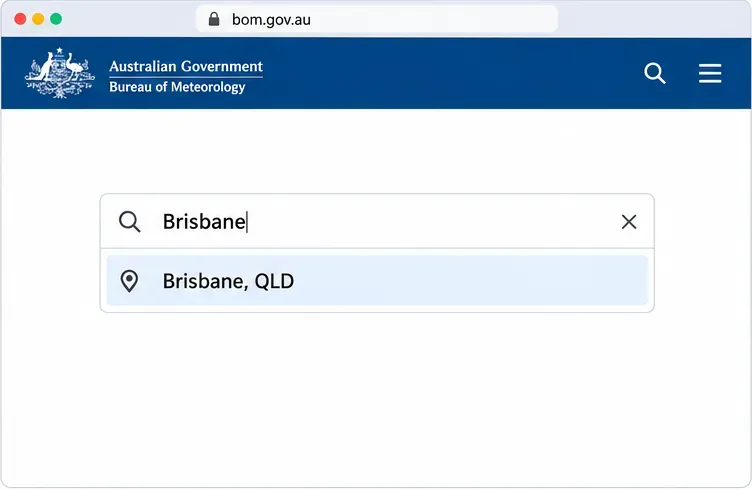
Go to the BOM Rain Radar and Weather Maps page, or open the Brisbane location page. You can also search for “Brisbane” in the site’s location search and choose Brisbane, QLD. The location page brings together the local forecast, observations, and weather map.
Search the BOM site for Brisbane, QLD to open the local forecast, observations, and rain map.
2. Center the map on your area and select Rain
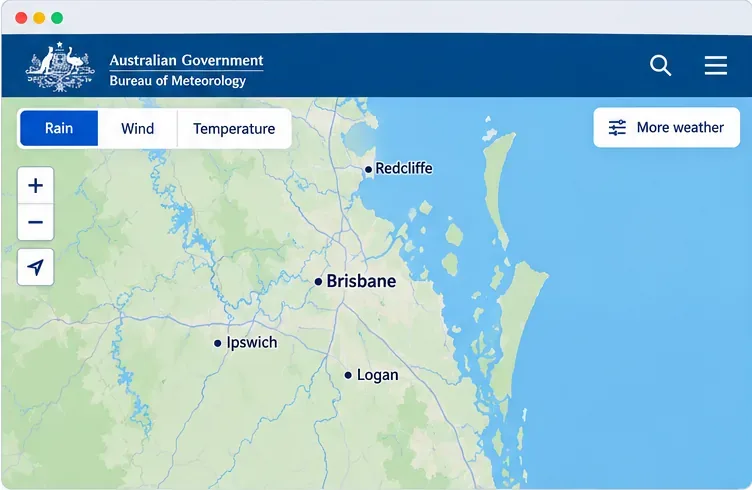
Choose the Rain view if it is not already active. Use the map search, zoom buttons, or pan controls to bring your suburb into view; the map works with touch, mouse, and keyboard controls. The rain map can show a broad regional picture or a closer view around Brisbane, Ipswich, Logan, Redcliffe, and nearby communities. If your exact suburb is not labeled, use recognizable roads, rivers, or coastlines to orient yourself rather than assuming the nearest town label marks the center of the radar image.
The Rain map is centered on Brisbane and nearby suburbs; this is an interface example, not a live weather reading.
3. Choose a rainfall layer and inspect radar sites
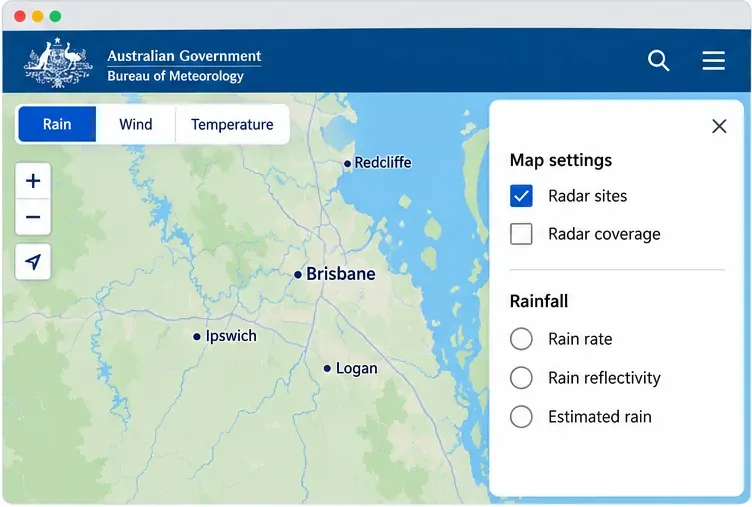
Open More weather to choose the past-rainfall display that answers your question. Use rain reflectivity to compare the relative strength of echoes, rain rate to see an estimated current rate, or estimated rain to review the previous 60 minutes. These views describe different things, so compare like with like when you check again later.
In Map settings, turn on Radar sites to show the radar locations. Select a radar marker to center the map on that site and display its range rings, which help you judge distance. Brisbane’s two radars are Marburg and Mt Stapylton. Comparing them can help when a storm sits between sites or one view looks incomplete.
Use More weather to choose a rain display and reveal radar-site controls.
4. Play the radar loop and check the time
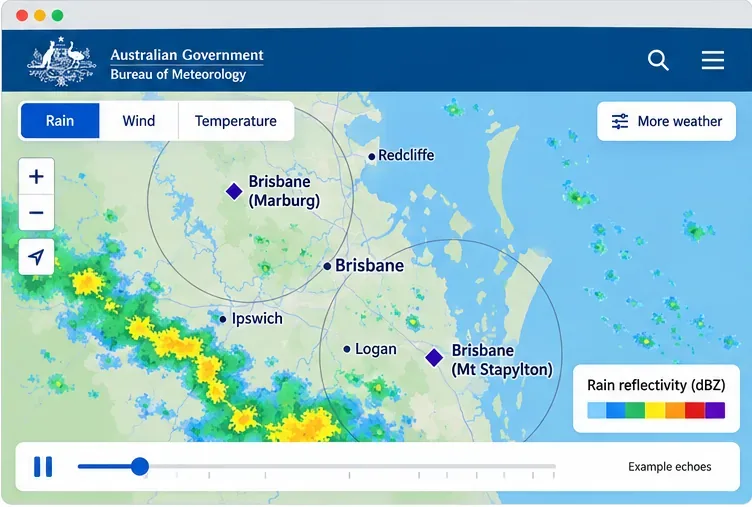
Use the map’s playback controls to move through recent radar frames. Follow the same rain band across several frames to see whether it is approaching, moving away, or changing shape. Check the time shown with the map before making a decision, especially if you have left the page open. A single still image can make a shower look stationary or more intense than it is; the sequence gives better context.
The markers, range rings, playback controls, and colored echoes illustrate the map tools; the echoes are examples, not current observations.
Read radar colors with care
Use the on-screen legend for the selected layer; colors do not mean the same thing across every rainfall display. A strong reflectivity echo may be associated with heavy rain, but hail can also return a strong signal. Radar can sometimes show precipitation aloft that evaporates before reaching the ground, known as virga, and light drizzle can be missed when droplets are small or the radar beam passes above low cloud.
The radar beam also rises farther from the site as it follows Earth’s curvature. BOM describes the useful radar range as roughly 5 to 200 kilometers, while terrain can block or weaken parts of a view. Around Brisbane, the Great Dividing Range to the west and the Lamington Plateau to the south can reduce detection of weak, low-level rain beyond those obstructions. A blank patch on the map is not proof that conditions are dry.
Check forecasts and warnings as well
Radar shows observed echoes; forecasts describe expected conditions. Before driving, boating, or planning outdoor work, review the BOM warnings and alerts and the Brisbane forecast. If a warning applies but the radar looks quiet, follow the warning. The Bureau also notes that its southeast Queensland Thunderstorm Tracker is a pilot product and is not itself a warning.
Common mistakes to avoid
Do not treat rain reflectivity as a measured rainfall total; switch to the estimated-rain layer if you need a recent accumulation estimate.
Do not judge storm direction from one frame; play the loop and compare successive positions.
Do not assume every colored echo is rain at ground level or every clear area is dry.
Do not rely on the radar alone for severe weather. Check the official warning text and forecast, then refresh the map for the latest view.