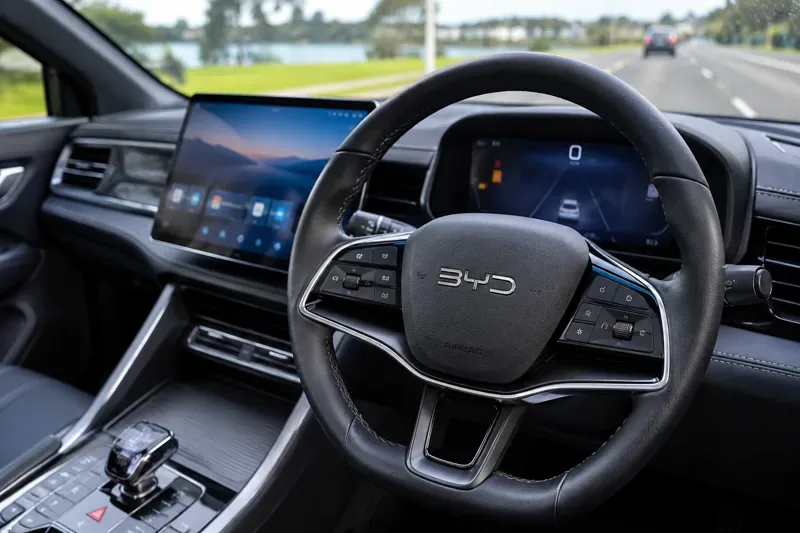
Verified and updated: 22 November 2026, 05:07 UTC.
BYD steering-wheel controls are model- and trim-specific: the same-looking buttons can operate audio, phone, instrument-cluster menus, cruise assistance or a shortcut such as the panoramic camera. The 2025 Australian ATTO 3 handbook, for example, documents a scroll control for volume and menus, left/right buttons for tracks or radio stations, and separate cruise and Intelligent Cruise Control buttons. Check the handbook for your exact vehicle before relying on a control or changing a setting.
Some BYD handbooks also describe a configurable “Custom” steering-wheel switch, but that does not mean every model offers it or that every function can be assigned. A current review of BYD Australia’s handbook material and the Australian product-safety portal did not establish a new steering-wheel hardware recall. Recall status should be checked against your vehicle’s VIN; a spare-wheel carrier notice, if applicable, concerns a different component from the steering wheel and its controls.
Destaques- Button layouts and available shortcuts vary across BYD models, trims and handbook versions.
- On the documented ATTO 3 layout, the right-hand scroll control adjusts volume or navigates instrument-cluster menus.
- Use a configurable Custom button only if it appears in your vehicle’s handbook and settings.
- Driver-assistance buttons do not make the car autonomous; keep control and check recall notices by VIN.
What do the buttons on a BYD steering wheel do?
Start by identifying the two control groups on the wheel, then confirm their functions in the handbook for your model year. Labels and icons offer clues, but a button can change behaviour depending on what is displayed on the instrument cluster or infotainment screen.
In the 2025 ATTO 3 handbook, the left-hand group includes panoramic-view and screen-mode functions, cruise-control controls, following-distance adjustment on equipped versions, and an ICC control. The right-hand group includes call and voice-recognition buttons, media mode, a scroll control, instrument-cluster/back, and left/right selection. A star in the handbook denotes equipment-dependent features.
How do BYD volume and track shortcuts work?
On the documented ATTO 3 layout, roll the right-side scroll control up or down to change audio volume when the instrument cluster is not in menu mode; press it to mute. When the cluster is in its menu, the same control moves through options and confirms a selection. The manual cautions that audio is muted while the cluster menu is active, so exit that menu before adjusting sound.
The left and right buttons can select saved radio stations or move between tracks, depending on the active media source. A long press may search for a radio station rather than simply step through presets. Phone controls can open the call screen or answer and place calls when Bluetooth is connected. Voice recognition can be useful for hands-free commands, but set up and practise it while parked.
Can you customise BYD steering-wheel buttons?
Some model handbooks label one control “Custom.” Where the car supports assignment, check the vehicle’s touchscreen settings for the relevant steering-wheel or shortcut menu and follow the prompts while parked. The available choices and menu path can differ by software version, model and trim. If your wheel or settings screen has no Custom option, do not assume a button can be reassigned.
Personalization can also mean setting preferences associated with the wheel rather than remapping buttons. The ATTO 3 handbook, for instance, says steering assistance can be set to Comfortable or Sport under Vehicle → Driving Control → Steering Assist Mode. This changes steering feel; it does not change the physical button layout. Avoid experimenting with menus while moving.
How do BYD cruise and lane-assistance shortcuts work?
On equipped vehicles, steering-wheel controls can switch on adaptive cruise control, resume a stored target speed, set a current speed, or change the following-distance level. Some models provide an ICC button for an integrated cruise and lane-centering assistance feature. Exact steps, operating limits and names vary; follow your owner’s handbook and instrument-cluster prompts.
These systems assist the driver and may not detect lane markings or traffic reliably in every condition. Keep your hands on the wheel, watch the road and be ready to steer or brake. A steering-wheel shortcut is a way to request or adjust a feature, not evidence that the feature is active: check the cluster indicator and alerts.
How do you use BYD steering-wheel heating?
Steering-wheel heating is equipment-dependent, so first check whether your model and trim include it. If equipped, the control may be on the climate interface rather than a dedicated wheel button; consult the vehicle handbook or on-screen climate controls for the correct location and operation. Do not infer that a heating icon or shortcut is available across the BYD range.
Why are BYD steering-wheel controls different between models?
BYD sells vehicles with different layouts, equipment packages and software. The ATTO 3 handbook’s button list is useful for that vehicle, but it should not be treated as a universal BYD map. The Australian ATTO 2 handbook, for example, describes a configuration that includes a Custom control, while the ATTO 3 handbook describes a different set of buttons. Use the handbook supplied for your vehicle, including its model year and market version. BYD’s Australian model pages provide owner-handbook downloads, including for models such as the SEAL.
Is a BYD steering-wheel recall the same as a spare-wheel recall?
No. A notice about a spare-wheel carrier concerns the spare wheel and its mounting or retention; it does not by itself indicate a fault in the steering wheel, steering column or steering-wheel buttons. This review did not verify a new Australian recall affecting BYD steering-wheel controls. That is not a guarantee that a particular vehicle has no open recall. Search the Australian Product Safety recall database and contact BYD or an authorised service centre with your VIN if you are unsure.
What should you do if a BYD steering-wheel button stops working?
First note which button fails, what screen or media source is active, and whether a warning appears. When safely parked, check the handbook for that control’s operating conditions and see whether the issue repeats after restarting the vehicle according to the normal owner instructions. Do not remove the steering-wheel trim or attempt a repair: the wheel contains airbag components. If the horn, steering assistance, airbag warning or a driver-assistance system is affected, arrange an inspection through an authorised BYD service centre.
For broader service questions, BYD Australia lists its customer-care contact details on its official contact page. Its service and warranty information describes steering-system inspections as part of scheduled servicing. A loose, damaged or intermittently functioning control should be assessed rather than ignored.
FAQs
Can I change what my BYD steering-wheel shortcut does?
Only if your model provides a Custom control and its settings allow reassignment. Confirm the options in your vehicle’s handbook and touchscreen.
Do all BYD models have steering-wheel heating?
No. Availability varies by model and trim. Check the handbook or equipment list for your exact vehicle.
Does a BYD spare-wheel recall mean the steering wheel is recalled?
No. They are different components. Check official recall information using your VIN to determine whether a notice applies to your car.
Sources checked