Common mistakes when using hair removal machines

If you've ever used an epilator , you probably know that you need to give it a try. This tool is designed to remove hair from the root with longer lasting results than shaving while leaving your skin smoother. However, not everyone knows how to use an epilator properly. Here are some common mistakes people make when using an epilator .
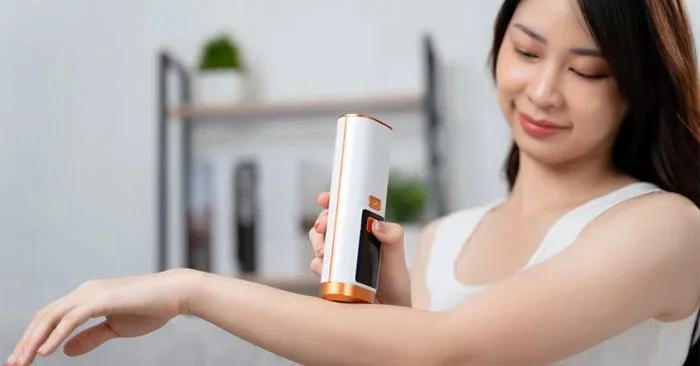
Common mistakes when using hair removal machines

Mistakes to avoid when using hair removal machine

Not taking care of your skin before hair removal

If your Epilator isn't giving you the best results, it could be due to prepping your skin beforehand. Exfoliation is one of the easiest & most important steps before waxing. Not only does it create a clean base (removing makeup, self-tanner or perfume), it also exfoliates dead skin cells for cleaner, more effective results. "Exfoliating beforehand not only helps get better results, it also helps prevent ingrown hairs in the future,"

Use a shower brush or dry brush. Exfoliating in a warm shower or bath before epilating can also open up your pores and soften your hair, making the process easier and less uncomfortable.

Another thing to keep in mind is to make sure the hair is the right length, 5mm maximum. This will make removing each hair as easy and painless as possible, but check your epilator's manual for the best advice.

Common mistakes when using hair removal machines

Using the wrong method

Just like shaving, for best results, try holding the epilator at a 75-degree angle (too much can break hair, preventing it from being removed properly) to your skin and gently pull it back and forth around the device to keep your skin smooth. Move the device against the direction of hair growth. You should go slowly, as running the device quickly across your skin can also break hair. Results may be better in a warm environment, as too cold can cause goose bumps, making it harder for the device to reach your skin.

Expect to get perfect results instantly

Another big mistake people make when using epilators is using them too close to an important event and expecting perfect skin right away. Razors can cause uncomfortable razor bumps, and while epilators can be the key to avoiding those bumps, they can still leave behind redness or irritation. So, give yourself at least 24 hours between epilations to give your skin time to recover.

Many people also expect too much. Laser hair removal doesn’t remove hair permanently, but it can leave skin smoother for about four weeks. If you want longer-lasting results, IPL or laser hair removal may be better. Likewise, hair that grows back will be softer and less noticeable after a few sessions. If you want peace of mind that any hair you lose will be lighter, start your laser hair removal sessions a few months in advance. Try weekly at first, then gradually reduce the frequency to, say, every three weeks.

Not keeping equipment clean

Like other beauty devices and tools, many people make the mistake of forgetting to clean their epilators properly and regularly — even though it is essential. Clean your device regularly to keep it running smoothly and prevent bacterial or fungal infections. Even if it is a device that can be used while wet, you should not leave it in the bathroom because bacteria and fungi can easily grow.

To clean your epilator, remove all the attachments and use a brush to remove hair. While many devices come with cleaning tools, such as a brush or cloth, you can use a clean makeup brush. If your device is waterproof, rinse it with water and dry it properly, then use rubbing alcohol to kill bacteria and germs. Repeat these steps each time you use your device.

Common mistakes when using hair removal machines

Using the wrong hair removal machine

Not all epilators are created equal, and you may find that some are more suitable for you than others. One of the main differences is whether they are designed for wet or dry use. Wet epilators allow you to epilate in the shower and can be better for sensitive skin than dry epilators, so you may want to try a waterproof version if you experience irritation or itching after epilating. Wet epilators may also be better suited to people who shave regularly and prefer the cleanness of removing body hair in the bath or shower. Some epilators have both wet and dry modes, including the Braun Epilator Silk-épil 9 Flex SkinSpa or the Philips Epilator Series 8000.

Another thing to consider is the size and shape, as well as the body part you're using it on. Some epilators have longer handles for harder-to-reach areas, and others have different attachments for specific areas, so consider your personal preferences and needs.


Leave a Comment

Causes of oil heater noise, oil leakage and no heating when in use

Causes of oil heater noise, oil leakage and no heating when in use

Oil heaters make noise, leak oil, and do not heat up. These are all problems that arise when using a heater. So what are the causes of these problems? Read our article below!

How to Assign Participants to Breakout Rooms in Microsoft Teams

How to Assign Participants to Breakout Rooms in Microsoft Teams

Master how to assign participants to breakout rooms in Microsoft Teams with this step-by-step guide. Boost meeting engagement, automate assignments, and troubleshoot like a pro for seamless virtual collaboration.

How to Fix Microsoft Teams Giá Error Pricing Update

How to Fix Microsoft Teams Giá Error Pricing Update

Struggling with Microsoft Teams "Price Error" after the latest pricing update? Discover step-by-step fixes to resolve it quickly, restore seamless collaboration, and avoid subscription headaches. Updated with the newest solutions.

Solving Microsoft Teams Background Error Transparency

Solving Microsoft Teams Background Error Transparency

Struggling with Microsoft Teams Background Error Transparency? Discover proven step-by-step fixes for blurry, glitchy virtual backgrounds. Restore perfect transparency in Teams meetings effortlessly. Updated with the latest solutions.

How to Fix Microsoft Teams Đăng nhập Error (Login)

How to Fix Microsoft Teams Đăng nhập Error (Login)

Struggling with Microsoft Teams "Đăng nhập" login error? Discover step-by-step fixes for smooth sign-in. Clear cache, update app, and more – no tech skills needed! Works on Windows, Mac, and web.

Solving Microsoft Teams Web Error 503 Service Unavailable

Solving Microsoft Teams Web Error 503 Service Unavailable

Tired of Microsoft Teams Web Error 503 Service Unavailable blocking your meetings? Discover quick, step-by-step fixes to resolve the 503 error fast – no tech skills needed! Clear cache, check status, and get back to collaborating seamlessly.

Troubleshooting Microsoft Teams Update Error 0x80070002

Troubleshooting Microsoft Teams Update Error 0x80070002

Stuck with Microsoft Teams Update Error 0x80070002? Discover proven troubleshooting steps to resolve this frustrating issue quickly and get your Teams app updated seamlessly for uninterrupted collaboration.

Solving Microsoft Teams Error AADSTS50020: User Account Conflict

Solving Microsoft Teams Error AADSTS50020: User Account Conflict

Tired of Microsoft Teams Error AADSTS50020 blocking your sign-in? Discover step-by-step fixes for user account conflicts, backed by the latest Azure AD solutions. Get back to work fast!

How to Fix Microsoft Teams Microphone Error No Sound

How to Fix Microsoft Teams Microphone Error No Sound

Tired of Microsoft Teams microphone error with no sound? Discover quick, step-by-step fixes for Teams mic not working on Windows, Mac, and more. Restore crystal-clear audio in minutes!

How to Fix Microsoft Teams Task Management Error

How to Fix Microsoft Teams Task Management Error

Tired of the Microsoft Teams "Task Management" Error disrupting your workflow? Discover proven fixes like clearing cache, updating Teams, and troubleshooting permissions to get back to seamless collaboration in minutes. Updated with the latest solutions.

How to Fix Microsoft Teams How to Teams Help Error

How to Fix Microsoft Teams How to Teams Help Error

Frustrated by the Microsoft Teams 'How to Teams' Help Error? Discover proven, step-by-step solutions to fix it quickly and restore smooth help access. Latest 2026 updates included for seamless teamwork.

Solving Microsoft Teams Room Error Syncing

Solving Microsoft Teams Room Error Syncing

Struggling with Microsoft Teams "Room Error" Syncing? This ultimate guide provides step-by-step fixes for Microsoft Teams Room Error Syncing issues, ensuring seamless meetings and quick resolutions. Updated with the latest tips.

Troubleshooting Microsoft Teams Workflows Power Automate

Troubleshooting Microsoft Teams Workflows Power Automate

Master troubleshooting Microsoft Teams Workflows Power Automate issues with step-by-step fixes for common errors. Get your automations running smoothly – no more frustration! Proven solutions for triggers, permissions, and more.

Solving Microsoft Teams Restart Error (2026)

Solving Microsoft Teams Restart Error (2026)

Struggling with Microsoft Teams "Restart Error" in 2026? Discover proven, step-by-step fixes to resolve the endless restart loop quickly. Clear cache, reset app, and more for seamless collaboration. Get back online fast!

How to Create Breakout Rooms in Microsoft Teams Before a Meeting

How to Create Breakout Rooms in Microsoft Teams Before a Meeting

Master how to create breakout rooms in Microsoft Teams before a meeting with this easy guide. Pre-assign participants, boost collaboration, and elevate your virtual sessions effortlessly.









