Leftover Halloween Candy and Pumpkins: What to Do Next

Sort leftover Halloween candy safely, share or repurpose sealed treats, and choose food use or compost for pumpkins based on their condition.
To find out which smartphone model has the longest battery life today, YouTuber The Tech Chap posted a video comparing the battery life of the iPhone 16 Series with the iPhone 15 Series and current high-end Android smartphones such as Galaxy S24 Ultra, OnePlus 12 / Pixel 9 Pro XL / Xiaomi 14 Ultra / Oppo X7 Ultra / Honor M6 Pro and Vivo X100 Pro.
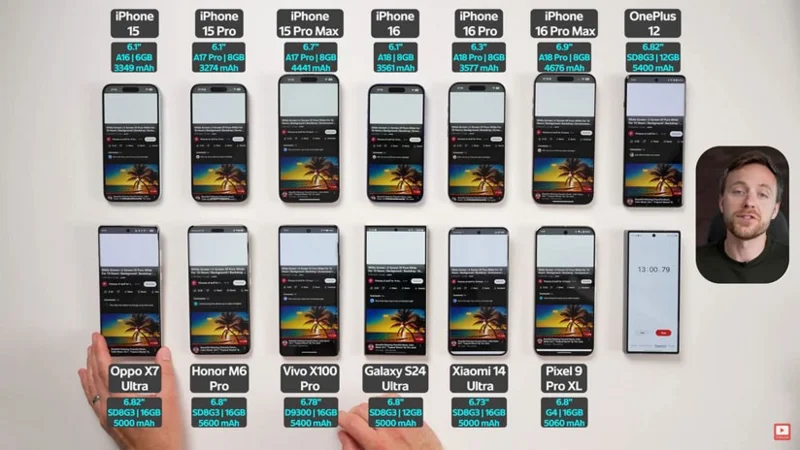
In the test of YouTuber The Tech Chap, the smartphone models will go through the user's daily tasks such as surfing social networks, surfing the web, watching Youtube and even playing games at the highest resolution of WQHD + and 120Hz refresh rate, except for the iPhone 16 Pro Max and 15 Pro Max which still keep the Full HD + screen resolution and 120Hz refresh rate.
After 2 hours of testing with tests such as watching YouTube, playing games, and recording videos, Vivo X100 Pro and OnePlus 12 were still above 90% thanks to being equipped with larger batteries than the remaining competitors, while all other smartphone models were below 90%.
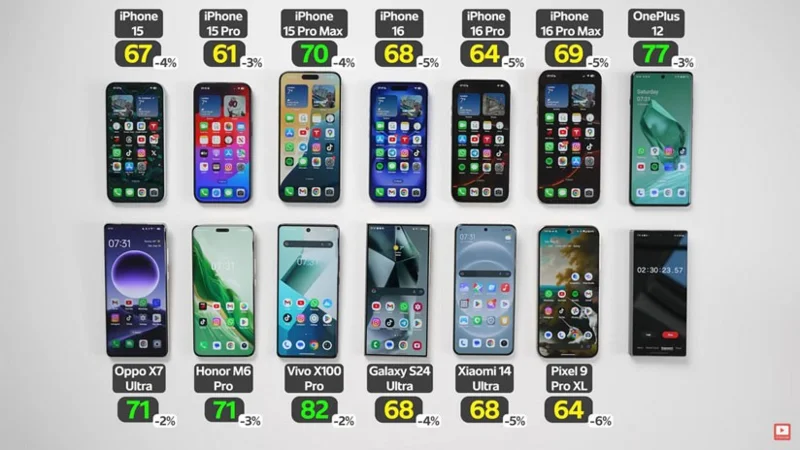
When left overnight, the Pixel 9 Pro XL lost the most battery (9%), followed by the iPhone 16, 16 Pro, and iPhone 16 Pro Max models, all losing up to 5% battery, and other older iPhones and Android models, all losing only 3-4% battery.
After 8 hours of continuous testing, the smartphone model that ran out of battery the fastest was the iPhone 15 Pro with 8 hours and 11 minutes of onscreen time, followed by the iPhone 15 with 8 hours and 30 minutes, the iPhone 16 with 9 hours and 11 minutes, and the iPhone 16 Pro with 9 hours and 06 minutes. After 9 hours and 09 minutes, the Xiaomi 14 Ultra also stopped playing. This result did not surprise many people because these iPhone models have small screens with quite small battery capacity.
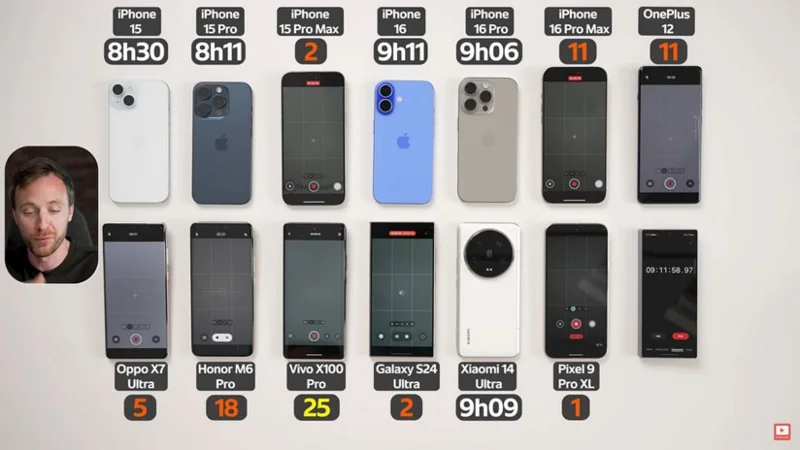
After 10 hours of testing, the iPhone 15 Pro Max lasted 9 hours and 26 minutes, the Galaxy S24 Ultra lasted 9 hours and 14 minutes, and the Oppo X7 Ultra lasted 9 hours and 41 minutes. Smartphones with remaining batteries include the iPhone 16 Pro Max, OnePlus 12, Honor M6 Pro, and Vivo X100 Pro.
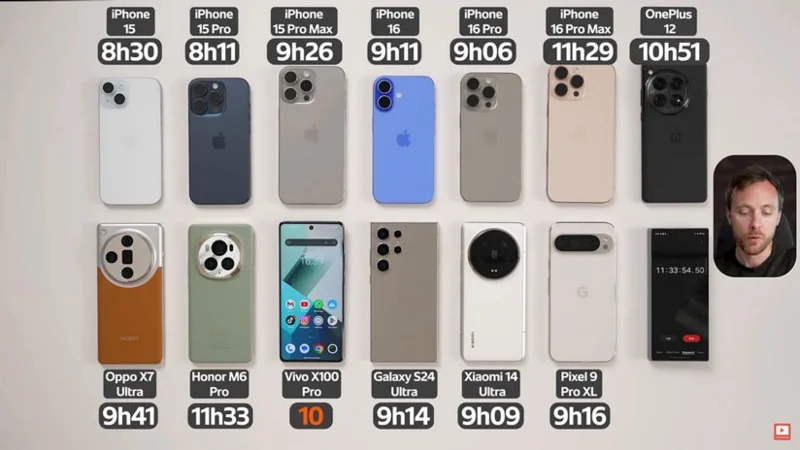
Finally, the test ended with the result that after more than 11 hours and 33 minutes, the Vivo X100 Pro with a battery of up to 5400mAh still had 10 percent left. Next was the Honor M6 Pro thanks to its 5600mAh battery (the largest in the test) reaching 11 hours and 33 minutes. The iPhone 16 Pro Max came in third with 11 hours and 29 minutes and the OnePlus 12 came next with 10 hours and 51 minutes.
Details of the test video by YouTuber The Tech Chap, please watch below:
Sort leftover Halloween candy safely, share or repurpose sealed treats, and choose food use or compost for pumpkins based on their condition.
Compare workplace Halloween costume choices by respect, dress code, mobility, and safety—and learn when a subtle accessory or a policy check is the better option.
Find a couples costume that fits your style, budget, and comfort level, from Addams Family classics to original inside-joke duos.
Need a last-minute high school Halloween costume? Compare 10 easy closet-based ideas by prep time, comfort, school-day practicality, and simple safety checks.
Use a simple 2026 Halloween decorating timeline for indoor décor, outdoor displays, and fresh pumpkins, with practical adjustments for weather and events.
Mix five vivid, approachable Halloween cocktails with measured recipes, simple prep tips, and an alcohol-free option for your party guests.
Find 15 office-friendly Halloween costume ideas for 2026, with practical checks for dress codes, respectful themes, comfort, and workplace safety.
Plan a fun elementary school Halloween party with easy crafts, games, inclusive treats, costume tips, and a sample 75-minute classroom schedule.
Compare realistic side hustles for 2026 by startup cost, fees, flexibility, and income control, with current tax and scam guidance from official sources.
Upgrade your home office ergonomics with current OSHA and NIOSH guidance on chair fit, monitor height, laptop setup, lighting, and movement.








